
A reliable laptop lock can help deter opportunistic theft in offices, classrooms, libraries, coworking spaces, and other shared environments. The right cable depends on your laptop’s security slot, preferred lock style, cable length, and mounting setup.
We’ve gathered 10 laptop locking cables covering standard T-Bar, Nano, Dell N17, and universal slot designs, along with keyed, combination, adhesive-anchor, and retractable options.
Best 10 Laptop Locking Cables Picks for 2026
Best Keyed Pick
Kensington T-Bar Keyed Laptop Lock
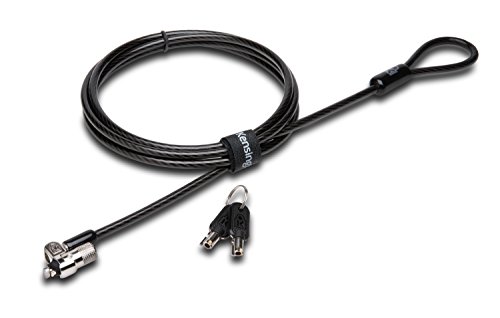
- 6-foot carbon steel cable
- Pivoting 10 mm T-Bar lock head
- Limited lifetime warranty
Best For: Kensington-slot devices and keyed-lock users
Most Versatile Kit
Universal Laptop Cable Lock with Anchor Plate

- 6.5-foot coated steel cable
- Includes adhesive anchor-plate option
- 360-degree rotating lock head
Best For: Mixed device collections with and without security slots
Best Combination Lock
Kensington Resettable Laptop Cable Lock

- Resettable four-digit combination
- 10,000 possible codes
- 6-foot carbon steel cable
Best For: Key-free access on standard Kensington-slot devices
Best for Shared Spaces

- Includes two keys and two anchor plates
- 6.6-foot, 5 mm steel cable
- Fits standard slots or smooth surfaces
Best For: Shared workspaces and mixed commercial electronics
Best for Easy Setup

- 10,000 resettable combinations
- Push-button one-hand operation
- Tamper-resistant lockhead
Best For: Keyless laptop security in offices, homes, and public spaces
Best Portable Keyed Option
LORADAR Retractable Cable Lock
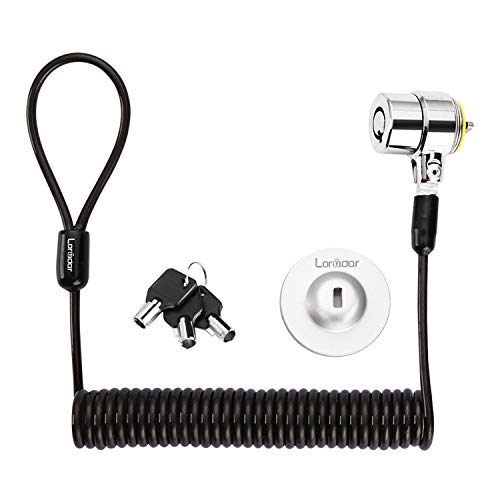
- 6.2-foot retractable cable
- Three keys included
- Anchor plate for devices without slots
Best For: Portable security for compatible laptops, monitors, tablets, and other devices
Best Combination Kit
Computer Laptop Cable Lock Kit

- 4-digit customizable combination
- 6.23-foot, 5 mm braided cable
- Includes adhesive lock-slot plate
Best For: Devices with or without built-in security lock holes
Best Slim-Laptop Pick
Kensington Nano Combination Lock

- Designed for Nano-sized laptop security slots
- Resettable four-wheel code with 10,000 combinations
- 5-foot carbon steel cable with rotating head
Best For: Thin laptops with Nano security slots
Best Dell-Specific Option
Kensington N17 Dell Combination Lock

- Fits Dell and Alienware wedge-type slots
- Six-foot carbon steel cable
- Push-button engagement and resettable combination
Best For: Dell or Alienware laptops with wedge slots
Best Universal Choice
Kensington 3-in-1 Combination Lock

- Fits standard, Nano, and wedge-shaped slots
- Interchangeable tips with tethered storage
- Six-foot cable and resettable four-number dial
Best For: Mixed-device offices, schools, and households
Best Keyed Pick – Kensington T-Bar Keyed Laptop Lock
For shoppers comparing laptop locking cables, the Kensington K65035AM is a keyed option built around the widely used Kensington T-Bar security slot. Its 6-foot carbon steel cable, pivoting lock head, and tubular pin-tumbler lock are designed for securing compatible electronics to a desk, table, or other fixed structure.
Best For: Users who want a keyed Kensington-slot lock for laptops and other compatible electronics.
Pros:
- 6-foot carbon steel cable with a protective plastic sheath.
- Pivoting 10 mm lock head helps with access on thin devices.
- Hidden-pin tubular lock and included limited lifetime warranty.
- Works with laptops, monitors, TVs, projectors, docking stations, and other devices with a Kensington security slot.
Cons:
- Not compatible with 2016-and-newer Dell devices using the wedge lock slot.
- Some HP devices and Chromebooks use a NanoSaver slot instead.
- Requires a compatible Kensington security slot.
This is a solid choice when your device has the standard Kensington slot and you prefer a physical key over a combination code. Check the device specifications before buying, especially for newer Dell and select HP models.
Most Versatile Kit – Universal Laptop Cable Lock with Anchor Plate
This laptop locking cable is designed for a broad mix of devices, including standard-slot laptops and tablets without built-in security slots. It combines a 6.5-foot coated steel cable with an adhesive anchor plate, giving buyers two installation approaches depending on the device.
Best For: Households, offices, and shared spaces securing both standard-slot laptops and slot-free tablets or phones.
Pros:
- Works with many standard-slot laptops and includes an anchor-plate option for slot-free devices.
- 6.5-foot cut-resistant twisted steel cable with PVC coating.
- 360-degree rotating stainless steel lock head.
- Compatible with tablets, phones, projectors, monitors, and other electronics when used as directed.
Cons:
- Some devices require use of the adhesive I3C anchor plate.
- Adhesive installation adds preparation and compatibility considerations.
- Verify the device and anchor-plate requirements before purchase.
The main advantage here is flexibility: use the standard lock slot where available or attach the supplied plate to a suitable hard surface. Buyers who do not want an adhesive plate should confirm that their device has a compatible standard slot.
Best Combination Lock – Kensington Resettable Laptop Cable Lock
For laptop locking cables without keys, the Kensington K64673AM uses a resettable four-digit combination with 10,000 possible codes. Its 6-foot carbon steel cable and push-button attachment make it a practical choice for compatible devices in offices, homes, and public work areas.
Best For: Users who want key-free access and a resettable combination for a standard Kensington security slot.
Pros:
- Four-wheel resettable combination with 10,000 possible codes.
- Push-button design supports one-handed engagement.
- 6-foot cut-resistant carbon steel cable anchors to fixed objects.
- Independently tested for several durability and security conditions.
Cons:
- Not compatible with Dell or Alienware devices that use other lock-slot designs.
- Requires a standard Kensington security slot.
- Combination locks require remembering the selected code.
This model is a good fit when multiple people need access and managing keys would be inconvenient. Confirm the slot type first, since newer Dell and some Alienware, Inspiron, Latitude, Venue, XPS, and Chromebook models may require a different Kensington lock.
Best for Shared Spaces – Laptop and Tablet Lock Kit
This laptop locking cable kit is aimed at shared and commercial environments where devices may include both standard security slots and slot-free tablets or small electronics. It includes a 6.6-foot steel cable, two keys, and two adhesive anchor plates for compatible smooth, hard surfaces.
Best For: Offices, classrooms, retail counters, libraries, cafes, and display areas securing mixed electronics.
Pros:
- Includes one cable lock, two keys, and two self-adhesive anchor plates.
- Directly fits devices with a standard 3 x 7 mm security slot.
- 6.6-foot reach helps connect devices to desks, counters, shelves, and monitor arms.
- Supports laptops, tablets, phones, monitors, POS devices, and displays as directed.
Cons:
- Adhesive plates require clean, dry, smooth, flat surfaces.
- Recommended wait times are 24 hours before locking and up to 72 hours for full bonding strength.
- Adhesive anchoring is not suitable for every device surface.
The included plates make this kit more adaptable than a slot-only cable, but installation matters. For the strongest bond, follow the supplied preparation and curing guidance, and use the direct slot connection whenever the device supports it.
Best for Easy Setup – Kensington Ultra Cable Lock
Kensington Combination Ultra Cable Lock for Laptops and Other Devices (K64675US),Silver
Check Price On AmazonFor shoppers comparing laptop locking cables, the Kensington Ultra is a straightforward choice when you want keyless access and a resettable combination. Its push-button design supports one-handed installation, while the cable anchors to a desk, table, or other fixed surface.
Best For: Offices, homes, and public spaces where a reusable combination lock is more convenient than carrying keys.
Pros:
- Four-wheel combination offers 10,000 possible combinations.
- Resettable keyless design eliminates the need for a key.
- Push-button lock supports one-hand operation.
- Tamper-resistant lockhead is designed to resist tampering.
Cons:
- Combination locks require you to remember the selected code.
- Only one lock is included.
This is a practical laptop cable lock for users who prioritize quick installation and key-free operation. Its silver Ultra Cable design and two-year limited warranty add useful everyday appeal.
Best Portable Keyed Option – LORADAR Retractable Cable Lock
This portable option gives laptop locking cables a compact, retractable design with keyed access. The 6.2-foot cut-resistant twisted-steel cable is intended for compatible laptops, monitors, tablets, and other devices, with an anchor plate for products lacking a security slot.
Best For: Users securing compatible devices in libraries, cafés, hotels, offices, and other shared environments where portability matters.
Pros:
- Includes three keys and a traceable number on the lock body and key.
- Retractable cable stretches to about 6 feet and rebounds to about 4 inches.
- Stainless-steel lock head rotates 360 degrees.
- Includes an adhesive anchor plate for devices without a compatible security hole.
Cons:
- Compatibility depends on a 3 x 7 mm security lock hole for direct use.
- Some listed laptop models require the anchor plate.
- The notes specify that new Apple MacBooks cannot use it directly.
Its retractable format is convenient for carrying and storage, but compatibility should be checked carefully before purchase. The adhesive anchor requires a clean surface and setup time for maximum hold.
Best Combination Kit – Computer Laptop Cable Lock Kit
Among laptop locking cables, this kit is useful when you need one combination lock for devices with or without built-in security slots. It combines a 4-digit customizable code with a 6.23-foot cable, plus an adhesive lock-slot plate and spacers for alternative mounting.
Best For: People securing laptops, tablets, and other digital devices that may not have a built-in security lock hole.
Pros:
- Four-digit combination provides more than 10,000 possible codes.
- Works with built-in security lock holes or the included adhesive slot plate.
- 5 mm braided cable is described as 30% thicker than normal.
- Rotating push-button lockhead supports one-hand operation.
Cons:
- Devices without security holes require adhesive plate installation.
- Combination users must remember their chosen code.
- The notes do not identify specific compatible device models.
This kit offers flexible installation and key-free access, making it a practical general-purpose choice. Check the device surface and slot configuration before relying on the adhesive plate.
Best Slim-Laptop Pick – Kensington Nano Combination Lock
For thin laptops with a Nano security slot, this Kensington combination lock is a practical choice among laptop locking cables. Its slim lock head is designed to let the computer sit flat while the 5-foot carbon steel cable anchors it to a desk, table, or other fixed point.
Best For: Securing thin laptops in shared spaces, cafes, and while traveling.
Pros:
- Designed for laptops with Nano-sized security slots.
- Resettable four-wheel combination provides 10,000 possible codes.
- Pivoting lock head and rotating cable can help preserve access to nearby ports.
- Carbon steel cable includes an anti-shearing plastic sleeve to help protect surfaces.
Cons:
- Compatible with Nano slots rather than every laptop security-slot format.
- The 5-foot cable is shorter than some six-foot alternatives.
This is a focused option for users who have a Nano slot and want a compact, keyless lock that supports a flat, stable laptop setup.
Best Dell-Specific Option – Kensington N17 Dell Combination Lock
Kensington N17 Dell Laptop Computer Lock, Combination Security Locking Cable (K68008WW) Black
Check Price On AmazonDell and Alienware owners should consider this model when shopping for laptop locking cables. The N17 is made for wedge-type security slots and combines a six-foot carbon steel cable with a resettable four-wheel code and push-button engagement.
Best For: Dell and Alienware laptops with wedge-type lock slots in offices, homes, or educational settings.
Pros:
- Fits Dell and Alienware laptops with wedge-type security slots.
- Six-foot carbon steel cable anchors to desks, tables, or fixed structures.
- Resettable four-wheel combination offers 10,000 possible codes.
- Push-button design supports one-handed lock engagement.
Cons:
- Designed specifically for wedge-type slots, limiting compatibility with other formats.
- Combination locks require remembering the selected code.
Choose this lock when your Dell or Alienware laptop has the matching wedge slot and you value extra cable reach plus convenient push-button attachment.
Best Universal Choice – Kensington 3-in-1 Combination Lock
If you manage laptops with different security-slot designs, this universal Kensington model is one of the more flexible laptop locking cables to consider. Its interchangeable tips fit standard, Nano, or wedge-shaped slots, while the six-foot carbon steel cable provides useful reach for anchoring to fixed furniture.
Best For: Households, offices, or schools using laptops with mixed standard, Nano, and wedge security slots.
Pros:
- Supports standard, Nano, and wedge-shaped laptop security slots.
- Interchangeable lock tips can be changed as needed, with a tether for unused tips.
- Resettable four-number dial provides 10,000 possible combinations.
- Six-foot carbon steel cable has a plastic sheath for cut and theft resistance.
Cons:
- Interchangeable tips add a setup step compared with a single-format lock.
- Users still need to select and retain the correct tip for their laptop.
This is the strongest fit when compatibility matters more than having the smallest or most specialized lock head, particularly for mixed-device environments.
How We Picked These Laptop Locking Cables
We selected products across the main compatibility and security categories, including keyed locks, resettable combination locks, universal designs, and kits with adhesive anchor plates. We also considered cable length, portability, ease of use, and whether a product is designed for a specific security-slot format. Because laptop slots vary by manufacturer and model, compatibility is a priority rather than an afterthought.
A cable lock is a theft deterrent, not an impenetrable security system. These products are best used in occupied or supervised spaces and secured to a strong, fixed object.
Quick Comparison
| Lock type | Best suited to | Main advantage | Potential drawback |
|---|---|---|---|
| Keyed | Users who want simple operation | Fast, familiar locking | Keys can be misplaced |
| Combination | Shared spaces or frequent travelers | No key to carry | Code management matters |
| Universal | Mixed-device households or offices | Broader device compatibility | May require closer slot verification |
| Adhesive-anchor kit | Devices without a built-in slot | Flexible installation | Anchor placement and surface strength are critical |
Key Buying Factors for Laptop Locking Cables
Security-Slot Compatibility
Check whether your laptop uses a standard T-Bar slot, Kensington Nano slot, Dell N17 slot, or another proprietary opening. A cable that fits one format may not fit another. Universal models can help when you secure several device types, but confirm the manufacturer’s compatibility list before buying.
Keyed Versus Combination Access
Keyed locks are usually quick and straightforward, especially when one person manages the device. Combination locks eliminate the need to carry a key and can work well in classrooms, offices, and equipment pools. Choose a resettable model if you want to set a memorable code, and avoid sharing the combination unnecessarily.
Cable Length and Construction
A six-foot cable provides useful reach around desks and tables, while a shorter retractable design is easier to pack. Look for a durable steel cable and a locking head that feels secure when attached. Extra length is helpful only if there is a suitable anchor point nearby.
Anchoring and Portability
Before purchasing, identify a heavy, fixed object such as a desk frame or permanent security bar. Adhesive plates can expand placement options for compatible devices, but they must be installed on a clean, suitable surface and allowed to bond properly.
Who Should Buy Which Laptop Locking Cables?
- For straightforward everyday use: Choose a keyed Kensington-style lock if you prefer quick access and can keep the key secure.
- For shared offices and classrooms: A resettable combination lock avoids distributing or replacing keys.
- For newer thin laptops: Verify whether the device has a Nano or Dell N17 slot before choosing a matching model.
- For mixed device collections: Consider a universal 3-in-1 design, but confirm support for every laptop, tablet, or monitor you plan to secure.
- For devices without a security slot: An adhesive-anchor kit may be the most practical option, provided the device surface and anchor location are suitable.
The best Laptop Locking Cables are the ones that fit your device securely, reach a solid anchor point, and match how your workspace is used. Verify slot compatibility first, then choose the access method and cable format that you can use consistently.