
Leaving a laptop unattended in an office, coworking space, classroom, or shared workspace creates an avoidable security risk. The right locking cable adds a visible physical barrier without significantly slowing down everyday work.
This roundup compares 10 laptop locking cables for professionals, with attention to slot compatibility, cable construction, locking style, installation, and support for laptops, monitors, tablets, and other devices.
Best 10 Laptop Locking Cables for Professionals Picks for 2026
Best Standard-Keyed Pick
Kensington T-Bar Laptop Cable Lock
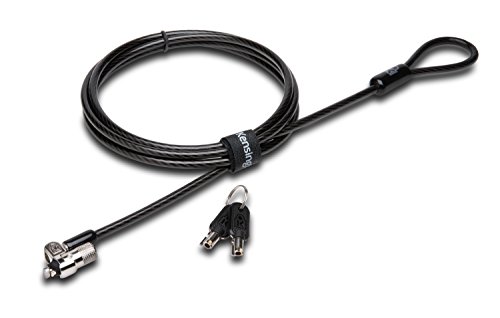
- Standard Kensington T-Bar compatibility
- 6-foot carbon steel cable
- Pivoting lock head with hidden-pin design
Best For: Professional workstations with standard Kensington security slots
Best Desktop Bundle
Kensington Desktop & Peripherals Locking Kit
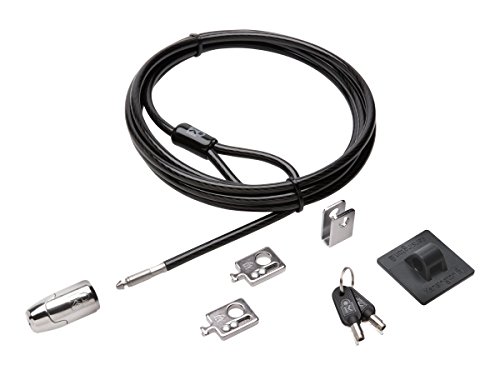
- 8-foot cut-resistant cable
- Includes adapters and cable trap
- Anchor plate supports non-slot devices
Best For: Desktop workstations securing computers and peripherals
Best Universal Fit
StarTech 3-in-1 Universal Laptop Cable Lock

- Supports K-Slot, Nano, and Noble Wedge
- 6.6-foot vinyl-coated steel cable
- Push-to-lock design with two keys
Best For: IT environments with mixed laptop and tablet security slots
Best Combination Lock
Kensington Resettable 4-Digit Cable Lock

- 10,000 possible combinations
- Push-button one-handed engagement
- 6-foot cut-resistant carbon steel cable
Best For: Keyless security for standard Kensington-slot devices
Flexible Multi-Device Security

- Includes cable, two keys, and two adhesive anchor plates.
- Supports standard slots and compatible non-slot devices.
- 6.6-foot, 5 mm steel cable suits shared workspaces.
Best For: Professionals protecting mixed electronics in offices, retail spaces, and classrooms.
Keyless Professional Protection
Kensington Nano Slot Combination Lock

- Uses a resettable four-digit combination.
- Slim head is designed for thin laptops with Nano slots.
- 5-foot carbon steel cable includes pivoting and rotating movement.
Best For: Thin-laptop users who want keyless security in shared spaces or while traveling.
Extended Combination Security

- Works with built-in slots or an included adhesive plate.
- Uses a four-digit combination with over 10,000 choices.
- 6.23-foot, 5 mm cable supports flexible workstation placement.
Best For: Professionals securing mixed compatible devices without managing keys.
Most Versatile Fit
AboveTEK 3-in-1 Universal Laptop Cable Lock

- Fits K-Slot, Nano, and Wedge slots
- Resettable four-digit combination
- 360° rotating head with steel cable
Best For: Professionals using laptops with different security-slot formats
Best for Slotless Devices
Hardware Security Cable Lock with Keys

- Includes an adhesive anchor-plate option
- 6.5-foot cut-resistant steel cable
- Works with laptops, tablets, and phones
Best For: Mixed-device workspaces with slotless tablets or laptops
Best Established All-Rounder
Kensington Universal 3-in-1 Combination Lock

- Fits standard, Nano, and Wedge slots
- Six-foot carbon steel cable
- Resettable dial with 10,000 combinations
Best For: Offices standardizing locks across varied laptop models
Best Standard-Keyed Pick – Kensington T-Bar Laptop Cable Lock
For professionals seeking laptop locking cables for professionals, this Kensington model offers a straightforward keyed solution for devices with a standard Kensington security slot. Its 6-foot carbon steel cable and pivoting lock head support flexible workstation placement.
Best For: Offices and workstations using laptops or peripherals with a standard Kensington security slot.
Pros:
- Uses Kensington T-Bar locking technology.
- 6-foot carbon steel cable has a protective plastic sheath.
- Pivoting 10mm lock head helps with access and awkward angles.
- Includes hidden-pin anti-pick tubular lock technology and an 8-year warranty.
Cons:
- Not compatible with newer Dell devices using wedge lock slots.
- Some HP devices use a Nano security slot instead.
- Requires carrying and managing keys.
This is a practical choice when your equipment has the compatible standard slot and you prefer keyed security over a combination lock. Confirm the device slot before ordering.
Best Desktop Bundle – Kensington Desktop & Peripherals Locking Kit
Professionals securing more than a single laptop may prefer this Kensington kit. It combines an 8-foot cut-resistant carbon steel cable with adapters, a cable trap, and an anchor plate for desktop PCs and peripherals.
Best For: Desktop workstations that need to secure computers and multiple accessories together.
Pros:
- Includes an 8-foot carbon steel cable.
- Two adapters help secure devices with compatible slots.
- Cable trap secures peripheral accessories.
- Anchor plate supports devices without a Kensington security slot.
Cons:
- Designed primarily for desktop PCs and peripherals rather than a lightweight laptop-only setup.
- The longer kit may be more hardware than a single-device user needs.
- Uses keyed locking, so keys must be managed.
This kit stands out for shared offices and fixed desks where monitors, desktops, and accessories need a coordinated security setup. Its included mounting components add flexibility beyond a basic cable lock.
Best Universal Fit – StarTech 3-in-1 Universal Laptop Cable Lock
For mixed-device environments, this StarTech cable lock is a versatile option among laptop locking cables for professionals. Its interchangeable heads support Kensington K-Slot, Kensington Nano, and Noble Wedge lock slots, while the push-to-lock design speeds up daily use.
Best For: IT teams and professionals managing laptops or tablets with different security-slot types.
Pros:
- Three interchangeable lock heads cover K-Slot, Nano, and Noble Wedge slots.
- 6.6-foot steel cable is vinyl-coated to help prevent scratches.
- Push-to-lock button simplifies attachment.
- Includes two keys and a two-year warranty.
Cons:
- Compatibility still depends on the device having one of the supported slots.
- Keyed access requires storing and managing keys.
- Provides one lock rather than a multi-device kit.
The interchangeable heads make this a strong choice for professional environments with varied hardware. It offers broader slot compatibility without requiring a combination to remember.
Best Combination Lock – Kensington Resettable 4-Digit Cable Lock
This Kensington combination lock is a convenient choice for professionals who do not want to carry keys. Its resettable four-wheel design offers 10,000 possible combinations, while the 6-foot carbon steel cable anchors compatible devices to a fixed structure.
Best For: Offices and shared workspaces where keyless, one-handed laptop security is convenient.
Pros:
- Resettable four-digit combination provides 10,000 possible codes.
- Push-button design supports one-handed engagement.
- 6-foot cut-resistant carbon steel cable anchors to desks or tables.
- Compatible with devices using a standard Kensington security slot.
Cons:
- Not compatible with Dell and Alienware devices using other lock-slot designs.
- Users must remember or securely store the combination.
- Limited to standard-size Kensington slots.
This model suits users who value quick, key-free access and a resettable code. Check your laptop’s security-slot type carefully, particularly with newer Dell systems.
Flexible Multi-Device Security – Laptop and Tablet Lock Kit
For professionals comparing laptop locking cables for professionals, this kit stands out when one cable needs to protect both slot-equipped computers and devices without built-in security slots. It includes a 6.6-foot, 5 mm steel cable, two keys, and two adhesive anchor plates for flexible use in offices, retail spaces, classrooms, cafes, and shared work areas.
Best For: Professionals securing laptops, tablets, POS devices, monitors, and other electronics in shared or commercial spaces.
Pros:
- Includes two keys and two self-adhesive anchor plates.
- Works with standard 3 x 7 mm security slots and compatible smooth, flat non-slot devices.
- 6.6-foot reach makes it easier to loop around desks, counters, shelves, or monitor arms.
- Compact design suits offices, libraries, classrooms, cafes, and display areas.
Cons:
- Adhesive plates require clean, dry surfaces and waiting time before use.
- Key-based operation means the keys must be kept available.
- Adhesive anchors are intended for smooth, flat surfaces rather than every device finish.
Choose this model when broad device compatibility matters more than a compact combination lock. The included anchor plates add useful flexibility, while the longer cable supports varied workstation and display layouts.
Keyless Professional Protection – Kensington Nano Slot Combination Lock
Professionals seeking laptop locking cables for professionals may prefer this Kensington model when a thin laptop has a Nano security slot and a combination lock is more convenient than carrying keys. Its 5-foot carbon steel cable, slim lock head, and resettable four-digit code are designed for shared spaces, cafes, and travel.
Best For: Professionals with thin laptops that use Nano-sized security slots and prefer keyless access.
Pros:
- Resettable four-wheel combination provides 10,000 possible codes.
- Slim lock head is designed to help thin laptops lie flat and stable.
- Pivoting lock head and rotating cable help preserve access to nearby ports.
- Five-foot carbon steel cable offers practical reach for desks and tables.
Cons:
- Designed for Nano-sized slots, so slot compatibility should be checked before purchase.
- Five-foot length is shorter than some extended-reach alternatives.
- Designed for laptops rather than a broad range of non-slot devices.
This is a focused choice for modern thin laptops with the correct Nano slot. Its combination mechanism reduces key management, while the slim, pivoting design supports everyday use without unnecessarily lifting the device.
Extended Combination Security – Universal Laptop Cable Lock
For professionals evaluating laptop locking cables for professionals, this combination model offers two installation approaches: direct attachment to a built-in security slot or use of the included adhesive plate for compatible devices without one. Its 6.23-foot cable, four-digit code, and one-hand rotating lock design fit flexible desk and workstation setups.
Best For: Professionals who want keyless protection for laptops, tablets, and other compatible digital devices.
Pros:
- Supports devices with built-in security slots and compatible devices without them.
- Four-digit combination offers more than 10,000 possible codes without requiring a key.
- 6.23-foot, 5 mm braided cable provides useful reach and movement.
- Rotating, one-hand push-button lock design is intended for convenient operation.
Cons:
- Adhesive plate installation is required for devices without security holes.
- Compatibility depends on the device surface and built-in slot design.
- Supplied notes do not specify a brand-specific slot standard.
This model is a practical middle ground for teams managing varied devices and wanting combination access instead of keys. Its longer cable and included spacers provide installation flexibility, but verify the device and adhesive-surface fit before ordering.
Most Versatile Fit – AboveTEK 3-in-1 Universal Laptop Cable Lock
For professionals comparing laptop locking cables for professionals, the AboveTEK 3-in-1 model is a flexible choice when devices use different security-slot designs. It supports K-Slot, Nano, and Wedge slots, with a resettable four-digit combination and rotating lock head.
Best For: Offices, campuses, and business travel involving laptops with varying security-slot types.
Pros:
- Compatible with K-Slot, Nano, and Wedge security slots.
- Resettable four-digit combination provides 10,000 possible codes.
- 360° rotating head and knob-turn mechanism support flexible, quick positioning.
- Galvanized steel cable has a vinyl protective coating and reinforced internal core.
Cons:
- Buyers need to check their laptop’s slot type before purchase.
- Combination locks may be less convenient than keyed designs for users who prefer physical keys.
With its three-slot compatibility and customizable combination, this AboveTEK lock is particularly practical for shared professional environments. The included spacers and 12-month warranty add useful support for routine workplace or travel use.
Best for Slotless Devices – Hardware Security Cable Lock with Keys
This keyed cable lock stands out among laptop locking cables for professionals because it can secure many devices with or without a built-in security slot. Its included adhesive anchor plate extends compatibility to tablets, phones, MacBooks, and other electronics, while the 6.5-foot cable offers flexible reach.
Best For: Professionals securing tablets, phones, or laptops that lack a standard security slot.
Pros:
- Works with standard laptop slots and an adhesive anchor plate for slotless devices.
- Compatible with a broad range of tablets, smartphones, monitors, projectors, and other electronics.
- 6.5-foot PVC-coated twisted steel cable supports flexible attachment to a fixed object.
- Stainless-steel lock head rotates 360°.
Cons:
- Some devices require use of the I3C adhesive security plate.
- Using an adhesive anchor plate may not suit buyers who prefer a non-adhesive setup.
- Compatibility depends on whether the device has a standard slot or can accept the anchor plate.
The anchor-plate design makes this a useful option for mixed-device workspaces where not every computer has a built-in lock slot. Confirm the included plate’s suitability for your device before relying on it for daily security.
Best Established All-Rounder – Kensington Universal 3-in-1 Combination Lock
The Kensington Universal 3-in-1 is a strong contender for professionals comparing laptop locking cables for professionals across different device generations. It accepts standard, Nano, and Wedge-shaped slots, and its interchangeable lock tips help keep one cable suitable for multiple laptop designs.
Best For: Professional users who want one resettable combination lock for laptops with different slot formats.
Pros:
- Fits standard, Nano, and Wedge-shaped security slots.
- Resettable four-number dial offers 10,000 possible combinations.
- Six-foot carbon steel cable provides cut and theft resistance.
- Interchangeable tips and tethered storage help keep unused tips accessible.
Cons:
- At 8.3 ounces, it is heavier than some competing models listed here.
- Users must change lock tips when moving between different slot designs.
- Combination retrieval depends on Kensington’s registration program if the code is forgotten.
For offices managing laptops from different brands or generations, Kensington’s interchangeable-tip system is a practical way to standardize physical security. Its six-foot cable and resettable dial suit routine desk use without requiring separate keys.
How We Picked the Best Laptop Locking Cables for Professionals
We focused on practical security features that matter in professional environments: compatibility with common security slots, cable length and construction, keyed versus combination access, anchor options, portability, and support for more than one device type. We also included established Kensington models alongside universal and budget-oriented alternatives so buyers can match the lock to their equipment and workplace routines.
A cable lock is a deterrent, not an impenetrable barrier. It works best when attached to a sturdy fixed object and used alongside strong passwords, device encryption, tracking tools, and sensible workspace security.
Quick Comparison
- Best for standard laptop slots: Choose a T-Bar keyed or combination model when the computer has a traditional K-Slot.
- Best for mixed device fleets: A 3-in-1 universal lock can support T-Bar, Nano, and wedge-style slots.
- Best for shared offices: Combination locks avoid the need to distribute or replace keys.
- Best for desks and peripherals: A locking kit or adhesive anchor plates can secure monitors, docking stations, tablets, and other equipment.
- Best for portability: Look for a compact cable with a resettable combination or a small keyed head.
Key Buying Factors for Laptop Locking Cables for Professionals
Slot Compatibility
Check the security slot before buying. Standard T-Bar, Kensington Nano, and Noble Wedge slots use different locking heads. Universal 3-in-1 models offer broader compatibility, but always confirm that the specific laptop, monitor, or tablet is listed by the manufacturer.
Cable and Anchor Design
Longer cables provide more placement flexibility, while shorter cables are easier to manage in crowded workspaces. Carbon-steel cables generally provide a strong deterrent, but the anchor point matters just as much. Use a substantial desk leg, frame, or permanently mounted anchor rather than a lightweight or movable object.
Keyed or Combination Access
Keyed locks are straightforward and can be convenient for individuals or managed equipment. Combination locks eliminate lost-key problems and work well in shared offices, though administrators should document codes securely and reset them when equipment changes hands.
Multi-Device Coverage
If employees use laptops with monitors, docking stations, tablets, or accessories, a desktop and peripherals kit may provide better overall coverage than a single laptop cable. Adhesive anchor plates can help secure devices without a built-in security slot, provided they are installed on clean, suitable surfaces and allowed to bond fully.
Who Should Buy Which Laptop Locking Cables for Professionals?
Office professionals with standard laptops should start with a keyed or combination T-Bar lock after verifying the slot. IT teams managing mixed hardware will usually benefit from a universal 3-in-1 model to reduce compatibility issues. Shared workspaces and training rooms are better served by resettable combination locks, which simplify handoffs and avoid key management. Businesses securing complete workstations should consider a peripherals kit or a lock with compatible anchor plates. For travel, choose a lighter universal cable that fits the employee’s devices without adding unnecessary bulk.