
Campus study spaces, libraries, and shared classrooms make laptops easy targets when you step away—even briefly. A laptop locking cable adds a visible layer of security by tethering your device to a fixed object.
This roundup compares 10 student-friendly options, including keyed and combination locks, universal designs, and cables for laptops, tablets, monitors, and other devices.
Best 10 Laptop Locking Cables for Students Picks for 2026
Best Keyed Pick
Kensington T-Bar Standard Keyed Laptop Lock
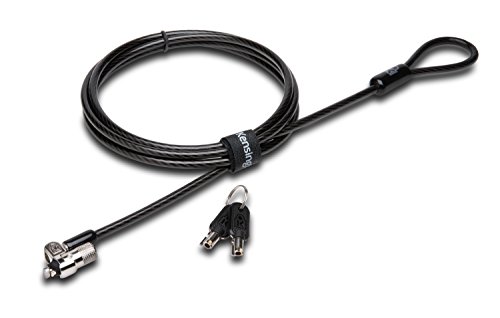
- 6-foot carbon steel cable
- Pivoting T-Bar lock head
- Limited lifetime warranty
Best For: Students with compatible Kensington-slot devices who prefer a keyed lock
Best Flexible Kit
Laptop Lock with Adhesive Anchor Plates

- Includes two keys and two anchor plates
- Works with slot and non-slot devices
- 6.6-foot cable reach
Best For: Shared spaces and students securing laptops, tablets, and other electronics
Best Keyless Option
Kensington Resettable Combination Laptop Lock

- Resettable four-digit combination
- 10,000 possible codes
- 6-foot carbon steel cable
Best For: Students who prefer key-free security for Kensington-slot devices
Best No-Slot Versatility
Combination Laptop Cable Lock Kit

- Supports slot and non-slot devices
- Customizable four-digit combination
- 6.23-foot cable with adhesive plate
Best For: Students securing mixed devices, including tablets and laptops without lock holes
Best Combination Lock

- Resettable four-wheel combination
- 10,000 possible code combinations
- One-hand push-button installation
Best For: Students wanting keyless laptop security for shared spaces
Best Long-Reach Option
6.7-Foot Wedge-Slot Cable Lock

- 6.7-foot flexible security cable
- 360-degree rotating lock head
- Designed for 6 x 2.5 mm wedge slots
Best For: Students with compatible wedge-slot laptops needing extra reach
Best Universal Fit
Kensington 3-in-1 Combination Lock

- Fits standard, nano, and wedge slots
- Resettable 10,000-combination dial
- Six-foot carbon steel cable
Best For: Students using multiple laptops or planning future upgrades
Most Versatile Fit
Universal Laptop Cable Lock with Keys

- Supports standard laptop security slots
- Includes an adhesive anchor plate for slotless devices
- Uses a 6.5-foot cut-resistant steel cable
Best For: Students securing laptops plus tablets or phones
Best for Dell Laptops
Kensington N17 Combination Lock

- Fits compatible Dell and Alienware wedge slots
- Uses a resettable four-wheel combination
- Includes a six-foot carbon-steel cable
Best For: Dell or Alienware laptop users
Best Universal Keyed Option
Sendt Push-to-Lock Security Cable

- Supports many common security-slot types
- Uses a convenient push-to-lock design
- Includes a six-foot cable and two keys
Best For: Students needing broad compatibility with keyed access
Best Keyed Pick – Kensington T-Bar Standard Keyed Laptop Lock
For students who want a traditional keyed option among laptop locking cables for students, this Kensington model combines a standard T-Bar connection with a 6-foot carbon steel cable. It is designed for devices with a Kensington security slot and can anchor to a desk, table, or other fixed structure.
Best For: Students using compatible laptops or shared electronics who prefer a keyed lock and a long-standing Kensington design.
Pros:
- 6-foot carbon steel cable with a plastic sheath helps resist cutting attempts.
- Pivoting 10 mm lock head and hinge support easier locking and unlocking.
- Works with laptops, monitors, docking stations, projectors, and other devices with a Kensington slot.
- Includes a limited lifetime manufacturer warranty.
Cons:
- Not compatible with 2016-and-newer Dell devices using a wedge lock slot.
- Some HP devices and Chromebooks use a NanoSaver slot instead.
- Requires carrying and managing a key.
This is a solid choice when a student’s device has the correct Kensington T-Bar slot. Check the laptop’s specifications before buying, especially for newer Dell and certain HP models.
Best Flexible Kit – Laptop Lock with Adhesive Anchor Plates
This kit stands out among laptop locking cables for students because it supports both standard security slots and devices without built-in slots. It includes a 6.6-foot cable, two keys, and adhesive anchor plates for tablets, phones, POS devices, and other smooth-surface electronics.
Best For: Students, libraries, classrooms, and shared workspaces securing a mix of laptops, tablets, and other electronics.
Pros:
- Includes two keys and two self-adhesive anchor plates.
- Compatible with standard 3 x 7 mm security slots.
- 6.6-foot reach makes it easier to loop around desks, table legs, shelves, and monitor arms.
- Adhesive plates support devices without built-in security slots.
Cons:
- Adhesive plates require clean, dry, smooth, flat surfaces.
- The manufacturer recommends waiting 24 hours before locking and up to 72 hours for full bonding strength.
- Uses a 5 mm cable, rather than the thicker cable found on some alternatives.
The included anchor plates make this a practical multipurpose option, but installation timing matters. It is particularly useful when a student needs to secure both a laptop and smaller non-slot devices.
Best Keyless Option – Kensington Resettable Combination Laptop Lock
For students comparing laptop locking cables for students, this Kensington combination lock avoids the need to carry a key. Its resettable four-wheel code offers 10,000 possible combinations, while the 6-foot carbon steel cable anchors compatible devices to a fixed structure.
Best For: Students who want key-free access and use laptops or other electronics with a standard Kensington security slot.
Pros:
- Resettable four-digit combination provides 10,000 possible codes.
- Push-button design supports one-handed engagement.
- 6-foot cut-resistant carbon steel cable anchors to desks, tables, or other fixed structures.
- Independently tested for factors including torque, pull, corrosion, and lock lifecycle.
Cons:
- May not work with newer Dell and Alienware devices using Noble or other nonstandard slots.
- Requires remembering the combination rather than using a key.
- Only compatible with devices featuring a Kensington standard-size security slot.
This is a convenient campus option for students who frequently move between classrooms, libraries, and study areas. Confirm the laptop’s slot type before purchase, particularly with Dell, Alienware, and some Chromebook models.
Best No-Slot Versatility – Combination Laptop Cable Lock Kit
This combination kit is a versatile pick among laptop locking cables for students, supporting laptops with built-in security slots as well as devices without them. It includes an adhesive lock-slot plate, spacers, and a 6.23-foot cable with a four-digit customizable code.
Best For: Students securing a mixture of laptops, tablets, and other devices, including models without a built-in lock hole.
Pros:
- Works with built-in security slots or the included adhesive lock-slot plate.
- Four-digit combination offers more than 10,000 possible combinations and eliminates lost keys.
- 5 mm braided cable is described as 30% thicker than normal.
- Rotating push-button design supports one-hand operation.
Cons:
- The adhesive plate must be attached to the device’s hard surface.
- Proper fit may require using one of the three included spacers.
- Combination locks depend on remembering the selected code.
This is a useful all-around kit for students sharing equipment or protecting devices with different designs. The adhesive plate adds flexibility, but it should be installed carefully on a suitable hard surface.
Best Combination Lock – Kensington Ultra Cable Lock
Kensington Combination Ultra Cable Lock for Laptops and Other Devices (K64675US),Silver
Check Price On AmazonFor students comparing laptop locking cables for students, the Kensington Ultra Cable Lock offers keyless combination access and straightforward desk or table anchoring. Its push-button design is intended for quick, one-handed installation, while the resettable four-wheel combination provides 10,000 possible codes.
Best For: Students who want a keyless lock for laptops and other portable devices in dorms, libraries, offices, or shared spaces.
Pros:
- Resettable four-wheel combination with 10,000 possible codes
- Push-button design supports one-hand installation
- Tamper-resistant lockhead is designed to resist tampering
- Anchors to desks, tables, or other fixed surfaces
Cons:
- Combination-based access may not suit shoppers who prefer a keyed lock
- Compatibility with a specific laptop security slot is not detailed in the supplied notes
This is a practical choice when convenience and no-key access matter most. The two-year limited warranty is an added consideration for students seeking a straightforward everyday security option.
Best Long-Reach Option – 6.7-Foot Wedge-Slot Cable Lock
This 6.7-foot cable lock is one of the more flexible laptop locking cables for students who need extra reach around desks, shelves, or other fixed objects. It is designed for 6 x 2.5 mm wedge-type slots and uses a keyed locking mechanism, so compatibility should be checked before purchase.
Best For: Students using laptops with compatible wedge-shaped security slots in libraries, cafés, offices, or other public spaces.
Pros:
- Extra-long 6.7-foot cable offers flexible tethering
- Designed for 6 x 2.5 mm wedge-type laptop slots
- 360-degree rotating lock head helps with positioning
- Suitable for securing devices to desks, shelves, or fixed objects
Cons:
- Limited to compatible 6 x 2.5 mm wedge-type slots
- Keyed design requires keeping track of the key
- Instructions indicate that part of the lock core must remain exposed for key operation
The extended cable makes this a useful option where the nearest anchor point is not close to the laptop. Its main buying consideration is slot compatibility, so students should verify their laptop’s security-slot dimensions first.
Best Universal Fit – Kensington 3-in-1 Combination Lock
For students who use different laptops or expect to upgrade, the Kensington Universal 3-in-1 is a versatile choice among laptop locking cables for students. Its interchangeable tips fit standard, nano, or wedge-shaped security slots, and the resettable four-number dial provides 10,000 possible combinations.
Best For: Students, families, or shared workspaces that need one combination lock for laptops with different security-slot formats.
Pros:
- Compatible with standard, nano, and wedge-shaped security slots
- Resettable four-number dial offers 10,000 possible combinations
- Six-foot carbon steel cable has a plastic sheath
- Tether keeps unused lock tips handy
Cons:
- Interchangeable tips add a setup step compared with a single-format lock
- Students must select the tip that matches their laptop’s slot
- Combination retrieval depends on registering with Kensington’s online program
This is the strongest fit for households or students who value compatibility across devices. Its three-slot design reduces the need to replace the lock when moving between laptop brands or generations.
Most Versatile Fit – Universal Laptop Cable Lock with Keys
This versatile option is worth considering when comparing laptop locking cables for students who use different devices. It supports laptops with standard lock slots and includes an adhesive anchor plate for many tablets, phones, and other devices without built-in slots.
Best For: Students securing a mix of laptops, tablets, phones, or projectors.
Pros:
- Works with most laptops that have standard security slots.
- Anchor plate expands compatibility to devices without standard slots.
- Includes a 6.5-foot cut-resistant twisted-steel cable with PVC coating.
- Rotating stainless-steel lock head can turn 360 degrees.
Cons:
- Some devices require use of the adhesive security plate.
- Applying the adhesive plate may not suit users who prefer not to attach hardware to a device.
This is the most flexible pick of the group, especially for students carrying more than one type of portable device. Check your device and slot compatibility before relying on the adhesive anchor plate.
Best for Dell Laptops – Kensington N17 Combination Lock
Kensington N17 Dell Laptop Computer Lock, Combination Security Locking Cable (K68008WW) Black
Check Price On AmazonFor students with Dell or Alienware laptops, this Kensington N17 model is a targeted choice among laptop locking cables for students. Its wedge-style head is designed for compatible Dell and Alienware lock slots, while the resettable combination avoids carrying keys.
Best For: Dell and Alienware laptop owners who prefer a combination lock.
Pros:
- Designed for Dell and Alienware laptops with wedge-type lock slots.
- Resettable four-wheel code offers 10,000 possible combinations.
- Push-button design supports one-handed engagement.
- Six-foot carbon-steel cable anchors to a desk, table, or fixed structure.
Cons:
- Compatibility is specialized for wedge-type Dell and Alienware slots.
- Students must remember the selected combination.
This is a focused option rather than a universal lock. Confirm that your Dell or Alienware laptop has the compatible wedge slot before purchasing, then use the resettable code for convenient shared-space security.
Best Universal Keyed Option – Sendt Push-to-Lock Security Cable
This keyed Sendt lock is a practical choice for students who want broad slot compatibility and quick attachment. It is designed for Kensington, Nano, Mini Saver, Noble Wedge, Samsung, and many other security slots, making it useful in libraries, classrooms, and other shared spaces.
Best For: Students who want a push-to-lock cable with keys and broad slot compatibility.
Pros:
- Works with many Kensington, Nano, Mini Saver, Noble Wedge, and Samsung slots.
- Push-to-lock design makes installation straightforward.
- Includes a six-foot cut-resistant cable and two keys.
- Comes with a hook-and-loop cable tie for cable management.
Cons:
- Uses keys rather than a combination, so a key must be available when unlocking.
- Limited one-year warranty is shorter than some competing coverage.
The Sendt stands out for convenient push-button locking and wide stated slot compatibility. It is a sensible everyday deterrent for students who are comfortable keeping track of two included keys.
How We Picked the Best Laptop Locking Cables for Students
We focused on practical security for campus life: compatibility with common laptop lock slots, cable length, locking method, portability, and ease of daily use. The selection includes established Kensington models alongside more broadly compatible alternatives. We also considered whether a lock uses a key, resettable combination, or an adhesive anchor plate for devices without a built-in security slot.
No cable lock makes a laptop theft-proof. These products work best as a deterrent and should be attached to a substantial, immovable object in a busy, well-observed area.
Quick Comparison
- Best for familiar keyed security: Kensington T-Bar standard keyed models and comparable keyed universal locks.
- Best for avoiding lost keys: Resettable combination locks, including Kensington four-digit and universal combination designs.
- Best for multiple device types: Universal locks that support more than one security-slot format.
- Best for devices without a slot: A cable lock bundled with adhesive anchor plates, provided the surface is clean, smooth, and suitable for bonding.
- Best for Dell systems: A lock specifically designed for the N17 wedge-shaped security slot.
Key Buying Factors for Laptop Locking Cables for Students
Slot Compatibility
Check your laptop’s security-slot type before buying. Common formats include the standard T-Bar slot, Nano slot, and Dell N17 wedge slot. A universal lock can be useful in a shared household, but it is still important to confirm that its included head fits your device.
Keyed Versus Combination
Keyed locks are straightforward and avoid remembering a code, but replacement keys can be inconvenient. Combination locks eliminate key management and are convenient for students who travel between classes. Choose a memorable code that is not obvious, and reset it before regular use when the design allows.
Cable Length and Construction
A six-foot cable usually provides enough reach around a desk leg or other fixed anchor without becoming difficult to pack. Look for a steel cable with a protective coating, which helps reduce scratching and makes it easier to handle. More cable length is not automatically better if it creates excess slack.
Daily Usability
A lock that is difficult to attach will be less useful. Consider whether the locking head is easy to insert, whether the key or combination is accessible from your normal seating position, and whether the cable fits neatly in your backpack.
Who Should Buy Which Laptop Locking Cables for Students?
Students who want the simplest routine should choose a keyed model compatible with their laptop’s slot. Students who frequently misplace small accessories may prefer a resettable combination lock. Students with multiple laptops or mixed devices should prioritize a universal three-in-one design, while students using a Dell laptop with an N17 slot should select a compatible N17 lock rather than relying on a generic fit.
If your tablet or laptop lacks a built-in security slot, an adhesive-anchor system can expand your options, but installation quality matters. Clean and dry the mounting surface, follow the manufacturer’s curing instructions, and test the attachment before leaving the device unattended.