
Portable interactive whiteboards for businesses can turn any room into a meeting space, training hub, or client presentation area without a permanent install.
Whether you need a mobile board on a wheeled stand or a flexible all-in-one display, the right setup should balance portability, image quality, and easy collaboration.
Best 10 Portable Interactive Whiteboards for Businesses Picks for 2026
Enterprise Collaboration Board

- 65-inch 4K UHD display with 20-point touch
- Wireless sharing and QR file distribution
- Built-in tools for annotation, voting, and conferencing
Best For: Large offices and hybrid teams needing a collaborative all-in-one board
Mobile Stand Pick
Vibe 55" Rolling Whiteboard Stand

- Four lockable wheels for easy room-to-room movement
- Durable metal frame with floor-standing design
- Made only for the Vibe 55-inch interactive board
Best For: Existing Vibe owners who need a mobile stand for meetings
Secure Hybrid Workboard
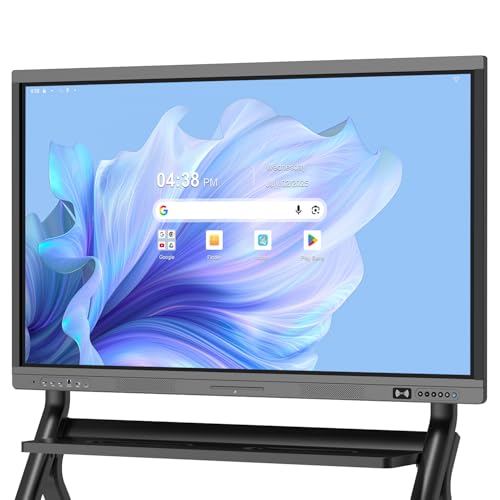
- Google EDLA-certified with Play Store and Drive access
- Android 14 with 8GB RAM and 128GB storage
- Anti-glare 4K touchscreen with wireless sharing
Best For: Hybrid offices wanting secure Google-based collaboration
Office Smartboard Choice
EUNIVON 55" 4K Interactive Whiteboard

- 55-inch 4K UHD board for office and classroom use
- Supports casting, HDMI, annotation, and screenshots
- Android 14 with 8GB RAM and open app ecosystem
Best For: Teams wanting a practical 55-inch board for meetings and training
Mobile Stand Solution
Vibe Portable Stand for 55" Smart Whiteboard
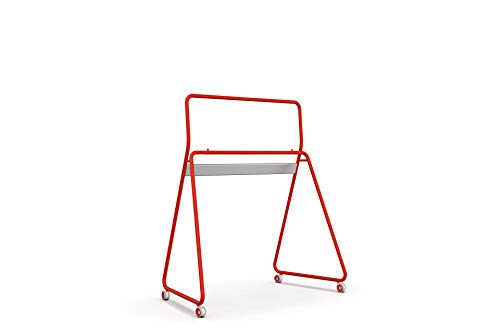
- 4 lockable wheels for easy movement
- Fits the Vibe All In One 55" board
- Durable steel frame with easy assembly
Best For: Teams needing a mobile stand for a compatible Vibe 55-inch whiteboard
Android Smart Board
55" 4K UHD Touchscreen Whiteboard

- 4K UHD touchscreen with annotation tools
- Supports screencasting from major device types
- Enterprise security and fleet management
Best For: Business teams that want a wall-mounted collaboration board with IT controls
Portable Collaboration Display
Vibe S1 55" All-in-One Smart Board

- Freestanding portable all-in-one meeting display
- 55-inch 4K touchscreen with whiteboarding software
- 250+ apps plus enterprise security
Best For: Small teams and huddle rooms needing an all-in-one portable collaboration board
Conference-Ready Collaboration Hub

- 86-inch 4K UHD touchscreen with 400+ nits brightness
- 20-point infrared touch with fast 6ms response
- Built-in conferencing plus wide front/rear/bottom ports
Best For: Large meeting rooms and training spaces
All-in-One Meeting Room Smartboard

- 4K UHD all-in-one board with Android 14 and 8GB/128GB
- 13MP camera, 8-array mic, and dual 20W speakers
- Wireless casting plus wired HDMI/USB-C sharing
Best For: Small to mid-sized offices and hybrid meeting rooms
Secure Hybrid Collaboration Display

- EDLA-certified Android 14 with security controls
- Works with Mac, Windows, iOS, and Android devices
- 4K anti-glare screen with built-in camera for remote meetings
Best For: Secure, cross-device collaboration in offices and classrooms
Enterprise Collaboration Board – COOLHOOD 65" 4K Smart Board
If you want portable interactive whiteboards for businesses, the COOLHOOD 65-inch smart board is built for teams that need a large, responsive workspace for meetings, presentations, and hybrid collaboration. Its 4K UHD display, 20-point touch support, and wireless screen sharing make it a practical fit for offices that want an all-in-one collaboration hub.
Best For: Offices, classrooms, and hybrid teams that want a large, app-friendly interactive board with strong annotation and conferencing tools.
Pros:
- 65-inch 4K UHD touchscreen with 20-point multi-touch and 6ms response time
- Wireless sharing works with Mac, Windows, iOS, and Android
- Includes presentation tools like annotation, smart voting, screenshots, and timer
- Supports Zoom, Google Meet, Microsoft Teams, and Webex
Cons:
- Wall mount is included, but the stand is sold separately
- Large size may be more than some smaller meeting rooms need
- Single HDMI port may limit some wired setups
Overall, this is a feature-heavy business whiteboard that emphasizes collaboration, sharing, and app flexibility. It makes the most sense for organizations that want a fixed but highly capable digital meeting display.
Mobile Stand Pick – Vibe 55" Rolling Whiteboard Stand
For businesses already using Vibe, this portable stand is a simple way to move a compatible interactive display between rooms. Among portable interactive whiteboards for businesses, the value here is mobility: four lockable wheels, a durable steel frame, and a floor-standing design that helps turn different spaces into meeting areas.
Best For: Teams that already own a compatible Vibe 55-inch board and want a mobile, lockable stand for shared office spaces.
Pros:
- Four lockable wheels make it easy to roll and secure in place
- Designed specifically for the Vibe 55-inch all-in-one interactive whiteboard
- Durable metal frame supports office or classroom use
- Lightweight, portable design helps move the board between rooms
Cons:
- Whiteboard is sold separately
- Only fits the Vibe 55-inch board
- Not a complete display solution on its own
This is a practical add-on rather than a standalone board, but it solves a real workplace need. If your team needs a mobile collaboration setup, it delivers straightforward portability with locking stability.
Secure Hybrid Workboard – Dornium 55" EDLA Smart Board
This 55-inch display is a strong option for businesses looking at portable interactive whiteboards for businesses with better platform support and security. With Google EDLA certification, Android 14, and a flexible open app ecosystem, it is designed for office meetings, hybrid work, and classroom-style collaboration.
Best For: Businesses that want a secure, Google-friendly interactive whiteboard for office collaboration and hybrid meetings.
Pros:
- Google EDLA certification supports Google Play Store and Google Drive access
- Android 14 plus 8GB RAM and 128GB storage for smooth performance
- Wireless sharing, HDMI, and QR code document sharing support collaboration
- Anti-glare 4K touchscreen with 20-point multi-touch and ±1mm accuracy
Cons:
- Standing bracket is sold separately
- Best suited to users who want a Google-centered workflow
- Connectivity options are extensive, which may be more than some small teams need
For organizations that care about security, Google integration, and versatile connectivity, this board offers a strong business-ready package. It’s especially appealing for teams that split time between office and remote collaboration.
Office Smartboard Choice – EUNIVON 55" 4K Interactive Whiteboard
If you need portable interactive whiteboards for businesses in a more compact 55-inch format, this EUNIVON smartboard is aimed at office meetings, classrooms, and home workspaces. It focuses on the core features many teams need most: screencasting, annotation, app flexibility, and enterprise security management.
Best For: Business users who want a straightforward 55-inch interactive board for meetings, training, and remote work.
Pros:
- Supports screencasting from Mac, Windows, iOS, and Android devices
- Allows annotation, screenshot pinning, and HDMI connection
- Open app ecosystem lets teams choose the software they need
- Android 14 with Cortex-A55 octa-core CPU and 8GB RAM for smooth operation
Cons:
- Designed for wall mounting, so portability depends on your setup
- Does not include the advanced Google EDLA certification of some alternatives
- Less focused on conferencing extras than some higher-feature boards
This is a practical, business-oriented smartboard that covers the essentials without overcomplicating the workflow. It is a sensible choice for teams that want reliable presentation and annotation tools in a familiar 55-inch size.
Mobile Stand Solution – Vibe Portable Stand for 55" Smart Whiteboard
For businesses using portable interactive whiteboards for businesses, this Vibe stand turns a compatible 55-inch board into a movable meeting setup. It is designed exclusively for the Vibe 55″ interactive smart whiteboard and adds lockable wheels plus a durable steel frame for room-to-room flexibility.
Best For: Teams that already use a Vibe 55-inch board and want a mobile, lockable floor stand for offices or classrooms.
Pros:
- 4 lockable wheels make it easy to roll between rooms and secure in place.
- Designed specifically for the Vibe All In One 55″ Interactive Smart Whiteboard.
- Lightweight stand with a durable steel frame for portable use.
- Easy-assembly design helps simplify setup.
Cons:
- Vibe interactive whiteboard is sold separately.
- Only fits the Vibe 55″ board, so compatibility is limited.
This is a practical add-on if mobility matters more than display features. It is best viewed as a support solution for creating a flexible presentation space, not as a standalone whiteboard system.
Android Smart Board – 55" 4K UHD Touchscreen Whiteboard
For portable interactive whiteboards for businesses that stay wall-mounted, this 55-inch smart board combines a 4K UHD display with touch input and Android-based software. It is built for office meetings, classroom use, and home setups, with screencasting, HDMI connectivity, annotation tools, and enterprise-focused fleet management.
Best For: Offices and meeting rooms that want a feature-rich wall-mounted smart board with collaboration and IT management tools.
Pros:
- 4K UHD touchscreen with annotation support for presentations and meetings.
- Works with Mac, Windows, iOS, and Android screencasting, plus HDMI input.
- Android 14 platform with 8GB RAM and 128GB storage for smooth use.
- Fleet management and high-level security features support enterprise needs.
Cons:
- Wall mount design is less flexible than a freestanding mobile setup.
- Its best use depends on installed space and mounting.
This model is aimed at teams that want a central collaboration display rather than a move-anywhere cart system. The open app ecosystem and business-oriented controls make it a strong fit for organized meeting spaces.
Portable Collaboration Display – Vibe S1 55" All-in-One Smart Board
This all-in-one Vibe board is a strong option for portable interactive whiteboards for businesses that need a freestanding collaboration hub. It combines a 55-inch 4K UHD touchscreen, whiteboarding software, and 250+ apps, with portable freestanding design, Wi-Fi 6, Bluetooth 5.2, and enterprise-level security features.
Best For: Small teams, huddle rooms, and offices that want a portable all-in-one meeting and whiteboarding device.
Pros:
- Freestanding portable design makes it easier to move into different meeting spaces.
- 4K UHD touchscreen with 10-point infrared touch and fast response time.
- 250+ apps and Chromium OS support for common business workflows.
- Enterprise security plus fleet management for IT-friendly deployment.
Cons:
- At 50.7 pounds, it is not as lightweight as a simple stand or cart.
- It is sized for smaller teams and huddle rooms rather than large collaboration spaces.
If you want a mobile meeting device that bundles display, whiteboarding, and app access in one package, this is the most complete option here. It is especially appealing for teams that need to present, brainstorm, and collaborate without relying on separate hardware.
Conference-Ready Collaboration Hub – 86'' Smart Board
If you’re comparing portable interactive whiteboards for businesses, this 86-inch smart board stands out as an all-in-one option for presentations, meetings, and hybrid collaboration. It combines a 4K UHD touchscreen, Android 14, and built-in conferencing tools in a single large-format display that can replace multiple separate devices.
Best For: Large meeting rooms, training spaces, and teams that want a feature-rich collaboration board with broad connectivity.
Pros:
- 4K UHD display with over 400 nits brightness for crisp, readable visuals.
- 20-point infrared touch with ±1mm precision and 6ms response for interactive teamwork.
- Built-in video conferencing features for annotating, editing, and presenting during calls.
- Front, rear, and bottom ports offer extensive connection flexibility for mixed devices.
Cons:
- The 86-inch size is better suited to fixed rooms than truly mobile use.
- Large-format setup may be more than smaller teams need.
- Port-rich configuration can be more complex than a simple plug-and-play display.
This is a strong fit when your priority is a fully equipped business collaboration board rather than a compact portable screen. The combination of Android 14, screen sharing, and wide I/O makes it versatile for presentations and hybrid meetings.
All-in-One Meeting Room Smartboard – 55" Smart Board
For businesses looking at portable interactive whiteboards for businesses, this 55-inch smart board offers a compact all-in-one design that covers display, collaboration, and conferencing in one unit. It is built around Android 14, 4K UHD touch, and integrated audio-video tools, making it practical for offices that want fewer peripherals and a cleaner setup.
Best For: Small to mid-sized offices, hybrid meeting rooms, and teams that want an integrated collaboration display.
Pros:
- All-in-one design combines computing, 4K display, conferencing, and whiteboard tools.
- 20-point touch makes group annotation and collaboration straightforward.
- 13MP auto-focus camera, 8-array mic, and dual 20W speakers support remote meetings.
- Wireless and wired screen sharing support multiple presentation workflows.
Cons:
- At 55 inches, it is less suited to large boardrooms than bigger models.
- Feature depth may be more than basic presentation-only users need.
- Wall mount is included, so it is less about true portability and more about flexible room use.
This model is a practical choice if you want a business-ready interactive whiteboard that simplifies setup and supports day-to-day collaboration. Its mix of app access, cloud storage, and conferencing hardware makes it a versatile office tool.
Secure Hybrid Collaboration Display – JAV Smart Board
If you need portable interactive whiteboards for businesses that emphasize compatibility and security, the JAV Smart Board is a compelling 55-inch option. It pairs Android 14 with EDLA certification, wireless sharing, and built-in camera support, giving teams a versatile workspace for meetings, annotation, and remote collaboration.
Best For: Offices, classrooms, and hybrid teams that want secure sharing and strong device compatibility.
Pros:
- EDLA-certified Android environment with security features like screen lock and USB password protection.
- Works with Mac, Windows, iOS, and Android devices for broad compatibility.
- 4K anti-glare touchscreen supports clear viewing in bright rooms.
- Built-in camera and wireless sharing support remote meetings and collaboration.
Cons:
- The product is positioned more as a room display than a highly mobile board.
- Specific speaker and microphone details are not highlighted in the supplied notes.
- Its strongest appeal is collaboration and security, not compact portability.
This board makes sense for buyers who want a dependable business collaboration display with security controls and flexible device support. The open app ecosystem and wireless file sharing add practical value for daily office workflows.
How We Picked the Best Portable Interactive Whiteboards for Businesses
We focused on Portable Interactive Whiteboards for Businesses that are useful in real workplaces, not just classrooms. Priority went to displays and bundles with strong touch response, 4K resolution, business-friendly operating systems, and practical mobility options like stands or wheeled bases. We also looked for models that can support meetings, training, hybrid work, and fast room-to-room movement.
Quick Comparison
The main differences come down to screen size, portability, and software ecosystem. Smaller 55-inch models are easier to move and fit better in conference rooms. Larger 65-inch and 86-inch boards improve visibility for bigger teams but are less nimble. If your team relies on Google services or app-based workflows, look for Android 14, EDLA certification, or Chrome OS support. If mobility matters most, a compatible rolling stand can be just as important as the display itself.
Key Buying Factors for Portable Interactive Whiteboards for Businesses
Mobility and Installation
Decide whether you need a truly mobile board on a lockable wheeled stand or a wall-mounted display that stays in one room. For businesses that host rotating meetings, the stand matters as much as the screen.
Screen Size and Room Fit
Choose 55 inches for small to medium rooms and frequent movement between spaces. Go larger if you need better visibility for training rooms, open offices, or larger collaboration areas.
Software and Compatibility
Check whether the system supports your preferred apps, cloud storage, and video meeting tools. For many teams, Android 14, Chrome OS, and EDLA certification improve app access and IT compatibility.
Touch, Resolution, and Performance
4K resolution helps with legibility in presentations and whiteboarding. A responsive multi-touch panel is important for smooth annotation, writing, and team interaction.
Ports, Wireless Sharing, and Account Control
Business users should look for reliable screen sharing, enough connectivity for laptops and peripherals, and simple user management. These details often determine how easy the board is to adopt day to day.
Who Should Buy Which Portable Interactive Whiteboards for Businesses?
If you need maximum flexibility, choose a 55-inch model with a portable stand or a lightweight setup that can move between rooms. If you run a boardroom, training center, or showroom, a larger 65-inch or 86-inch display may be worth the tradeoff in portability. Teams that already use Google tools should prioritize certified Android or Chrome-based options, while businesses wanting a simple all-in-one collaboration device should focus on models with built-in software and straightforward setup.
In short, the best Portable Interactive Whiteboards for Businesses are the ones that fit your room size, workflow, and mobility needs without adding IT headaches.