
Electronic whiteboards for presentations have become the centerpiece of modern meeting rooms, classrooms, and hybrid workspaces. The best models make it easy to annotate, share content wirelessly, and keep everyone engaged.
In this roundup, we focus on the features that matter most: display quality, touch responsiveness, app support, and setup simplicity. That way, you can choose a board that fits your room, your team, and your workflow.
Best 10 Electronic Whiteboards for Presentations Picks for 2026
Premium Google EDLA Large-Screen Pick
65'' 4K Smart Board for Classroom & Office

- Google EDLA certified with Play Store access
- Android 14, 8GB RAM, and 128GB storage
- 4K touchscreen with 20-point touch and 6 ms response
Best For: large classrooms and offices that want Google app support
Compact All-Purpose Presentation Board
55'' 4K Smart Whiteboard with Wall Mount

- Supports casting from Mac, Windows, iOS, and Android
- Android 14 with 8GB RAM and 128GB storage
- Includes wall mount for easier setup
Best For: smaller rooms and home offices needing a versatile board
Enterprise Hybrid-Meeting Upgrade
75" Google EDLA 4K Smart Whiteboard

- Google EDLA-certified with OTA updates and Drive access
- Built-in 48MP camera and 8-mic array
- 75-inch 4K anti-glare touchscreen with 20-point touch
Best For: hybrid meetings and large rooms needing advanced collaboration
Software-First Collaboration Board
Vibe S1 55" All-in-One Smart Board

- 250+ apps in an open ecosystem
- Cloud whiteboard with PDF and app annotation
- 10-point infrared touch with under 8 ms response
Best For: small teams that want a compact all-in-one meeting board
Classroom-Ready Collaboration
HORION 55-Inch 4K Digital Whiteboard
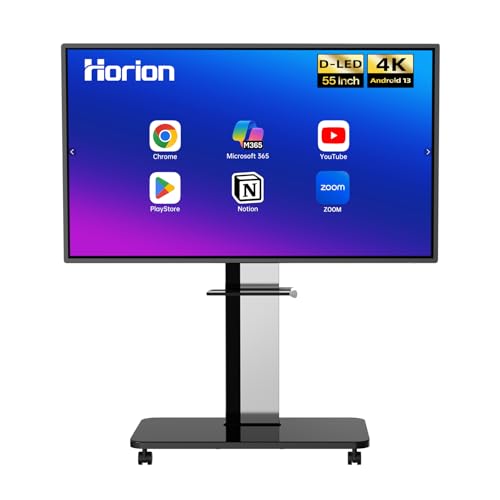
- 40-point 4K anti-glare touchscreen
- Wireless sharing with touchback control
- Dual 20W speakers and Android 13
Best For: schools and offices needing a wall-mounted collaborative presentation board
Meeting-Friendly All-In-One

- Built-in camera, mics, and speakers
- 4K touchscreen with 20-point multi-touch
- Open app ecosystem with wireless projection
Best For: teams that want conferencing hardware built into the presentation board
Google-Connected Large Format
NewBoard 75E 75-Inch 4K Smart Board

- Google EDLA-certified with Google Workspace support
- 75-inch 4K panel with 50-point touch
- Wireless casting for up to 16 devices
Best For: large rooms and classrooms centered on Google apps and shared casting
Premium Large-Format Collaboration Board
86'' 4K Android 14 Smart Board

- 86-inch 4K UHD touchscreen with over 400 nits brightness
- Android 14 with 8GB RAM and 128GB storage
- 20-point touch plus extensive front, rear, and bottom ports
Best For: Large rooms needing a high-capacity interactive presentation board
Dual-System Conference Whiteboard
55" 4K Smart Board with 48MP Camera

- Windows 11 and Android 13 dual-system setup
- Built-in 48MP camera with dual 8-array microphones
- 20-point touch plus support for screen sharing and meetings
Best For: Teams that need presentation and video-conference functions in one board
EDLA-Certified Classroom Display
55" Android 14 Interactive Smart Board

- Google EDLA-certified Android 14 with 8GB RAM and 128GB SSD
- 4K UHD touchscreen with 20-point touch and 6ms latency
- AirPlay, Wi-Fi, USB-C, and HDMI for flexible presenting
Best For: Schools and offices wanting an app-friendly interactive presentation board
Premium Google EDLA Large-Screen Pick – 65'' 4K Smart Board for Classroom & Office
If you want electronic whiteboards for presentations that can double as a classroom display and office collaboration hub, this 65-inch KEINONE smart board is built around speed, app access, and easy annotation. Its Google EDLA certification, Android 14 platform, and 4K touchscreen make it a practical choice for teams that want a modern all-in-one presentation surface.
Best For: classrooms, offices, and hybrid teams that want Google app access and strong multi-touch performance.
Pros:
- Google EDLA certified with access to the Google Play Store and compatible educational apps.
- Android 14, 8GB RAM, and 128GB storage help it handle multitasking and larger files smoothly.
- 4K UHD panel with 20-point touch and 6 ms response time for responsive presenting and writing.
- Supports AirPlay, WiFi, Type C, HDMI, and device connections for sharing and collaboration.
Cons:
- Requires enough wall or desk space for the 65-inch format.
- At 90 pounds, it is not a lightweight setup.
Overall, this model is a strong fit if you want a presentation board that blends app flexibility, fast interaction, and broad connectivity. It is especially appealing for users who rely on Google tools and want a larger display for clear group viewing.
Compact All-Purpose Presentation Board – 55'' 4K Smart Whiteboard with Wall Mount
For buyers comparing electronic whiteboards for presentations, this 55-inch EUNIVON model focuses on everyday practicality: Android-based software, screen casting, and easy annotation. It is sized well for meeting rooms, classrooms, and home workspaces where a compact but capable interactive board makes more sense than a larger display.
Best For: small meeting rooms, classrooms, and home offices that need a versatile presentation board.
Pros:
- Supports screencasting from Mac, Windows, iOS, and Android devices, plus HDMI input.
- Open app ecosystem lets teams choose the tools they need.
- Android 14 with 8GB RAM and 128GB storage supports smooth daily use.
- Includes wall mount for simpler installation.
Cons:
- No built-in camera is listed for video meetings.
- It is a smaller 55-inch display, which may be less ideal for larger rooms.
This is a straightforward option if you want a presentation-ready smart board without unnecessary extras. Its strength is flexibility: it can handle annotation, casting, and app-based workflows in a format that works well in tighter spaces.
Enterprise Hybrid-Meeting Upgrade – 75" Google EDLA 4K Smart Whiteboard
If your priority is a large-format platform for electronic whiteboards for presentations, this 75-inch Dornium board stands out with Google EDLA certification, strong security features, and a built-in camera. It is designed for hybrid work, classrooms, and office presentations where quick sharing, clear visuals, and remote collaboration all matter.
Best For: hybrid meetings, larger classrooms, and office teams that need enterprise-grade collaboration features.
Pros:
- Google EDLA certification with Google Play Store, Google Drive, and OTA updates support.
- 75-inch 4K anti-glare touchscreen with 20-point touch and ±1 mm accuracy.
- Built-in 48MP camera and 8-mic array support remote meetings and online teaching.
- Wide connectivity includes HDMI, DP, Type-C, VGA, USB, and LAN.
Cons:
- Large 75-inch size may be more than some rooms need.
- Standing bracket is sold separately.
This model is well suited to users who want a presentation board that can handle in-room collaboration and virtual meetings equally well. The mix of security, camera, audio, and sharing features makes it a strong fit for teams that work across locations.
Software-First Collaboration Board – Vibe S1 55" All-in-One Smart Board
The Vibe S1 is a strong option if you want electronic whiteboards for presentations that also function as a meeting platform and app hub. With Chrome OS, an open app ecosystem, and a cloud-based whiteboard, it is aimed at teams that want to brainstorm, present, and share from one compact all-in-one device.
Best For: small teams, conference rooms, and classrooms that want an all-in-one collaboration board.
Pros:
- 250+ apps and an open ecosystem support a wide range of workflows.
- Cloud-based whiteboard lets you annotate PDFs and third-party apps, then save and share quickly.
- 10-point infrared touch with under 8 ms response time feels responsive for writing and presenting.
- Wi-Fi 6, Bluetooth 5.2, 8GB RAM, and 128GB storage support modern collaboration.
Cons:
- 55-inch size is better for smaller rooms than large auditoriums.
- Freestanding design may not suit every fixed-installation setup.
For teams that value software depth as much as display quality, the Vibe S1 offers a polished collaboration experience. It is especially appealing when you want to move from ideation to presentation without switching devices or platforms.
Classroom-Ready Collaboration – HORION 55-Inch 4K Digital Whiteboard
If you want electronic whiteboards for presentations that feel responsive in a classroom or meeting room, the HORION 55-inch board is built around quick annotation and easy sharing. Its 4K anti-glare touchscreen, 40-point touch support, and Android 13 platform make it a practical option for teams that need smooth writing, wireless casting, and simple conferencing workflows.
Best For: Schools, offices, and presentation spaces that need a compact wall-mounted smart board with multi-user touch and wireless sharing.
Pros:
- 4K anti-glare display with 40-point touch and low-latency writing
- Wireless screen sharing from iPhone, Mac, Windows, and Android devices
- Supports 4-way split-screen collaboration and touchback control
- Dual 20W speakers and compatibility with Zoom and Teams
Cons:
- Camera and microphone are not included for video conferencing
- Wall-mount setup may be less flexible than a mobile cart
- 55-inch size may feel small for larger conference rooms
Overall, this HORION model is a strong fit if your priority is a dependable, fixed-installation whiteboard for presentations with clear casting and collaborative writing tools. The included wall mount, stylus pens, and 18-month warranty add value for buyers who want a straightforward setup.
Meeting-Friendly All-In-One – YCKJNB 65-Inch 4K Smart Board
For buyers comparing electronic whiteboards for presentations, this 65-inch YCKJNB smart board stands out as an all-in-one meeting display. It combines a 4K UHD touchscreen with Android 13, a built-in 13MP camera, 8-array mics, and dual 20W speakers, so it can handle whiteboarding, remote demos, and video calls without extra setup.
Best For: Offices, classrooms, and home learning setups that want built-in conferencing hardware and flexible app support.
Pros:
- Built-in 13MP camera, 8-array microphones, and dual 20W speakers
- 4K UHD touchscreen with 20-point infrared multi-touch
- Open app ecosystem lets you install the software you need
- Wireless projection supports up to 4 users, plus reverse touch control
Cons:
- Wall mount is included, but a mobile stand requires a separate option
- Only one HDMI port and one USB port are listed in the specs
- Glossy screen finish may not suit every lighting condition
This is a practical choice if you want a presentation board that doubles as a meeting hub. The integrated camera and mic array make it especially appealing for teams that want to run presentations and conferencing from the same device.
Google-Connected Large Format – NewBoard 75E 75-Inch 4K Smart Board
If you need electronic whiteboards for presentations in a larger room, the NEWORK NewBoard 75E brings a big 75-inch 4K display with Google EDLA certification. That means full access to Google Play, Google Workspace, and the Google Education Suite, along with Android 14, 8 GB RAM, and wireless casting for up to 16 devices.
Best For: Large classrooms, meeting rooms, and hybrid workspaces that rely on Google tools and multi-device sharing.
Pros:
- Google EDLA-certified with access to Google Play and Workspace
- 75-inch 4K display with 178° viewing angle and 85% NTSC color gamut
- 50-point touch supports up to 10 simultaneous writers
- Wireless screen sharing works with up to 16 devices at once
Cons:
- Wall mount and mobile cart setup may take more planning than a smaller board
- Only one-year manufacturer warranty is listed
- 165-watt-class power draw is higher than smaller alternatives
For teams that want a large presentation surface with strong Google integration, this model is easy to recommend. The combination of a spacious 4K panel, broad device casting, and collaborative touch support makes it well suited to busy shared environments.
Premium Large-Format Collaboration Board – 86'' 4K Android 14 Smart Board
If you want electronic whiteboards for presentations that feel closer to a full collaboration hub than a basic display, this 86-inch smart board is built for that job. It combines a 4K UHD touchscreen, Android 14, and plenty of connectivity, so it can handle lessons, meetings, annotations, and mixed-media content in one place.
Best For: Large classrooms, conference rooms, and studio spaces that need a big interactive screen with strong app support.
Pros:
- 86-inch 4K UHD display with over 400 nits of brightness for sharp, vibrant visuals.
- Android 14 with 8GB RAM and 128GB storage for smooth multitasking and app use.
- 20-point infrared touch with 6ms response and ±1mm precision for interactive presentations.
- Front, rear, and bottom ports make it flexible for frequent device connections.
Cons:
- The large size may be more than smaller rooms need.
- Its broad feature set may be more complex than a simple display-only setup.
This is a strong fit if you need a presentation board that can also support conferencing, annotation, and wide-ranging input options. It’s especially compelling for environments where one screen needs to do the work of several devices.
Dual-System Conference Whiteboard – 55" 4K Smart Board with 48MP Camera
For electronic whiteboards for presentations that need to support both teaching and video meetings, this 55-inch smart board brings a lot to the table. Its dual Windows 11 and Android 13 systems, 4K touchscreen, and built-in camera and microphones make it well suited to collaborative sessions where the display is also part of the communication setup.
Best For: Offices, classrooms, and training rooms that want an all-in-one board for presentations and conferencing.
Pros:
- Dual operating systems: Windows 11 and Android 13 for flexible workflows.
- 4K UHD touch display with a built-in 48MP camera and dual 8-array microphones.
- 20-point infrared touch with 6ms response for smooth writing and annotation.
- Supports major meeting platforms and wireless screen sharing options.
Cons:
- Wall mount is included, but a mobile floor stand is not.
- At 55 inches, it is less expansive than larger-format boards.
This model stands out when your presentation space also doubles as a conferencing space. The camera, microphones, and dual-system design make it a practical choice for teams that switch often between local collaboration and remote meetings.
EDLA-Certified Classroom Display – 55" Android 14 Interactive Smart Board
If you’re comparing electronic whiteboards for presentations and want a board that leans into teaching and collaboration, this 55-inch model is a strong candidate. It runs Google EDLA-certified Android 14, offers 4K UHD visuals, and includes touch tools and connectivity features that support interactive lessons, shared notes, and wireless presenting.
Best For: Schools, home offices, and team spaces that want a versatile presentation board with Android-based app support.
Pros:
- Google EDLA-certified Android 14 with 8GB RAM and 128GB SSD.
- 4K UHD touchscreen with 20 touch points and 6ms latency.
- Built-in educational tools, text recognition, and multiple brush options.
- AirPlay, Wi-Fi, USB-C, and HDMI connectivity for flexible presenting.
Cons:
- 55-inch size may feel compact for very large rooms.
- Product details list a wall mount, so a rolling stand is not the focus.
This board is a balanced choice if you want presentation hardware that can also act like a teaching and collaboration platform. The Android 14 ecosystem and annotation tools make it especially useful for presenters who switch between content, notes, and live interaction.
How We Picked These Electronic Whiteboards for Presentations
We looked for boards that balance image clarity, reliable touch performance, and flexible software support. For presentation use, a good smart board should handle fast note-taking, smooth casting, and everyday collaboration without requiring a complicated setup.
We also prioritized models with modern Android or certified ecosystem support, strong memory and storage for multitasking, and features like wireless screen sharing, wide touch support, and anti-glare panels for better visibility in bright rooms.
Quick Comparison: What Matters Most
Most buyers will choose between a 55-inch, 65-inch, 75-inch, or 86-inch display. Smaller boards suit compact meeting rooms and classrooms, while larger models are better for boardrooms, training spaces, and larger audiences.
Beyond size, compare resolution, touch-point count, built-in camera and audio options, and whether the board supports the apps and casting methods your team already uses. Those factors usually matter more than raw specs alone.
Key Buying Factors for Electronic Whiteboards for Presentations
Screen Size and Viewing Distance
Pick a size that matches the room. A 55-inch board works well for small groups, while 75-inch and 86-inch options are easier to see in larger spaces or when presenting to a crowd.
Touch and Annotation Performance
For live presentations, responsive touch is essential. Look for multi-touch support and low-latency writing so you can mark up slides, brainstorm ideas, and move between tasks without lag.
Software and Ecosystem Support
Electronic Whiteboards for Presentations are best when they run the apps you actually use. Google-certified or EDLA-certified models are especially appealing for teams that rely on familiar productivity tools and cloud workflows.
Connectivity and Casting
Wireless casting, HDMI, and other simple input options make sharing fast and reduce downtime between speakers. If multiple people present in one room, easy switching is a major advantage.
Camera, Audio, and Room Features
Built-in cameras, microphones, and speakers can turn a board into a collaboration hub for video calls and hybrid meetings. These extras are especially valuable in offices that host remote participants.
Who Should Buy Which Electronic Whiteboards for Presentations?
If you need a board for a small office or classroom, a 55-inch model is usually the most practical choice. For mid-size conference rooms and training spaces, 65-inch options often hit the sweet spot.
If you present to larger groups or want better visibility across a wide room, choose a 75-inch or 86-inch board. Buyers who want the simplest experience should lean toward certified platforms with strong app support, while teams that value flexibility may prefer open Android-based systems.
In short, the best choice depends on room size, software needs, and how often the board will be used for live collaboration versus standard slide presentations.