
In a shared office, a laptop can be vulnerable whenever its owner steps away—even for a few minutes. The best laptop locking cables for shared offices add a visible physical deterrent without disrupting normal desk use.
Our 2026 roundup covers standard T-bar and Nano-compatible locks, combination and keyed designs, universal cables, and kits with adhesive anchors for devices that lack a built-in security slot.
Best 10 Laptop Locking Cables for Shared Offices Picks for 2026
Best Standard-Slot Pick
Kensington T-Bar Combination Cable Lock

- Resettable four-digit combination
- Six-foot carbon-steel cable
- Push-button, one-handed attachment
Best For: Compatible standard-slot laptops and office equipment
Best Desktop and Peripheral Kit
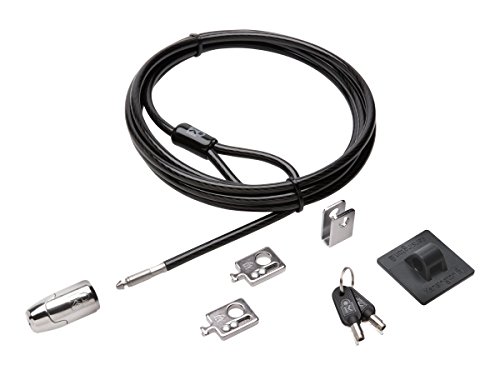
- Eight-foot carbon-steel cable
- Includes adapters and cable trap
- Anchor plate handles devices without slots
Best For: Desktop workstations and peripheral-heavy setups
Best No-Slot Flexibility
Universal Laptop Cable Lock Kit

- Works with devices lacking lock holes
- Includes adhesive lock-slot plate
- 6.23-foot cable with combination lock
Best For: Mixed laptops and tablets with varied security options
Best for Thin Laptops
Kensington Nano-Slot Combination Lock

- Slim head for Nano-sized slots
- Resettable four-digit combination
- Pivoting head supports port access
Best For: Thin laptops with Nano security slots
Best Keyed Standard-Slot Pick
Kensington T-Bar Keyed Laptop Lock
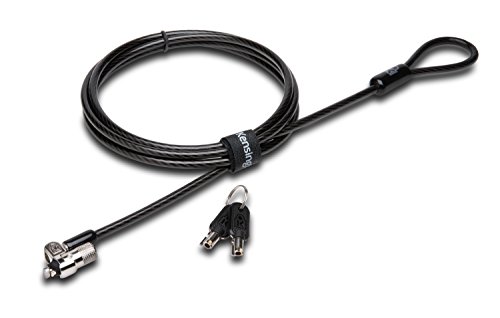
- 6-foot carbon steel cable
- Pivoting 10 mm lock head
- Limited lifetime warranty
Best For: Shared offices with standard Kensington security slots
Best Flexible Anchor Kit
Laptop and Tablet Security Cable with Plates

- Includes two adhesive anchor plates
- 6.6-foot cable reach
- Works with slot and non-slot devices
Best For: Shared spaces securing mixed electronics
Best Universal Combination Pick
Kensington 3-in-1 Combination Laptop Lock

- Fits three common slot types
- 10,000 resettable combinations
- Six-foot carbon steel cable
Best For: Multi-brand shared offices avoiding key management
Most Versatile
Retractable Keyed Cable Lock Kit
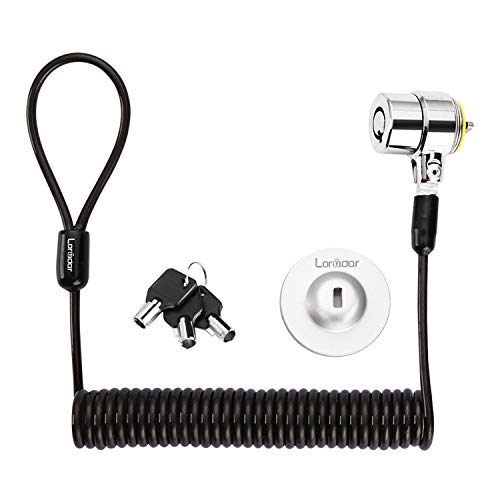
- Fits many 3-by-7 mm security slots
- Includes three keys and an adhesive anchor
- Self-rolling cable extends about 6 feet
Best For: Mixed-device shared offices
Best Heavy-Duty Pick

- Fits standard 7-by-3 mm lock slots
- Uses a 1.7-meter cut-resistant cable
- Includes two keys and a pivoting head
Best For: Compatible standardized laptop fleets
Best Multi-Device Kit

- Includes two adhesive anchor sets
- Six-foot cut-resistant steel cable
- Supports laptops, tablets, and smartphones
Best For: Mixed-device offices and display areas
Best Standard-Slot Pick – Kensington T-Bar Combination Cable Lock
For shared offices using laptops with a standard Kensington security slot, this resettable combination lock offers a straightforward way to anchor equipment to a desk or other fixed structure. Its six-foot carbon-steel cable and push-button design support convenient everyday use.
Best For: Offices securing compatible laptops, monitors, docking stations, projectors, and other devices with a standard Kensington slot.
Pros:
- Resettable four-wheel code with 10,000 possible combinations
- Six-foot cut-resistant carbon-steel cable
- Push-button attachment supports one-handed engagement
- Works with multiple device types featuring a standard Kensington slot
Cons:
- Not compatible with Dell or Alienware devices that use a Noble lock slot
- Compatibility may vary with some 2016-and-newer Dell laptops and tablets
This is a practical choice among laptop locking cables for shared offices when your equipment has the matching standard slot. Verify the slot type before purchasing, especially for Dell systems.
Best Desktop and Peripheral Kit – Kensington Locking Kit 2.0
Shared offices often need to secure more than a laptop. This Kensington kit combines an eight-foot carbon-steel cable with adapters, a cable trap, and an anchor plate for protecting desktop PCs and peripheral accessories.
Best For: Desktop workstations and office setups that need a keyed lock plus coverage for peripherals or devices without a Kensington security slot.
Pros:
- Eight-foot cut-resistant cable provides flexible anchoring options
- Includes two K-Slot adapters and a cable trap for peripherals
- Anchor plate supports devices without a Kensington security slot
- Patented anti-pick Hidden Pin Technology in the 5mm keying system
Cons:
- Uses a keyed lock rather than a combination system
- More specialized than a basic single-device laptop cable
For laptop locking cables for shared offices that must also cover desktop accessories, this is the most comprehensive option in the group. Its longer cable and included hardware suit fixed workstation installations.
Best No-Slot Flexibility – Universal Laptop Cable Lock Kit
This combination lock is designed for mixed office inventories: it can connect directly to a built-in security slot or use the included adhesive plate for devices without one. The 6.23-foot cable and key-free code make it convenient for shared work areas.
Best For: Offices securing a mix of laptops and tablets, including devices without built-in security lock holes.
Pros:
- Adhesive lock-slot plate supports devices without security holes
- Four-digit combination offers more than 10,000 possible codes
- 6.23-foot, 5mm braided cable provides useful reach
- Rotating push-button lock is designed for one-hand operation
Cons:
- Adhesive plate requires attachment to the device before use
- Supplied notes do not identify specific laptop slot standards or brands
Among laptop locking cables for shared offices, this kit stands out for compatibility flexibility. It is worth considering when your organization has devices with inconsistent security-slot designs, provided the adhesive mounting approach suits the equipment.
Best for Thin Laptops – Kensington Nano-Slot Combination Lock
Thin laptops may require a smaller security connector than standard office equipment. This Kensington lock is built for Nano-sized slots, with a slim head that helps the laptop sit flat while a five-foot carbon-steel cable anchors it to a desk or table.
Best For: Thin laptops with Nano-sized security slots in shared offices, cafes, and other indoor workspaces.
Pros:
- Slim lock head is designed for Nano-sized laptop slots
- Resettable four-wheel combination provides 10,000 possible codes
- Pivoting head and rotating anchor can improve port access
- Five-foot carbon-steel cable resists cutting attempts
Cons:
- Only compatible with laptops using the Nano-sized slot standard
- Five-foot cable is shorter than some alternatives in this roundup
This is a focused option for laptop locking cables for shared offices where thin, Nano-slot laptops are common. Confirm the slot size first; the slim design is an advantage only when it matches the device.
Best Keyed Standard-Slot Pick – Kensington T-Bar Keyed Laptop Lock
For shared offices using laptops and other equipment with a Kensington security slot, this keyed cable lock provides a familiar, desk-anchored setup. Its 6-foot carbon steel cable and pivoting lock head are designed for practical everyday security without awkward locking angles.
Best For: Offices standardizing on keyed locks for compatible Kensington-slot laptops, monitors, docking stations, and other electronics.
Pros:
- 6-foot carbon steel cable with a plastic sheath helps resist cutting attempts.
- Pivoting 10 mm lock head supports easier access on thin laptops and devices.
- Hidden-pin tubular lock technology and a limited lifetime warranty add useful long-term support.
Cons:
- Does not work with 2016 and newer Dell devices using the wedge lock slot.
- Some HP devices use Kensington’s NanoSaver slot and require a different lock.
- Keyed operation means managing keys across a shared office.
This is a strong fit when your office devices already use the standard Kensington T-Bar slot. Check each device’s slot type before purchasing, especially for newer Dell and select HP models.
Best Flexible Anchor Kit – Laptop and Tablet Security Cable with Plates
This kit is a practical option for laptop locking cables for shared offices that also need to secure tablets, phones, POS devices, or displays. It combines a standard 3 x 7 mm slot lock with two adhesive anchor plates for compatible non-slot equipment.
Best For: Coworking spaces, classrooms, counters, and offices protecting a mix of slot-equipped and non-slot devices.
Pros:
- Includes the cable lock, two keys, and two self-adhesive anchor plates.
- 6.6-foot reach makes it easier to loop around desks, table legs, shelves, and monitor arms.
- Supports laptops, monitors, tablets, phones, POS devices, and other shared electronics.
Cons:
- Adhesive plates require clean, dry, smooth surfaces and waiting time before use.
- The 5 mm cable is intended to deter quick grab-and-go theft, not provide an absolute theft-proof solution.
- Adhesive anchors may not suit rough, porous, or uneven surfaces.
Choose this kit when device variety matters more than using one built-in laptop slot standard. Follow the installation guidance carefully, including the recommended bonding time, for the adhesive anchors.
Best Universal Combination Pick – Kensington 3-in-1 Combination Laptop Lock
For shared offices with laptops from different generations, this resettable combination lock is designed to fit standard, Nano, and wedge-shaped security slots. Its interchangeable lock tips can reduce the need to stock separate locks for different devices.
Best For: Multi-brand offices that want a reusable, keyless locking system for varied laptop slot types.
Pros:
- Fits standard, Nano, and wedge-shaped laptop security slots.
- Resettable four-number dial offers 10,000 possible combinations.
- Six-foot carbon steel cable and tethered unused tips support practical daily use.
Cons:
- Combination management is required, even though codes can be reset.
- Only the cable lock is described in the supplied notes; no adhesive anchors are included.
- Users must change the lock tip to match the device slot.
This is the most adaptable choice of the three for offices managing mixed laptop fleets. Its combination format also avoids shared-key logistics, while the interchangeable tips help accommodate different slot designs.
Most Versatile – Retractable Keyed Cable Lock Kit
For shared offices that need laptop locking cables for shared offices across varied devices, this retractable keyed kit offers broad compatibility with standard 3-by-7 mm security slots plus an adhesive anchor plate for devices without one. Its 6.2-foot self-rolling cable is practical for desks, monitors, tablets, and other equipment.
Best For: Offices securing a mix of laptops, monitors, tablets, and phones.
Pros:
- Works with many laptops and other devices using 3-by-7 mm security holes.
- Includes three keys and a traceable lock-and-key number.
- Self-rolling, cut-resistant steel cable extends up to about 6 feet.
- Includes an adhesive anchor plate for compatible devices without a lock slot.
Cons:
- Some newer Dell, HP, Acer, Lenovo, and Apple models require the anchor plate or may not be compatible.
- The adhesive anchor requires careful cleaning, pressure, and up to 48 hours for maximum hold.
This is a flexible choice for shared workspaces, especially where equipment varies. Check each device’s lock-slot design before deployment.
Best Heavy-Duty Pick – Pivoting T-Bar Laptop Lock
This keyed cable is a straightforward option for shared offices using laptops with a standard 7-by-3 mm lock slot. The 1.7-meter cut-resistant steel cable loops around a fixed point, while the pivoting lock head is designed to reduce stress on the laptop body.
Best For: Standardized laptop fleets with compatible T-shaped security slots.
Pros:
- Designed for standard 7-by-3 mm laptop lock slots.
- Provides a 1.7-meter cable for looping around desks or other fixed structures.
- Pivoting ball-joint lock head helps minimize stress on the laptop body.
- Includes two keys.
Cons:
- Compatibility is limited to laptops with the specified standard lock slot.
- Does not include an adhesive anchor option for devices without a slot.
For an office with matching laptops, this focused design keeps setup simple. Confirm the slot dimensions on the organization’s devices before buying.
Best Multi-Device Kit – AboveTEK Adhesive Anchor Lock
For laptop locking cables for shared offices that also need to protect tablets and phones, this AboveTEK kit combines a six-foot steel cable with two adhesive anchor sets. The anchors make it useful for devices without built-in security slots in offices, retail areas, showrooms, and other shared environments.
Best For: Teams securing laptops, tablets, smartphones, and display devices across multiple locations.
Pros:
- Includes two adhesive sticker-and-anchor sets for multiple devices.
- Six-foot cut-resistant galvanized steel cable supports flexible positioning.
- Works with laptops, notebooks, tablets, and smartphones.
- Stainless steel lock is designed for smooth key operation.
Cons:
- Adhesive anchors require suitable, clean flat surfaces.
- Devices must be secured with the included anchors when they lack a compatible built-in slot.
This is a practical kit when a shared workspace protects more than laptops. Its two anchor sets add flexibility, but surface suitability should be checked before installation.
How We Picked the Best Laptop Locking Cables for Shared Offices
We compared these 10 options by checking the locking mechanism, cable length, device compatibility, included accessories, and practical fit for communal workspaces. We also considered whether a lock is easy to share across a team, simple to install, and flexible enough for laptops, monitors, tablets, or other office equipment.
Because security slots vary, compatibility was a priority. The selection includes standard T-bar locks, Nano-slot models, universal designs, and adhesive-anchor kits. Combination locks can simplify team use, while keyed models may suit organizations that want tighter control over who can unlock equipment.
Quick Comparison
- Best for shared team access: Resettable combination locks avoid misplaced keys and allow administrators to change the code.
- Best for traditional laptop slots: Standard T-bar keyed or combination cables fit many business laptops and monitors.
- Best for slim devices: Nano-compatible locks are designed for newer, thinner security slots.
- Best for devices without a slot: Adhesive-anchor kits provide an attachment point for compatible laptops and tablets.
- Best for broader office coverage: Universal and desktop locking kits can secure peripherals as well as computers.
Key Buying Factors for Laptop Locking Cables for Shared Offices
Security Slot Compatibility
Check whether the computer has a standard T-bar slot, a Nano security slot, or no built-in slot at all. A mismatch can make an otherwise well-made cable unusable. For mixed fleets, a universal lock or separate compatible models may be more practical.
Combination or Keyed Lock
Combination locks are convenient for hot desks and shared equipment because employees do not need to borrow or store keys. Keyed locks can be preferable when access should remain limited to supervisors, IT staff, or assigned users. Resettable combinations are especially useful when staffing changes or a code is exposed.
Cable Length and Construction
A six-foot cable generally offers enough reach to connect a laptop to a sturdy desk frame or fixed object, but measure your setup before buying. Look for a steel cable and a locking head that feels substantial. Remember that a cable is a deterrent, not a substitute for securing the desk or improving the room’s access controls.
Anchors and Included Accessories
If a device lacks a security slot, verify that adhesive plates are suitable for its surface and that installation instructions are followed carefully. Kits that include multiple anchors or keys may provide better value for offices managing several devices.
Who Should Buy Which Laptop Locking Cables for Shared Offices?
Choose a resettable combination lock for hot desks, training rooms, and shared laptops used by many employees. Choose a keyed standard T-bar lock for assigned workstations where IT or management should control access. Choose a Nano-compatible model for thin business laptops with the smaller slot design.
Choose an adhesive-anchor kit for tablets, laptops, or other equipment without a built-in security opening. Choose a universal or desktop locking kit when your goal is to protect monitors, peripherals, and mixed office hardware—not just one laptop. Before ordering, confirm the slot type, cable reach, anchoring point, and the number of users who need access.