
A crowded desk should not force you to choose between usable space and basic device security. The best laptop locking cables for small desks help secure a computer without adding bulky hardware or requiring a large permanent footprint.
This roundup compares 10 compact laptop security options, including standard-slot locks, universal designs, and adhesive-anchor kits for laptops, tablets, monitors, and other devices.
Best 10 Laptop Locking Cables for Small Desks Picks for 2026
Best Slot-Free Pick
Adhesive-Anchor Laptop Cable Lock

- Supports standard slots and adhesive-anchor installation
- 6.7-foot cut-resistant braided steel cable
- Includes three traceable-code keys
Best For: Shared spaces and laptops without security slots
Best Complete Desk Kit
Kensington Desktop & Peripherals Kit
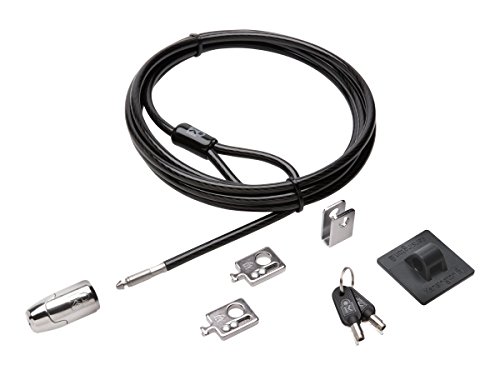
- Includes cable trap for peripheral accessories
- 8-foot carbon steel cable with two adapters
- Anchor plate supports devices without a slot
Best For: Multi-device desks and desktop workstations
Best Flexible Budget Option
Universal Laptop Cable Lock with Anchor Plate

- Fits standard slots and devices without slots
- 6.5-foot cut-resistant twisted-steel cable
- Compatible with laptops, tablets, phones, and monitors
Best For: Users securing several types of electronics
Best Slot-Only Choice
Kensington T-Bar Laptop Cable Lock
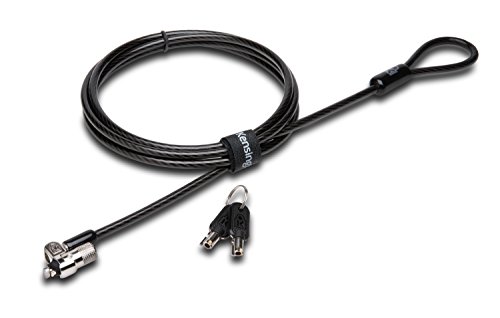
- 6-foot carbon steel cable for fixed-object anchoring
- Pivoting 10 mm head suits thin devices
- Hidden Pin Technology and hinged locking design
Best For: Slot-equipped laptops on compact desks
Flexible Plate Security

- Adhesive plate supports devices without lock holes
- Resettable four-digit combination
- 6.23-foot, 5 mm braided cable
Best For: Devices without built-in security slots
Standard Slot Choice
Kensington T-Bar Combination Lock

- Six-foot carbon steel cable
- Resettable four-digit combination
- Push-button attachment for standard Kensington slots
Best For: Laptops and devices with standard Kensington slots
Multi-Device Coverage

- Two adhesive anchor sets for multiple devices
- Six-foot galvanized steel cable
- Includes two keys and stainless steel lock
Best For: Securing multiple flat-surface devices
Best Compact Standard-Slot Pick
Slim Resettable Combination Lock

- Slim head lets thin laptops lie flat
- Resettable four-wheel code
- 5-foot carbon steel cable
Best For: Thin standard-slot laptops on compact desks
Best Universal Fit
3-in-1 Combination Laptop Lock

- Fits standard, nano, and wedge slots
- 6-foot carbon steel cable
- Resettable four-number dial
Best For: Multi-device homes and shared workspaces
Best Long-Cable Slim Pick

- Flat-lying slim lock head
- 6-foot carbon steel cable
- One-handed push-button engagement
Best For: Compatible thin laptops needing extra cable reach
Best Slot-Free Pick – Adhesive-Anchor Laptop Cable Lock
For laptop locking cables for small desks, this 6.7-foot option is a flexible choice when your device may not have a built-in security slot. It supports standard Kensington-style slots while also including an adhesive anchor plate for compatible MacBooks, tablets, phones, and slim laptops.
Best For: Shared workspaces, cafes, libraries, and devices without a security slot.
Pros:
- Works with standard 3 × 7 mm security slots or the included adhesive anchor.
- 6.7-foot cut-resistant braided steel cable provides useful reach around a desk or fixed object.
- Includes three traceable-code keys, with replacement-key support if one is lost.
- Adhesive anchor is rated for over 100 pounds after a 24–48 hour curing period.
Cons:
- Adhesive installation requires waiting for the anchor to fully cure.
- Devices with adhesive anchors need a suitable hard surface and careful installation.
This is a practical small-desk pick when compatibility matters more than a compact cable. The dual installation approach makes it more versatile than slot-only locks, though users should plan around the adhesive curing time.
Best Complete Desk Kit – Kensington Desktop & Peripherals Kit
Among laptop locking cables for small desks, this Kensington kit stands out when you also want to secure accessories. Its 8-foot carbon steel cable, cable trap, two adapters, and no-slot anchor plate give a compact workstation a broader security setup.
Best For: Desktop PCs, peripherals, and workstations that need more than a basic laptop cable.
Pros:
- Includes a cable trap for securing peripheral accessories.
- Two adapters and an anchor plate support devices with or without a Kensington Security Slot.
- 8-foot carbon steel cable can anchor to a desk, table, or other fixed structure.
- Hidden Pin Technology is designed to resist picking, and the kit includes a limited lifetime worldwide warranty.
Cons:
- The kit is more equipment than needed for someone securing only one laptop.
- Its 8-foot cable may be more length than a very small desk requires.
This is the most workstation-oriented option in the group. Choose it when a small desk holds a desktop, monitor, or accessories alongside a laptop; otherwise, a simpler single-device lock may be easier to manage.
Best Flexible Budget Option – Universal Laptop Cable Lock with Anchor Plate
This universal cable lock is a useful option for laptop locking cables for small desks when you need coverage across laptops, tablets, phones, monitors, and projectors. It uses a standard lock for compatible laptops and an adhesive anchor plate for devices without a security slot.
Best For: Mixed-device users who want one cable lock for laptops, tablets, and other electronics.
Pros:
- Works with standard laptop lock slots or the included adhesive anchor plate.
- 6.5-foot cable offers room to loop around a fixed object near a desk.
- Rotating stainless-steel lock head is designed to turn 360 degrees.
- Supports a wide range of devices, including MacBook, iPad, Surface, Kindle, Samsung, and Android devices.
Cons:
- Some models require use of an I3C adhesive security plate.
- Users who prefer not to attach an adhesive plate should confirm device compatibility first.
Its broad device compatibility makes this a convenient general-purpose choice. Check your device’s slot type or adhesive-plate requirements before buying, especially if you plan to secure a tablet or phone.
Best Slot-Only Choice – Kensington T-Bar Laptop Cable Lock
For small desks with a laptop that already has a Kensington security slot, this 6-foot Kensington T-Bar lock offers a straightforward, compact setup. Its pivoting lock head is designed for thin devices, while the carbon steel cable anchors to a desk, table, or other fixed structure.
Best For: Laptops and peripherals with a compatible Kensington security slot.
Pros:
- Pivoting 10 mm lock head is designed for thin laptops and devices.
- 6-foot carbon steel cable has a plastic sheath and supports desk or table anchoring.
- Hidden Pin Technology is designed to resist picking.
- Hinged design helps reduce awkward locking angles.
Cons:
- Does not work with newer Dell devices using the wedge lock slot.
- Some HP devices use the NanoSaver slot instead, so slot compatibility must be checked.
- It is intended for devices with a Kensington security slot and does not include an adhesive anchor option.
This is a clean, dependable fit for a compatible slot-equipped laptop on a small desk. Confirm the device’s lock-slot format before purchase, since Dell wedge and certain HP NanoSaver models require different Kensington locks.
Flexible Plate Security – Adhesive Laptop Cable Lock
For laptop locking cables for small desks, this kit is useful when a device lacks a built-in security slot. Its adhesive lock plate supports compatible laptops, tablets, and other devices, while the 6.23-foot cable provides room to position a device on a compact workspace.
Best For: Devices without security lock holes and users who prefer a resettable combination instead of keys.
Pros:
- Includes an adhesive lock plate for devices without built-in slots.
- Works with devices that do have compatible security lock holes.
- Uses a customizable four-digit combination with more than 10,000 possible codes.
- Has a 5 mm braided cable, rotating push-button lock head, and 6.23-foot length.
Cons:
- Adhesive installation requires a suitable hard surface and proper placement.
- Combination locks may be less convenient than keyed locks for some users.
This is a versatile choice for small desks where built-in laptop slots are not guaranteed. Check the device surface and allow the adhesive plate to bond properly before relying on it.
Standard Slot Choice – Kensington T-Bar Combination Lock
For laptop locking cables for small desks, the Kensington T-Bar is a straightforward option when your laptop or monitor has a standard Kensington security slot. Its six-foot carbon steel cable anchors to a desk or other fixed structure without taking much room on the work surface.
Best For: Laptops and peripherals with a standard Kensington security slot, including many HP, Lenovo, Acer, and Asus models.
Pros:
- Resettable four-wheel combination offers 10,000 possible combinations.
- Push-button design supports one-handed attachment.
- Six-foot cut-resistant carbon steel cable anchors to desks, tables, or fixed structures.
- Can secure laptops, monitors, docking stations, projectors, and other compatible devices.
Cons:
- Not compatible with Dell or Alienware models that use a different lock slot; newer Dell devices may require another Kensington part.
- Requires a compatible standard Kensington security slot.
This established combination lock fits a compact desk setup well when slot compatibility is confirmed first. Pay particular attention to Dell and Alienware models before ordering.
Multi-Device Coverage – AboveTEK Adhesive Cable Lock
For laptop locking cables for small desks, the AboveTEK kit is designed for laptops, tablets, smartphones, monitors, and other flat-surface devices. It includes adhesive anchors and a six-foot steel cable, making it practical when several gadgets need flexible protection around a compact workstation.
Best For: Users securing multiple mobile devices or devices without a standard security slot in offices, cafes, libraries, retail spaces, and similar settings.
Pros:
- Includes two sets of adhesive stickers and anchor plates for multiple devices.
- Industrial-grade 3M adhesive is designed for most flat surfaces.
- Six-foot cut-resistant galvanized steel cable allows device movement while secured.
- Includes two keys and a stainless steel lock.
Cons:
- Adhesive anchors are intended for flat surfaces and require careful installation.
- Key operation means there is no combination option if keys are misplaced.
This kit stands out for shared or rotating workstations where more than one device needs an adhesive anchor. Confirm that each device has a suitable flat bonding surface before installation.
Best Compact Standard-Slot Pick – Slim Resettable Combination Lock
Kensington Combination Laptop Lock for Standard Security Slot, Resettable (K60213WW), Black
Check Price On AmazonFor shoppers comparing laptop locking cables for small desks, this Kensington model is a space-conscious choice for thin laptops with a standard security slot. Its slim lock head helps the laptop lie flat, while the 5-foot cable provides practical reach for anchoring to a desk or table.
Best For: Thin laptops used at home, in offices, or in public spaces where a compact, combination-based lock is convenient.
Pros:
- Slim lock head supports a flat, stable laptop position.
- Resettable four-wheel code offers 10,000 combinations.
- Pivoting head and rotating cable help preserve access to nearby ports.
- One-handed slider attachment simplifies installation.
Cons:
- Designed for standard security slots, so slot compatibility should be checked.
- The 5-foot cable is shorter than some six-foot alternatives.
This is a practical small-desk option when a low-profile design and easy combination resetting matter more than maximum cable length.
Best Universal Fit – 3-in-1 Combination Laptop Lock
When evaluating laptop locking cables for small desks across multiple devices, Kensington’s universal 3-in-1 design offers flexibility. It includes interchangeable lock tips for standard, nano, and wedge-shaped security slots, plus a 6-foot carbon steel cable for anchoring to a desk or other fixed point.
Best For: Shared workspaces, households, or offices with laptops that use different security-slot shapes.
Pros:
- Works with standard, nano, or wedge-shaped laptop slots.
- Six-foot carbon steel cable provides useful anchoring reach.
- Resettable four-number dial offers 10,000 combinations.
- Tethered spare tips help keep unused adapters available.
Cons:
- Interchangeable tips add more parts than a single-slot lock.
- Compatibility depends on selecting the correct included lock tip.
This is the most adaptable choice in the group, particularly if the same cable may need to secure different laptops over time.
Best Long-Cable Slim Pick – T-Bar Standard-Slot Lock
For small desks that still need extra anchoring flexibility, this Kensington slim T-Bar lock combines a flat-lying lock head with a 6-foot cable. It is made for thin and light laptops with a standard Kensington slot and uses a resettable four-wheel code.
Best For: Thin and light HP, Lenovo, Acer, Asus, and other compatible standard-slot laptops in offices, cafés, or public spaces.
Pros:
- Slim design keeps ultra-thin and 2-in-1 laptops flat.
- Six-foot carbon steel cable reaches desks, tables, or fixed structures.
- Push-button, one-handed engagement makes attachment convenient.
- Resettable code provides 10,000 possible combinations.
Cons:
- Not compatible with Dell or Alienware models according to the supplied notes.
- Designed for standard slots, not Kensington NanoSaver slots.
This model suits buyers who want the low-profile feel of a slim lock head but prefer the reach of a 6-foot cable for anchoring around a compact workspace.
How We Picked the Best Laptop Locking Cables for Small Desks
We focused on the practical constraints of compact work areas: limited room for routing a cable, shared desks, portable devices, and compatibility with newer laptops that may not include a built-in security slot. The selection includes keyed and resettable combination locks, standard T-Bar models, universal systems, and adhesive-anchor solutions.
We also considered cable length, locking method, installation requirements, included hardware, and the types of devices each design can help secure. A strong match should deter casual grab-and-go theft while remaining straightforward to attach, use, and store.
Quick Comparison
- Best for built-in security slots: Standard T-Bar or compatible Kensington locks.
- Best for mixed devices: Universal 3-in-1 and desktop peripheral kits.
- Best for slot-free laptops: Adhesive-anchor systems that attach to a suitable flat surface.
- Best for shared environments: Combination locks, since they avoid misplaced keys.
- Best for controlled offices: Keyed locks, especially when several devices need managed access.
Key Buying Factors for Laptop Locking Cables for Small Desks
Check the Attachment Method First
Many business laptops use a Kensington T-Bar slot, but not every laptop, tablet, or monitor does. Confirm the device has a compatible security slot before choosing a standard lock. If it does not, select an adhesive-anchor kit and verify that the manufacturer’s mounting surface requirements fit your device.
Measure the Cable Path
A six-foot cable is common and usually provides enough reach to wrap around a desk leg or fixed frame. On a small desk, excess cable can become clutter, so plan the route before buying. The anchor point should be difficult to move and positioned where the cable will not interfere with ports, hinges, or walkways.
Choose Keys or a Combination
Keyed locks are useful when an administrator needs control over access, while resettable combinations are convenient for hot desks and shared workspaces. Combination models still require secure code management; avoid using an obvious number or leaving the code next to the device.
Consider the Full Device Setup
Some kits protect only one laptop, while desktop and peripheral kits may accommodate monitors, docks, keyboards, or other equipment. If your desk includes several valuable items, a broader kit may reduce the number of separate cables and anchors needed.
Who Should Buy Which Laptop Locking Cables for Small Desks?
Choose a standard keyed Kensington-style lock if your laptop has a compatible slot and you want a familiar, straightforward security setup. Choose a resettable combination model for shared desks, classrooms, or offices where multiple users need access without exchanging keys.
Choose a universal or desktop peripheral kit when you need to secure more than one type of equipment. Choose an adhesive-anchor cable for a slot-free MacBook, tablet, or slim laptop, provided the anchor can be safely installed on a clean, suitable surface. For any option, remember that a cable lock is a theft deterrent—not a guarantee against determined removal—so pair it with sensible device tracking, strong account security, and an occupied or access-controlled workspace.