
Keeping a busy household organized is easier when schedules, chores, meals, and reminders are visible in one shared place. The best smart displays for families turn routine planning into an interactive hub that everyone can check and update.
We selected 10 touchscreen family calendars in several sizes and configurations, including wall-mounted and desk-friendly models, photo-capable displays, and no-subscription planners.
Best 10 Smart Displays for Families Picks for 2026
Best for Large Family Scheduling
Dragon Touch 15.6-Inch Smart Planner

- Large 15.6-inch Full HD touchscreen
- Calendar, chores, meals, lists, and photos
- Wall- or desk-mountable design
Best For: Families needing a highly visible shared planning hub
Best No-Subscription Option
Westsee 15.6-Inch Family Planner

- Core functions available without subscription
- 32GB storage for photos and videos
- Includes wall mount and desk stand
Best For: Families wanting broad planning features without ongoing core-function fees
Best for Family Safety Features

- Shared calendars, chores, lists, and photos
- Optional location and driving safety tools
- Optional hands-free family AI assistant
Best For: Families wanting scheduling with added safety features
Best Compact Family Command Center

- Compact 10.1-inch IPS touchscreen
- Chores, rewards, meals, lists, and calendars
- 32GB built-in photo and video storage
Best For: Families with limited space who still want shared planning tools
Best No-Subscription Family Hub
15.6-Inch Digital Calendar & Chore Chart

- Syncs major calendar services
- Includes chores and meal planning
- Desk or wall mount with photo mode
Best For: Families seeking an all-in-one organizer without a monthly subscription
Best for Storage and Customization
AiMOR 15.6-Inch FHD Family Calendar

- Includes 64GB media storage
- Offers 1080P auto-rotating display
- Backed by a one-year replacement warranty
Best For: Families wanting extensive photo storage and customizable planning tools
Best Flexible Family Planner
15.6-Inch Touchscreen Calendar and Photo Frame

- Works on a desk or wall
- Combines chores, meals, and schedules
- Includes subscription-free photo mode
Best For: Families wanting a movable shared planner with everyday household tools
Best Large Family Planner
15.6-Inch Smart Calendar and Chore Chart

- 15.6-inch HD touchscreen for shared schedules
- Syncs with Google, Outlook, iCloud, Cozi, and Yahoo
- Adds chores, rewards, meals, weather, and photo albums
Best For: Families wanting a large, feature-rich household command center
Best Compact Family Organizer
10.1-Inch Smart Display Calendar

- Compact desk- or wall-mountable 10.1-inch display
- Syncs Apple and Google calendars
- No subscription for core planning features
Best For: Smaller spaces and families wanting simple shared organization
Best Oversize Family Display
21.5-Inch Dragon Touch Planner
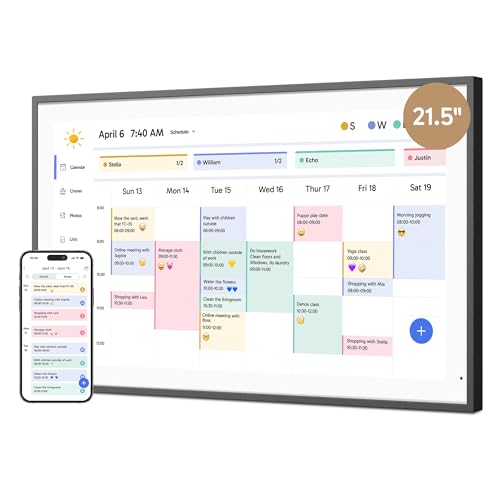
- Large 21.5-inch 1080p touchscreen
- Unifies iOS and Google calendars
- Includes chores, dinner plans, lists, photos, and app control
Best For: Large households needing a highly visible shared schedule
Best for Large Family Scheduling – Dragon Touch 15.6-Inch Smart Planner
For families comparing smart displays for families, the Dragon Touch offers a large 15.6-inch Full HD touchscreen designed to make schedules, chores, meals, and photos easy to see in shared spaces.
Best For: Families that want a large, wall- or desk-mountable planning hub with calendar syncing and household organization tools.
Pros:
- Combines color-coded calendars, chores, dinner planning, grocery lists, and photos.
- Syncs multiple calendars, including iOS and Google calendars, through the mobile app.
- Can be managed remotely and doubles as a digital picture frame when idle.
Cons:
- Its 15.6-inch footprint may require substantial wall or counter space.
- Some advanced tools, including Magic Import, are paid functions.
The Dragon Touch is a practical choice when visibility is the priority. Its large display and broad mix of family-planning features make it well suited to kitchens, entryways, or other central household locations.
Best No-Subscription Option – Westsee 15.6-Inch Family Planner
The Westsee is one of the more flexible smart displays for families, combining a 15.6-inch touchscreen with core scheduling, chore, meal-planning, photo, and grocery-list features that are available without a subscription.
Best For: Families seeking a large display with free core functions, generous photo storage, and both wall-mount and desk-stand placement.
Pros:
- Core schedules, tasks, rewards, meal plans, photos, and grocery lists are free.
- Syncs Google, iCloud, Outlook, and other calendars through the Zical app.
- Includes 32GB of storage, weather updates, sleep mode, and both mounting options.
Cons:
- Advanced tools such as the AI Assistant may require a future subscription.
- The plastic construction may feel less premium than some alternatives.
Westsee stands out for families trying to avoid recurring costs while still wanting a full-featured household command center. Its storage capacity and flexible placement also make it useful as a shared photo display.
Best for Family Safety Features – Greenlight Family Hub
Among smart displays for families, the Greenlight Family Hub adds safety-oriented tools to the usual calendar, chore, list, and photo functions. It works with Google, Apple, and Outlook calendars and can be updated through the companion app.
Best For: Families that want shared scheduling plus optional location, place-alert, driving-report, and hands-free assistant features.
Pros:
- Core calendars, chores, rewards, lists, and photos are included without a mandatory subscription.
- Supports color-coded schedules, unlimited photos, weather, and Google Photos or iCloud integration.
- Optional Family Hub+ adds live location maps, place alerts, teen driving reports, and voice controls.
Cons:
- Family Hub+ features require a paid tier after the 30-day trial.
- The safety and AI features may be more than some families need from a calendar display.
The Greenlight Family Hub is a strong fit for households that value connected safety features alongside organization. Buyers should distinguish between the included core experience and the optional Family Hub+ tools before purchasing.
Best Compact Family Command Center – 10.1-Inch Smart Calendar
For smaller spaces, this 10.1-inch model provides the core features many shoppers want in smart displays for families, including shared calendars, chore rewards, meal planning, reminders, and photo display.
Best For: Families needing a compact touchscreen planner for a kitchen counter, living room, or other space where a larger display would be inconvenient.
Pros:
- Combines calendar syncing, chores, rewards, meal planning, to-do lists, and photos.
- Supports Google and Outlook sync, with URL-based options for iCloud, Cozi, and Yahoo.
- Includes a 1280-by-800 IPS touchscreen and 32GB of built-in photo and video storage.
Cons:
- The 10.1-inch screen is less visible across a room than 15.6-inch alternatives.
- Initial setup recommends updating the calendar system and AiMOR app for synchronization.
This compact smart calendar delivers a broad feature set without taking over a wall or counter. It is especially appealing when families want a shared planning screen but have limited display space.
Best No-Subscription Family Hub – 15.6-Inch Digital Calendar & Chore Chart
If you want smart displays for families that combine scheduling with household organization, this 15.6-inch touchscreen is a practical option. It supports shared calendars, chore assignments, meal planning, custom lists, weather information, and photo slideshows without a monthly subscription.
Best For: Families wanting a straightforward wall-or-desk organizer with chores, meal plans, calendar syncing, and photo display.
Pros:
- Syncs with Google, iCloud, Outlook, Cozi, and Yahoo calendars.
- Includes color-coded tasks, chore tracking, star rewards, and meal planning.
- Works as both a 15.6-inch digital calendar and photo frame.
- Supports desktop or wall placement and scheduled sleep/wake mode.
Cons:
- The supplied notes do not specify storage capacity or warranty coverage.
- Families must use Wi-Fi and the companion app for syncing and photo uploads.
This model is a well-rounded choice for households that want shared visibility without subscription costs. Its mix of calendar tools, chore features, and photo display makes it especially useful in a kitchen, living room, or home office.
Best for Storage and Customization – AiMOR 15.6-Inch FHD Family Calendar
Among smart displays for families, this AiMOR model stands out for its 1080P touchscreen, 64GB storage, and extensive planning features. It combines shared schedules with interactive chores, meal planning, grocery lists, reminders, and digital photo or video display.
Best For: Families that want generous media storage, customizable widgets, and a dedicated app for calendar and photo sharing.
Pros:
- 64GB of storage holds thousands of HD media files.
- Supports calendar syncing, color-coded schedules, task lists, meal plans, and grocery lists.
- 1080P display includes auto-rotation, auto-dimming, and sleep mode.
- Includes a desktop stand, wall-mount kit, and one-year replacement warranty.
Cons:
- Free sharing through the AiMOR app is limited to nine photos or one short video at a time.
- The feature-rich interface may be more than needed for households seeking a basic calendar.
Choose this version if photo storage and customization matter as much as scheduling. Its combination of large internal storage, adjustable display behavior, and warranty support gives it a stronger feature set for busy, media-sharing households.
Best Flexible Family Planner – 15.6-Inch Touchscreen Calendar and Photo Frame
This family planner is a useful pick for shoppers comparing smart displays for families, especially when flexible placement is important. Its touchscreen combines shared schedules, chore charts, meal planning, weather forecasts, custom lists, and a photo-frame mode in a subscription-free design.
Best For: Households that want a simple shared planning display that can move between a desk and wall installation.
Pros:
- Syncs with Google, iCloud, Outlook, Cozi, and Yahoo calendars.
- Supports color-coded assignments, star-based chore rewards, and meal plans.
- Switches between family calendar and cloud photo-frame modes.
- Offers weather forecasts, custom lists, and scheduled sleep/wake operation.
Cons:
- The supplied notes do not list internal storage capacity or warranty details.
- Calendar synchronization and photo uploading require Wi-Fi and the dedicated app.
This model is a practical middle-ground for families that want organization and home decor in one screen. Its no-subscription positioning and dual mounting options make it easy to place where the household naturally gathers.
Best Large Family Planner – 15.6-Inch Smart Calendar and Chore Chart
For households that want a visible command center, this 15.6-inch display is one of the more versatile smart displays for families. It combines shared calendars, chore tracking, meal planning, custom lists, weather, and photo display in a wall- or desk-mountable format.
Best For: Families needing a larger shared schedule with colorful tasks, rewards, and meal plans.
Pros:
- Syncs with Google, Outlook, iCloud, Cozi, and Yahoo calendars.
- Supports color-coded events, interactive chores, stars, and custom rewards.
- Includes meal plans, custom lists, weather forecasts, and photo albums.
- Can be mounted on a wall or placed on a desk.
Cons:
- The larger 15.6-inch size may require more wall or desk space.
- Requires Wi-Fi and a power connection for setup and use.
This is a strong choice when visibility and broad calendar compatibility matter. Its combination of scheduling and household-management tools makes it especially useful in a kitchen, hallway, or shared living area.
Best Compact Family Organizer – 10.1-Inch Smart Display Calendar
This 10.1-inch model offers the core features many households need in a smaller footprint. As smart displays for families go, it keeps schedules, meal titles, lists, chores, rewards, and photos together while fitting comfortably on a desk or wall.
Best For: Families seeking a compact organizer with no-subscription core features.
Pros:
- Syncs with Apple and Google calendars using color-coded schedules.
- Displays meal titles, grocery lists, shopping lists, and to-do items.
- Includes photo-frame and customizable sleep modes.
- Core routines, schedules, tasks, rewards, and meal-planning features require no subscription.
Cons:
- The display shows meal titles rather than detailed recipes.
- The 10.1-inch screen provides less viewing area than larger alternatives.
Choose this version if you want a straightforward family board without dedicating much space to it. Its no-subscription core feature set also makes it a practical option for households focused on recurring calendar and list management.
Best Oversize Family Display – 21.5-Inch Dragon Touch Planner
With a 21.5-inch 1080p touchscreen, this Dragon Touch model is designed for at-a-glance household coordination. It brings multiple calendars, color-coded tasks, chores, dinner plans, grocery lists, and family photos into one large wall- or desk-mountable display.
Best For: Larger households that prioritize maximum screen visibility and app-based management.
Pros:
- Large 21.5-inch Full HD touchscreen is easy to view across a room.
- Combines iOS and Google calendars in one interface after Wi-Fi setup.
- Supports chore charts, dinner plans, grocery lists, and photo-frame mode.
- The eCalendar app allows calendar management while away from the display.
Cons:
- At 4.68 kg, it is substantially heavier than the smaller listed displays.
- Some advanced functions, including Magic Import, are paid features.
- Its large size may be less suitable for limited desks or walls.
The Dragon Touch stands out among smart displays for families that need a highly visible central screen. Its large format is useful for shared spaces, while the app adds convenience for managing schedules remotely.
How We Picked the Best Smart Displays for Families
We compared these family planners by looking at screen size, display clarity, touchscreen usability, mounting flexibility, calendar and chore-management features, storage, connectivity, and subscription requirements. We also considered how practical each model is for shared household use: a family display should be easy for children and adults to read, update, and access from a central location.
Because product specifications can vary by configuration, check the current listing for included mounts, supported apps, storage capacity, Wi-Fi requirements, and any optional paid features before ordering.
Quick Comparison
| Best for | Look for |
|---|---|
| Large shared wall hub | 15.6-inch or 21.5-inch screen, clear calendar layout, wall mounting |
| Small kitchens and desks | 10.1-inch display, compact footprint, desk stand or flexible mounting |
| Chore and task tracking | Interactive touchscreen, recurring tasks, multiple family profiles |
| Lower ongoing costs | No-subscription operation and clearly stated included features |
| Photos and household information | Internal storage, photo support, and a bright HD display |
Key Buying Factors for Smart Displays for Families
Screen Size and Placement
A 15.6-inch display is a versatile choice for a kitchen, hallway, or family command center. A 21.5-inch model is easier to read from across a room, while a 10.1-inch option works better on a countertop, desk, or in a smaller home. Measure the intended location and confirm whether the display can be mounted securely.
Calendar, Chore, and List Features
Decide whether you need only a shared calendar or a broader household organizer with chore charts, meal planning, to-do lists, reminders, and recurring events. Multiple profiles and color coding can make responsibilities easier for children to understand.
Subscriptions and Connectivity
Some products advertise no-subscription access, which may reduce long-term cost. Others may depend on companion apps, cloud services, or optional features. Confirm Wi-Fi compatibility, account requirements, and whether core planning tools remain available without a paid plan.
Ease of Use and Visibility
Look for responsive touch controls, readable text, strong viewing angles, and a simple interface. A display that requires frequent menu navigation or complicated setup may be frustrating in a busy household.
Who Should Buy Which Smart Displays for Families?
Choose a large 15.6-inch planner if you want a balanced shared display for schedules, chores, and meal planning. The 21.5-inch option is better for large rooms or households that prioritize visibility from a distance. Pick a 10.1-inch model for a compact desk or kitchen setup, especially when space is limited.
Families seeking predictable ownership costs should prioritize no-subscription models and verify exactly which features are included. If children will actively update tasks, focus on touchscreen responsiveness, clear profiles, and straightforward chore controls. For households that also want a digital photo frame or extra local storage, compare storage capacity and photo features alongside calendar functions.