
The best smart displays for home use do more than show the time. They can organize family schedules, manage chores, control compatible devices, stream entertainment, and provide useful information at a glance.
We selected 10 options ranging from large touchscreen calendars and kitchen hubs to compact bedside displays, focusing on screen size, platform compatibility, subscription requirements, audio, and everyday usability.
Best 10 Smart Displays for Home Use Picks for 2026
Best Family Command Center

- 15.6-inch Full HD display with family widgets
- Built-in Fire TV and smart-home dashboard
- Auto-framing video calls with privacy controls
Best For: Families wanting organization, entertainment, and smart-home control in one large display
Best Dedicated Family Calendar

- 15.4-inch touchscreen for shared schedules
- Syncs with major calendar services
- Adds chores, tasks, lists, and meal planning
Best For: Families coordinating schedules and daily routines from one dedicated display
Best Smart Display for Entertainment

- 11-inch Full HD screen with spatial audio
- Built-in smart-home hub and camera feeds
- Auto-framing calls plus Alexa assistance
Best For: Households seeking a balanced display for streaming, calls, and smart-home control
Best No-Subscription Family Hub

- Large 21.5-inch Full HD touchscreen
- Google Play supports flexible app choices
- Wall mount and desk stand included
Best For: Families wanting a customizable planning hub without a required proprietary calendar subscription
Best Smart Home Control Panel

- Customizable smart-home dashboard
- Works with many device protocols
- Supports cameras, routines, and security
Best For: Alexa-centered households needing centralized device control
Best Family Planning Display

- 10.1-inch 1080P touchscreen
- Syncs with major calendar services
- Includes chores, meals, lists, and rewards
Best For: Families coordinating schedules and daily responsibilities
Best Security Monitoring Display

- Shows up to four camera feeds
- Provides automatic security alerts
- Offers local event playback and summaries
Best For: eufy security users wanting a dedicated monitoring screen
Best with Extra Features

- Syncs Google, iCloud, and Outlook schedules
- Tracks chores, meals, lists, and reminders
- Works as a wall-mounted photo frame
Best For: Busy families organizing schedules and household tasks
Connected Home Hub

- Controls compatible smart-home devices
- Supports calls, cameras, and streaming
- Adds privacy controls with a camera shutter
Best For: Compact Alexa control and everyday media
Nightstand Assistant
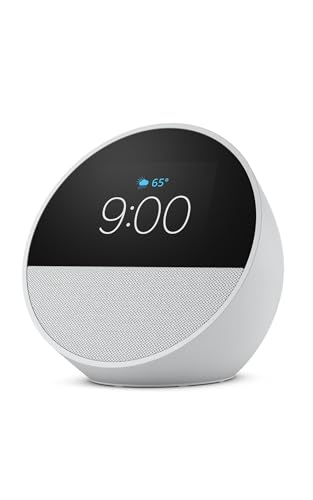
- Shows time, weather, reminders, and song titles
- Delivers clear audio with deep bass
- Can extend existing eero Wi-Fi coverage
Best For: Nightstands, offices, and kitchens
Best Family Command Center – Echo Show 15
The Echo Show 15 is a strong choice among smart displays for home use when you want one large screen for family organization, entertainment, and smart-home control. Its 15.6-inch Full HD display supports customizable widgets, built-in Fire TV, video calls, and photo slideshows.
Best For: Families wanting a large kitchen hub that combines schedules, entertainment, calls, and smart-home controls.
Pros:
- Large 15.6-inch Full HD screen with customizable family widgets
- Built-in Fire TV supports services including Prime Video, Netflix, YouTube, and Apple TV
- Centered auto-framing camera with 3.3x zoom and noise reduction
- Camera shutter and mic/camera-off controls support privacy
Cons:
- Its larger size may require more counter or wall space
- Some entertainment services may require subscriptions
Choose this model if your priority is an all-in-one family display rather than a simple calendar. It offers especially broad functionality for kitchens and shared living spaces.
Best Dedicated Family Calendar – Skylight Calendar
The Skylight Calendar is one of the more focused smart displays for home use, built around shared schedules, chores, tasks, and meal planning. Its 15.4-inch touchscreen syncs with several popular calendar platforms and can be wall-mounted or placed on a countertop.
Best For: Busy families who want a dedicated visual calendar and chore chart for shared household routines.
Pros:
- 15.4-inch HD touchscreen provides an at-a-glance family schedule
- Syncs with Google, iCloud, Outlook, Cozi, and Yahoo calendars
- Includes interactive chores, tasks, lists, and meal-planning features
- Supports wall or countertop placement with a wall mount included
Cons:
- Some features, including Magic Import, rewards, and Disney mode, require the optional Plus Plan
- It is focused on planning rather than general entertainment or broad app use
This is a practical pick when household coordination matters more than streaming or smart-home versatility. The dedicated interface should be easy for family members to check and update throughout the day.
Best Smart Display for Entertainment – Echo Show 11
The Echo Show 11 is a versatile option among smart displays for home use, pairing an 11-inch Full HD touchscreen with spatial audio, Alexa-based assistance, video calling, and smart-home controls. It offers more viewing area than the Echo Show 8 (2025 release) while remaining smaller than a large wall-oriented display.
Best For: Homes wanting a balanced smart display for streaming, recipes, calls, music, and everyday assistance.
Pros:
- Vibrant 11-inch Full HD screen with room-filling spatial audio
- Built-in smart-home hub controls compatible lights, thermostats, cameras, and more
- Centered auto-framing camera with 3.3x zoom and noise reduction
- Supports routines based on temperature, presence, or visual ID detection
Cons:
- Its 11-inch display offers less workspace than the 15-inch-class models
- Streaming services such as Netflix may require subscriptions
This model makes sense for rooms where entertainment and assistance are equally important. Its spatial audio and compact footprint give it an advantage over calendar-first displays for everyday media use.
Best No-Subscription Family Hub – Mazera 21.5 Smart Hub
The Mazera 21.5-inch Smart Hub is a flexible choice among smart displays for home use, especially if you want to choose your own calendar and productivity apps. Its Google Play access, large Full HD touchscreen, and wall-or-countertop setup support a customizable family dashboard without locking you into one calendar system.
Best For: Families wanting a large, app-flexible planning display without a required proprietary calendar subscription.
Pros:
- Large 21.5-inch anti-glare Full HD touchscreen with auto brightness
- Google Play access supports calendar, planner, photo, streaming, and smart-home apps
- Works with services including Google Calendar, Apple Calendar, Outlook, and Cozi
- Includes both wall-mount and desk-stand options
Cons:
- App and Google Gemini feature availability may vary by supported software
- The larger screen requires more space than smaller calendar displays
Mazera is the most adaptable option here for households that prefer assembling their own dashboard. Its large screen is useful for shared rooms, while the included mounting choices make placement more flexible.
Best Smart Home Control Panel – Echo Hub
The Amazon Echo Hub is one of the more focused smart displays for home use, acting as a centralized touchscreen for compatible lights, cameras, locks, alarms, routines, and media. Its customizable dashboard makes frequently used controls easier to reach.
Best For: Households that want a dedicated Alexa-compatible control panel for managing connected devices and security.
Pros:
- Customizable dashboard with resizable sections and device controls.
- Built-in smart home hub supports Wi-Fi, Bluetooth, Zigbee, Matter, Sidewalk, and Thread devices.
- Can display cameras, activate routines, manage security systems, and control media.
- Supports wall mounting and optional tabletop placement.
Cons:
- Some accessories, including stands and cable-management options, are sold separately.
- Ring camera summaries and footage search require Alexa+ and a compatible Ring subscription.
The Echo Hub is best understood as a practical command center rather than a general-purpose entertainment display. It is a strong fit for Alexa-centered homes that value quick, visual access to smart-home controls.
Best Family Planning Display – Airzeen Digital Wall Calendar
The Airzeen Digital Wall Calendar takes a family-planning approach to smart displays for home use. Its 10.1-inch 1080P touchscreen combines shared calendars, tasks, meal plans, lists, weather, rewards, and photo slideshows without requiring a monthly subscription for core features.
Best For: Busy families, parents, and households that need a shared visual schedule and chore-planning station.
Pros:
- Customizable dashboard with drag-and-drop widgets.
- Syncs with Google Calendar, iCloud, Outlook, and other popular calendar platforms.
- Includes chore tracking, rewards, meal planning, grocery lists, and reminders.
- Can be wall-mounted or placed on a desk, with photo slideshow support.
Cons:
- Its primary focus is family organization rather than smart-device control.
- The supplied details do not identify built-in camera, voice-assistant, or home-automation features.
Choose the Airzeen if your main goal is keeping schedules, chores, meals, and lists visible in one shared location. The no-subscription core feature set also makes it appealing for families seeking predictable ongoing costs.
Best Security Monitoring Display – eufy Smart Display E10
The eufy Smart Display E10 is a security-focused option among smart displays for home use. It provides an 8-inch touchscreen for live camera viewing, alerts, local event playback, and daily security summaries, with an interface designed for convenient use by different age groups.
Best For: Homes using compatible eufy security devices that want a dedicated monitoring screen.
Pros:
- Automatically shows live video and voice alerts for selected security events.
- Displays up to four simultaneous live camera feeds.
- Stores historical events locally for quick playback without buffering.
- Supports facial and package recognition through HomeBase 3, plus daily security summaries.
Cons:
- Its most advanced features depend on compatible eufy security equipment and HomeBase 3.
- The supplied notes focus on security monitoring rather than general smart-home or entertainment controls.
The E10 makes sense when camera visibility and fast event awareness matter more than broad smart-display functionality. Its multi-feed view and local event access can make it a useful dedicated security station for a compatible eufy setup.
Best with Extra Features – Wall-Mount Digital Calendar
For households comparing smart displays for home use, this 10.1-inch wall-mounted digital calendar focuses on shared scheduling and family organization. It syncs with Google, iCloud, and Outlook, while also combining reminders, chores, meal planning, grocery lists, weather, and photo slideshows in one visible hub.
Best For: Busy families that want a shared wall calendar and household task center.
Pros:
- Synchronizes schedules in real time with Google, iCloud, and Outlook.
- Includes chore tracking with points and rewards to encourage responsibility.
- Combines meal planning, grocery lists, reminders, weather, and photo display.
- Wall-mountable design suits high-traffic areas of the home.
Cons:
- Its primary focus is family planning rather than entertainment or video calling.
- Requires installation and access to the companion application for some features.
This is a practical choice if visibility and shared organization matter more than a general-purpose voice assistant. Its photo-frame mode and auto-sleep feature add convenience without distracting from the calendar’s central role.
Connected Home Hub – Echo Show 5
The Echo Show 5 is a compact option among smart displays for home use, with a 5.5-inch screen, Alexa controls, improved bass, and a built-in camera. It can show weather and news, stream supported content, make video calls, display photos, and control compatible lights, thermostats, cameras, and doorbells.
Best For: Bedrooms, kitchens, and small spaces needing Alexa control, calls, and media playback.
Pros:
- Supports video calls, announcements, compatible camera views, and doorbell monitoring.
- Streams music, podcasts, and shows from supported services including Amazon Music, Spotify, and Prime Video.
- Controls compatible smart-home devices, including lights and thermostats.
- Includes a camera shutter and microphone/camera-off controls for privacy.
Cons:
- The 5.5-inch display is relatively small for extended viewing.
- Some features depend on compatible services or smart-home devices.
Choose this model when you want a versatile Alexa-enabled display rather than a dedicated family planner. Its compact footprint, camera features, and privacy controls make it especially useful for connected rooms where quick access matters.
Nightstand Assistant – Echo Spot Smart Alarm Clock
The Echo Spot is a focused choice for smart displays for home use in bedrooms, offices, and kitchens. Its customizable screen shows the time, weather, reminders, and song titles, while Alexa, routines, smart-home controls, and built-in eero Wi-Fi extension add utility beyond a standard alarm clock.
Best For: Nightstands and workspaces where alarms, quick information, music, and smart-home controls are priorities.
Pros:
- Customizable clock faces and colors show time, weather, reminders, and song titles.
- Provides rich sound with clear vocals and deep bass for music, podcasts, and audiobooks.
- Supports gradual wake routines, motion-based routines, and compatible device control.
- Built-in eero functionality can add up to 1,000 square feet of Wi-Fi coverage to an existing eero network.
Cons:
- Its compact display is better suited to quick glances than large-screen viewing.
- The Wi-Fi extension feature requires an existing eero network.
The Echo Spot makes the most sense when your priority is a polished smart alarm clock with useful Alexa features. It offers more visual information and control than a conventional clock while retaining a small footprint.
How We Picked the Best Smart Displays for Home Use
We compared these displays by looking at the features that matter most in daily household use: screen size, calendar and planning tools, smart-home compatibility, voice-assistant support, audio and video capabilities, mounting or placement flexibility, and setup requirements. We also noted whether a product requires a subscription for its core calendar or planning functions.
The lineup includes multifunctional displays such as the Echo Show range, dedicated family-planning screens, and focused control panels. That mix makes it easier to choose based on how your household actually uses a display rather than simply choosing the largest screen.
Quick Comparison
| Best For | Recommended Type | What to Prioritize |
|---|---|---|
| Family schedules and chores | Large digital calendar | Screen size, shared editing, no recurring fee |
| Kitchen organization and entertainment | Large smart display | Video support, voice control, audio quality |
| Smart-home control | Dedicated hub or Echo display | Device compatibility and customizable controls |
| Bedroom or desk use | Compact display or smart clock | Footprint, alarms, brightness, and sound |
| Security monitoring | Security-focused control panel | Camera integration, alerts, and simple navigation |
Key Buying Factors for Smart Displays for Home Use
Screen Size and Placement
A 15-inch or larger screen is easier to read from across a kitchen or hallway and works well for shared calendars. Smaller models take up less room on a nightstand, desk, or counter. Check whether the display is designed for wall mounting, tabletop use, or both.
Calendar Features and Subscription Costs
Dedicated family planners are often better for chores, color-coded schedules, and household coordination. Confirm which features work without a subscription, especially if you want a calendar that remains useful without ongoing fees.
Platform Compatibility
Alexa-based models are a practical choice for households already using Echo devices and compatible smart-home products. Displays with Google Play or broader app support may offer more flexibility, while security hubs can be preferable when camera and sensor control is the priority.
Entertainment, Audio, and Privacy
If the display will stream shows, recipes, or music, look for a suitable resolution, useful viewing angle, and strong speakers. For bedrooms or private spaces, review camera controls, microphone-mute options, and privacy settings before buying.
Who Should Buy Which Smart Displays for Home Use?
Choose a large dedicated calendar if your main goal is coordinating family appointments, chores, and routines. Pick a larger Echo Show when you want that organization combined with streaming, voice assistance, and general kitchen utility. A mid-size display is a balanced option for everyday information and smart-home control without taking over the room.
For focused device management, an Echo Hub or security-oriented panel is the better fit. Compact Echo Show models suit desks, counters, and bedside tables, while the Echo Spot is best for buyers who primarily want an attractive smart alarm clock with voice assistance. Before purchasing, confirm the supported calendar services, connected-device ecosystem, mounting needs, and any recurring charges.