
The best smart displays for seniors make everyday technology easier to see, hear, and use. Depending on the model, they can support video calls, shared calendars, medication or appointment reminders, family photos, weather updates, and household organization.
We selected options ranging from compact voice assistants to large wall-mounted command centers, focusing on screen visibility, setup, communication features, scheduling tools, and subscription requirements.
Best 10 Smart Displays for Seniors Picks for 2026
Best Compact Alexa Display
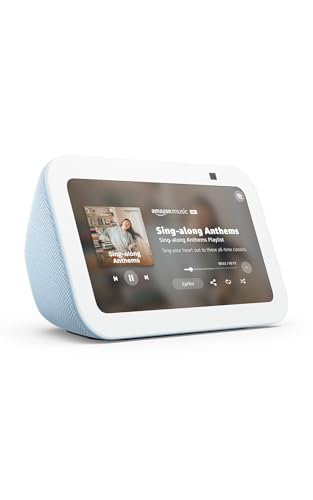
- Compact 5.5-inch screen
- 2 MP video calling camera
- Privacy shutter and controls
Best For: Small spaces and everyday Alexa assistance
Best Family Planning Display
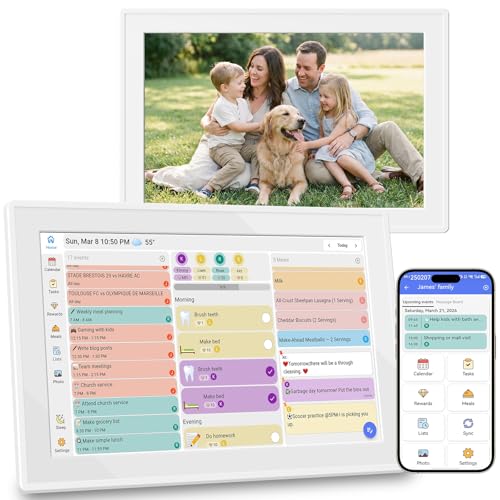
- Syncs three major calendar platforms
- Includes reminders and meal planning
- No subscription listed for core features
Best For: Shared schedules, appointments, and household organization
Best Large Family Hub

- 15.6-inch Full HD display
- Widgets for calendars and to-dos
- Built-in Fire TV and video calling
Best For: Large, shared kitchen or wall-mounted home hubs
Best Reminder Clock for Seniors

- Large fonts on a bright LCD
- Weather and appointment reminders
- Remote control and media playback
Best For: Simple visual reminders, weather, and personal photos
Family Planning Hub

- Syncs Google, iCloud, Outlook, Yahoo, and Cozi calendars
- Includes tasks, meal planning, recipes, and photo sharing
- Wall- or desk-mountable with no monthly subscription fees
Best For: Families wanting shared schedules and household planning
Senior Routine Assistant
Wi-Fi Clock and Reminder Display

- Large 10.1-inch display with elderly-focused mode
- Includes multiple alarms and three medicine reminders
- Shows weather, temperature, humidity, and calendar information
Best For: Seniors needing prominent daily reminders and time displays
Connected Family Frame
ViewClix Video-Calling Display

- 15.6-inch 1080p frame with hands-free video calling
- Remote photo, video, caption, reminder, and weather sharing
- Private sharing list with encrypted, unrecorded calls
Best For: Seniors who want simple family video calls and photo updates
Best Overall
Eyoyo 15.6" Smart Family Command Center

- Large 15.6-inch display with clear 1080p resolution
- Bold reminders and loud alerts for medications and appointments
- Auto-dimming plus wall or tabletop placement
Best For: Seniors and caregivers who want a large shared reminder and scheduling screen
Best for Video Calling
Meta Portal 10" Smart Video Display
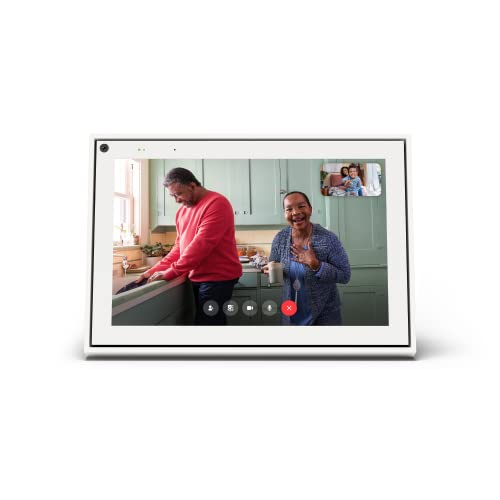
- Auto-framing camera supports natural movement
- Works with Messenger and WhatsApp calls
- Physical camera cover and camera/microphone controls
Best For: Seniors who primarily want straightforward video calls with loved ones
Best Compact Planner
10.1" Subscription-Free Smart Calendar

- Syncs with Google, iCloud, and Outlook calendars
- Includes reminders, meal planning, checklists, and photos
- Wall-mountable or tabletop design with no subscription
Best For: Seniors and families needing a compact shared scheduling hub
Best Compact Alexa Display – Echo Show 5
For shoppers comparing smart displays for seniors, the Echo Show 5 is a compact option with a 5.5-inch screen, voice control through Alexa, and features for communication, entertainment, and basic smart-home control. Its small footprint makes it practical for a bedside table, kitchen counter, or desk.
Best For: Seniors who want a small Alexa display for video calls, weather, music, photos, and compatible smart-home controls.
Pros:
- Compact 5.5-inch display shows weather, news, song titles, and more at a glance.
- Supports video calling through its 2 MP camera and compatible Alexa devices or apps.
- Includes a camera shutter and mic/camera-off button for added privacy control.
- Can display photos and control compatible lights, thermostats, cameras, and doorbells.
Cons:
- The smaller screen may be less suitable for viewing from across a room.
- Some entertainment and smart-home features depend on compatible services or devices.
The Echo Show 5 is a sensible pick when space and simplicity matter more than a large viewing area. It combines everyday information, family calling, and Alexa controls in a compact design.
Best Family Planning Display – 10.1-Inch Digital Calendar
This 10.1-inch digital calendar is designed around schedules, reminders, and household organization. For families seeking smart displays for seniors, its large touchscreen, calendar syncing, weather information, and photo-frame mode can provide a shared place to review plans and daily tasks without a subscription.
Best For: Seniors and families who want a wall-mounted calendar for appointments, reminders, chores, meal planning, and shared schedules.
Pros:
- Syncs with Google Calendar, iCloud, and Outlook in real time.
- Includes reminders, to-do lists, chore tracking, meal planning, and grocery-list features.
- Offers a 10.1-inch touchscreen and photo slideshow mode.
- Core organizer features are described as available without a subscription.
Cons:
- It is focused on planning and organization rather than video calling or entertainment.
- Calendar syncing requires compatible third-party calendar accounts.
- The product notes emphasize family management features that may be more than one user needs.
This display is a strong fit for a household command center, particularly when several people share appointments and tasks. Its no-subscription positioning and wall-mountable design may also appeal to families helping a senior stay organized.
Best Large Family Hub – Echo Show 15
The Echo Show 15 is a large-format choice for shoppers comparing smart displays for seniors who prefer information that is easy to see from across a room. Its 15.6-inch Full HD screen supports calendars, to-do lists, weather, video calls, smart-home controls, photos, and built-in Fire TV.
Best For: Seniors or families who want a prominent kitchen or wall display for organization, communication, entertainment, and smart-home control.
Pros:
- Large 15.6-inch Full HD display is suited to shared viewing.
- Customizable widgets can show calendars, to-do lists, weather, and smart-home information.
- Built-in Fire TV supports content from services including Prime Video, Netflix, YouTube, and Apple TV.
- Video calling includes a centered auto-framing camera, wide field of view, and 3.3x zoom.
Cons:
- Its larger size requires more wall or counter space than compact displays.
- Some entertainment services may require separate subscriptions.
- Its broader feature set may be more complex than needed for simple reminders or calls.
The Echo Show 15 is the most comprehensive option here for a shared household information center. Choose it when screen visibility, family organization, and entertainment are priorities, and there is room for its larger format.
Best Reminder Clock for Seniors – 10-Inch Smart WiFi Clock
This smart WiFi clock takes a straightforward approach to smart displays for seniors, combining a large, bright screen with weather information, reminders, and personal photo or video playback. A remote control and power-memory feature are useful for users who prefer simple operation and consistent settings.
Best For: Seniors who primarily need visible time, weather, appointment reminders, and a simple photo or video display.
Pros:
- 10-inch LCD uses large fonts and 500 cd/m² brightness for easier viewing.
- Displays outdoor weather, humidity, and indoor climate conditions over Wi-Fi.
- Supports alerts for birthdays, anniversaries, appointments, and countdowns.
- Remote control, USB or card media playback, and power-memory support add convenience.
Cons:
- It does not list video calling, voice assistant, or smart-home control features.
- Photos and videos require a compatible card or USB drive.
- The supplied specifications contain some inconsistent display and clock details, so buyers should verify the listing before purchase.
This is a practical choice for reminder-focused use rather than a full conversational smart assistant. Its large-format presentation and remote control make it especially suitable for a bedroom, living room, or other space where quick visual information is helpful.
Family Planning Hub – Touchscreen Digital Calendar
For households comparing smart displays for seniors, this 10.1-inch touchscreen calendar offers an easy-to-see way to organize appointments, tasks, meals, and family updates. It can sync with Google, iCloud, Outlook, Yahoo, and Cozi, while working as either a wall-mounted or tabletop display.
Best For: Seniors and families who want shared scheduling, reminders, and remote photo updates in one display.
Pros:
- Syncs in real time with several popular calendar platforms.
- Supports month, week, schedule, and list views.
- Combines chores, meal planning, recipes, and photo slideshows without monthly subscription fees.
- Includes a one-year warranty and lifetime technical support.
Cons:
- The 10-inch screen may provide less viewing space than larger senior-focused displays.
- Its chore and meal-planning features may be more extensive than some seniors need.
This is a versatile choice when the goal is shared household organization rather than a dedicated medical reminder device. Its flexible mounting and family-sync features make it especially useful in a kitchen, hallway, or common room.
Senior Routine Assistant – Wi-Fi Clock and Reminder Display
This 10.1-inch Wi-Fi clock is a practical option among smart displays for seniors, particularly for users who benefit from a prominent date, time, weather, and reminder screen. It offers multiple alarms, three medicine reminders, and an elderly-focused display mode for everyday routine support.
Best For: Seniors, including those with memory challenges, who need visible time, calendar, alarm, and medication reminders.
Pros:
- Displays time, date, weather, temperature, humidity, and wind speed.
- Provides three medicine reminders and multiple alarms.
- Offers nine display interfaces, including an elderly-focused view.
- Can be used on a tabletop or mounted on a wall.
Cons:
- Its corded-electric design limits placement near an outlet.
- Weather and connected features depend on Wi-Fi access.
- It is primarily a clock and reminder display rather than a photo-sharing or video-calling device.
Choose this model when clarity and routine reminders matter more than entertainment features. Its combination of a large display, alarms, medicine reminders, and weather information is well suited to a living room or bedroom.
Connected Family Frame – ViewClix Video-Calling Display
For shoppers seeking smart displays for seniors that emphasize family connection, the 15.6-inch ViewClix frame combines photo sharing, video calling, captions, reminders, and weather updates. Family members can manage the frame remotely through the app or website, while auto-answer calling supports hands-free conversations.
Best For: Grandparents and seniors who want simple, remotely managed contact with family members.
Pros:
- Supports hands-free video calls with an auto-answer option.
- Family can remotely share photos, videos, captions, reminders, and weather updates.
- Private sharing lists and encrypted, unrecorded video calls support household privacy.
- Large 15.6-inch 1080p display is easy to view from across a room.
Cons:
- The Premier membership costs $9.95 per month after the included first month.
- It requires AC power and Wi-Fi or Ethernet connectivity.
- The feature set is centered on family communication rather than calendar synchronization.
ViewClix is a strong fit for seniors who may find conventional video-calling technology frustrating. The ongoing membership cost is worth considering, but remote management and auto-answer calling can make staying connected notably easier for both seniors and caregivers.
Best Overall – Eyoyo 15.6" Smart Family Command Center
For shoppers comparing smart displays for seniors, the Eyoyo combines a large, readable screen with medication reminders, appointment alerts, and family scheduling. Its bold text, loud stereo alerts, auto-dimming sensor, and flexible wall-or-tabletop setup make it especially practical for shared household use.
Best For: Seniors who need prominent reminders, caregivers coordinating appointments, and families wanting a large central planning screen.
Pros:
- Large 15.6-inch 1920×1080 IPS touchscreen with a 178-degree viewing angle.
- Bold text and loud stereo alerts support medication and doctor-appointment reminders.
- Auto-dimming adjusts brightness for darker rooms and sensitive eyes.
- Wall mounting, auto-rotation, tabletop use, photo display, and no subscription requirement add flexibility.
Cons:
- The larger footprint may require more wall or counter space.
- Its many family-oriented features may be more than a senior seeking a simple reminder display needs.
With its spacious display and senior-focused alert features, this is the strongest fit when visibility and household coordination matter more than compact size.
Best for Video Calling – Meta Portal 10" Smart Video Display
Meta Portal - Smart Video Calling for the Home with 10” Touch Screen Display - White
Check Price On AmazonAmong smart displays for seniors, Meta Portal is focused on simple, natural video communication rather than calendars or medication management. Its auto-framing camera, Smart Sound, voice and touchscreen controls, and physical privacy controls can make staying in touch easier at home.
Best For: Seniors whose main priority is video calling with family and friends through Messenger or WhatsApp.
Pros:
- Smart Camera keeps users in frame as they move.
- Smart Sound helps callers hear and be heard clearly.
- Supports Messenger and WhatsApp calls, including contacts without a Meta Portal.
- Camera and microphone can be disabled, and the lens has a physical cover.
Cons:
- It is designed primarily for video calls and does not provide the calendar, chore, or medication-planning features of the other options.
- It requires a Wi-Fi connection and compatible calling apps.
Choose Portal when connection is the goal. Its intuitive controls and privacy features make it a better communication hub than an all-purpose senior reminder display.
Best Compact Planner – 10.1" Subscription-Free Smart Calendar
This 10.1-inch model is a compact choice for shoppers seeking smart displays for seniors with family scheduling and organization features. It supports color-coded calendars, customizable reminders, and synchronization with Google Calendar, iCloud, and Outlook, while fitting on a desk or wall.
Best For: Seniors and families who want a smaller subscription-free calendar for appointments, routines, meal planning, and shared checklists.
Pros:
- Syncs with Google Calendar, iCloud, and Outlook for centralized scheduling.
- Customizable dashboard includes calendars, tasks, reminders, meal plans, weather, and photos.
- Chore charts, rewards, voice reminders, and checklists support household routines.
- Wall mounting and tabletop placement suit different rooms and spaces.
Cons:
- The 10.1-inch screen is smaller than the Eyoyo display.
- The supplied notes do not specify senior-specific bold text or loud alert features.
This is a practical middle ground for users who want broad planning tools without monthly fees, provided a compact screen is large enough for their viewing needs.
How We Picked the Best Smart Displays for Seniors
We compared these Smart Displays for Seniors by looking at the features that matter most in daily use: readable screen size, straightforward controls, audio quality, video-calling support, calendar and reminder tools, photo sharing, mounting flexibility, and connectivity. We also considered whether a device requires a paid subscription, depends on a particular ecosystem, or needs family members to help with setup and ongoing management.
Because “easy to use” varies by household, the list includes both general-purpose smart displays and dedicated digital calendars. A compact assistant may be best for voice commands and bedside use, while a larger wall display can provide a persistent view of appointments and chores.
Quick Comparison
Use the product sections above to compare screen sizes, communication features, calendar functions, and placement options. In general, 5-inch displays suit nightstands or small spaces; 10-inch models offer a useful balance of visibility and flexibility; and 15-inch displays work best as shared kitchen or family command centers.
Key Buying Factors for Smart Displays for Seniors
Screen Size and Readability
A larger display is usually easier to read from across a room, especially for calendars, weather information, and photo slideshows. Look for adjustable brightness, clear text, and a viewing angle that works in the intended location. A smaller screen can still be practical beside a bed, on a desk, or in a kitchen where space is limited.
Video Calls and Family Communication
Consider how calls are started and who will manage contacts. Hands-free voice calling can reduce the need to navigate menus, while a dedicated family photo and video platform may simplify communication for users who prefer fewer features. Check device compatibility before buying if relatives use different phones or messaging services.
Calendars, Reminders, and Synchronization
Dedicated digital calendars are designed for appointments, chores, routines, and household schedules. Confirm which calendar services sync with the device and whether multiple family members can update it remotely. If reminders are important, verify how alerts appear and whether they can be customized.
Audio, Privacy, and Setup
Clear speakers and responsive microphones help with calls and voice commands. Review camera controls, privacy settings, and whether the device includes a physical camera shutter or microphone switch. Also account for Wi-Fi requirements, power-cable placement, wall-mounting needs, and the amount of initial setup a family member may need to provide.
Subscriptions and Ecosystem Compatibility
Some features may depend on a manufacturer’s account, cloud service, or optional subscription. Check the current terms before purchase, particularly for remote photo sharing, advanced calendar functions, storage, or video calling. Compatibility with existing smart-home devices can also influence which model makes the most sense.
Who Should Buy Which Smart Displays for Seniors?
Choose a compact smart display for a bedside table, desk, or user who primarily wants voice assistance, alarms, weather, music, and occasional calls. Choose a 10-inch digital calendar or photo display when visibility, family updates, and routine planning are the priorities.
A larger 15-inch wall display is better for busy households that need a shared schedule, chores, meal planning, or entertainment in a kitchen or common area. For a relative who values personal connection most, a dedicated photo and video-calling frame can be simpler than a feature-heavy assistant. Finally, shoppers seeking the lowest ongoing cost should prioritize models advertised without a subscription and verify exactly which features are included at purchase.