
The best compact smart displays put useful information, voice control, and everyday organization within easy reach without taking over your counter or nightstand.
Our lineup includes Alexa and Google Assistant models, family calendar hubs, and customizable dashboards, so you can match screen size, sound, privacy features, and ecosystem support to your routine.
Best 10 Compact Smart Displays Picks for 2026
Best Compact Smart Display Alarm Clock
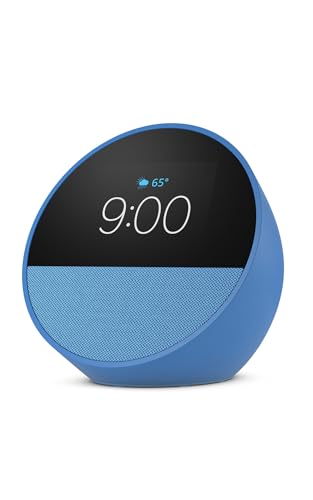
- Customizable clock with Alexa
- Rich audio in a compact design
- Optional eero Wi-Fi extension
Best For: Nightstands, offices, and kitchens
Best Compact Smart Display Family Calendar
10.1-Inch Digital Family Calendar
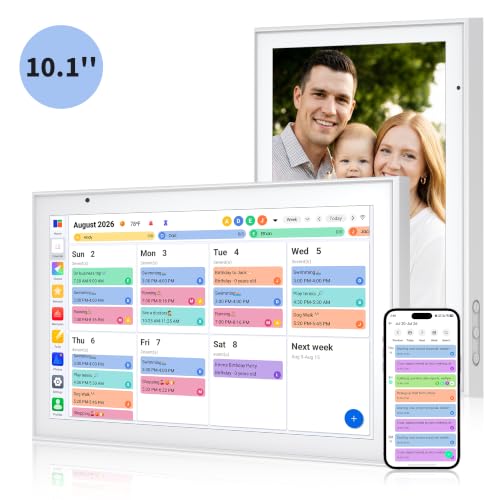
- Syncs multiple calendar services
- Includes chores and meal planning
- Works as a photo frame
Best For: Busy families and shared household planning
Best Compact Smart Display for Entertainment

- 8.7-inch HD touchscreen
- Spatial audio and streaming support
- Built-in smart-home hub and camera
Best For: Entertainment, video calls, and smart-home control
Best No-Subscription Compact Smart Display Calendar
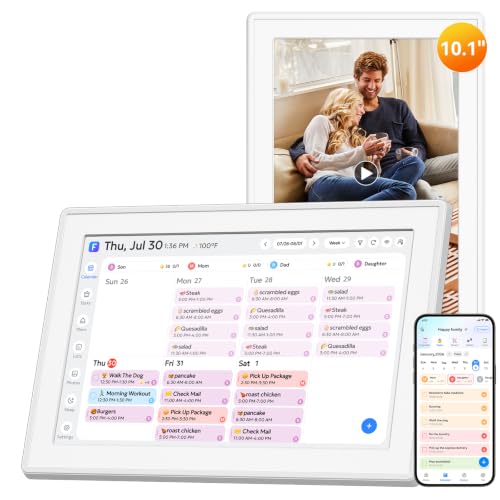
- No subscription fees
- Supports up to 20 users
- Calendar, chores, photos, and art
Best For: Busy households wanting flexible family organization
Best Everyday Pick
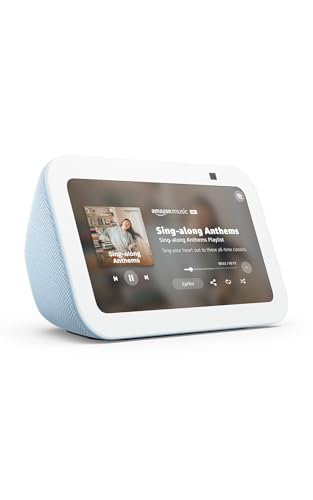
- 5.5-inch display fits small spaces
- Improved bass and clearer vocals
- Built-in camera with privacy shutter
Best For: Small spaces, calls, entertainment, and Alexa controls
Best Low-Power Dashboard

- 7.3-inch color E Ink display
- Up to three months of battery life
- Home Assistant and maker integrations
Best For: DIY dashboards, home automation, and smart-office displays
Best Large Family Hub

- 15.6-inch Full HD family dashboard
- Built-in Fire TV entertainment
- Custom widgets and enhanced video calling
Best For: Family organization, kitchen entertainment, and smart-home control
Best Global Value
Google Nest Hub 7-inch (2nd Gen)

- 7-inch touchscreen with Google Assistant
- Universal adapter and multilingual support
- Camera-free design with full-range speaker
Best For: International users and Google smart-home households
Best Alexa Compact Pick

- 5.5-inch display in a small footprint
- 2 MP camera for calls and monitoring
- Deeper bass and clearer vocals
Best For: Alexa users who want video calling and media
Best Budget Google Display

- 7-inch camera-free smart display
- Google Assistant and smart-home control
- Compact design for counters and nightstands
Best For: Simple Google Assistant tasks and home control
Best Compact Smart Display Alarm Clock – Echo Spot
The Amazon Echo Spot is a compact smart display designed for nightstands, offices, and kitchens. It combines an at-a-glance clock with Alexa, customizable visuals, music playback, smart-home controls, and optional eero Wi-Fi extension.
Best For: Bedrooms, desks, and small spaces where you want a smart alarm clock with Alexa and clear audio.
Pros:
- Customizable clock faces show time, weather, reminders, and song details.
- Provides rich sound with clear vocals and deep bass for music, podcasts, and audiobooks.
- Supports routines, compatible smart-home control, and motion detection.
- Can add up to 1,000 square feet of coverage to an existing eero network.
Cons:
- Its smaller screen is better suited to glanceable information than extensive visual content.
- The eero Wi-Fi extension feature requires an existing eero network.
Choose the Echo Spot if your priority is a compact Alexa device that handles alarms, audio, and basic visual information without taking much counter or nightstand space.
Best Compact Smart Display Family Calendar – 10.1-Inch Digital Family Calendar
This 10.1-inch digital family calendar is one of the more organization-focused compact smart displays. It combines shared calendars, chore tracking, meal planning, to-do lists, and photo-frame functionality in a desk- or wall-mountable format.
Best For: Families that want a shared command center for schedules, chores, meals, and household reminders.
Pros:
- Syncs with Google, iCloud, Outlook, Cozi, and Yahoo calendars.
- Supports color-coded family schedules and an interactive chore chart.
- Combines meal planning, to-do lists, and photo-frame features.
- Can sit on a desk or mount on a wall for flexible placement.
Cons:
- Its primary focus is family organization rather than general-purpose voice assistance or entertainment.
- The 10.1-inch screen may feel limited for households seeking a larger shared display.
This model is a practical pick when household coordination matters more than streaming or smart-home control. Its compact footprint keeps calendars and tasks visible without requiring a large wall display.
Best Compact Smart Display for Entertainment – Echo Show 8
The latest Echo Show 8 is a versatile choice among compact smart displays, pairing an 8.7-inch HD touchscreen with spatial audio, Alexa, video calling, and built-in smart-home control. It is suited to users who want a small display that can also handle entertainment and household tasks.
Best For: Kitchens, living spaces, and home offices where streaming, video calls, recipes, and smart-home controls share one screen.
Pros:
- Vibrant HD display with 15% more viewing area than the 2023 Echo Show 8.
- Spatial audio provides room-filling sound with clearer vocals and wider sound.
- Built-in smart-home hub controls compatible lights, thermostats, cameras, and more.
- Centered auto-framing camera supports video calls and remote live view.
Cons:
- Its broader feature set may be more than needed for users seeking only a basic clock or calendar.
- Some personalized features depend on Alexa+ and compatible services or devices.
The Echo Show 8 is the strongest all-around option here for entertainment and connected-home use. Its larger screen, improved audio, and camera make it more versatile than display products focused mainly on scheduling.
Best No-Subscription Compact Smart Display Calendar – 10.1-Inch Family Hub
This 10.1-inch family hub is a flexible compact smart display for calendars, chores, meal plans, photos, and art. It supports desk or wall placement, automatic screen rotation, multiple calendar services, and offline media import without subscription fees.
Best For: Families, couples, caregivers, and busy households needing a customizable planning display without recurring subscription costs.
Pros:
- Offers calendar, photo-frame, and art-display modes in one device.
- Syncs Google, Apple iCloud, Outlook, Cozi, Yahoo, and TeamSnap calendars.
- Supports chores, habit tracking, meal plans, and profiles for up to 20 users.
- Includes 32GB storage and offline photo or video import through microSD or USB.
Cons:
- The wall bracket is sold separately.
- Its tall 9.7-by-15.6-inch footprint may require careful placement on smaller surfaces.
- Some features depend on keeping the companion app and device software updated.
Consider this model when a subscription-free family organizer is the priority. It offers more planning customization than a basic digital calendar while remaining suitable for counters, desks, nightstands, and compact rooms.
Best Everyday Pick – Echo Show 5
The Amazon Echo Show 5 is a practical choice for shoppers seeking compact smart displays with everyday Alexa features. Its 5.5-inch screen fits easily on a bedside table, desk, or kitchen counter while supporting video calls, entertainment, smart-home controls, camera viewing, and photo slideshows.
Best For: Small spaces, Alexa users, video calling, and basic smart-home control.
Pros:
- Compact 5.5-inch display for news, weather, calls, compatible cameras, and more.
- Improved audio with deeper bass and clearer vocals.
- Built-in 2 MP camera, privacy shutter, and microphone/camera-off controls.
- Works with compatible lights, thermostats, video doorbells, music, and streaming services.
Cons:
- The small screen is less suitable for extended viewing or large household dashboards.
- Smart-home and camera features depend on compatible devices.
The Echo Show 5 balances a genuinely small footprint with a broad set of Alexa capabilities. Choose it when countertop space matters more than a large viewing area or advanced dashboard customization.
Best Low-Power Dashboard – reTerminal E1002
The reTerminal E1002 takes a different approach to compact smart displays, using a 7.3-inch color E Ink screen for dashboards, reminders, and live information. Its low-power design, customizable software, and maker-friendly expansion make it especially useful for home automation projects and always-visible information panels.
Best For: Home Assistant users, DIY makers, smart-office dashboards, and low-maintenance information displays.
Pros:
- 7.3-inch color E Ink Spectra 6 display remains clear in bright light.
- Up to three months of battery life in the stated deep-sleep configuration.
- No-code dashboard creation through SenseCraft HMI with templates and AI-assisted layouts.
- Supports Home Assistant, ESPHome, TRMNL plugins, GPIO, I²C, SPI, and Grove expansion.
Cons:
- E Ink is better suited to dashboards and periodic updates than video or rich entertainment.
- Its maker-focused integrations may require more setup than a conventional voice assistant display.
- The supplied notes list USB connectivity and do not specify broader wireless details beyond WiFi in the title.
This is the strongest option for users who want a customizable, low-energy dashboard rather than a streaming or calling device. Its long battery life and expansion options are particularly compelling for DIY smart-home installations.
Best Large Family Hub – Echo Show 15
The Amazon Echo Show 15 is the large-screen choice among these compact smart displays, designed to organize a household from the kitchen or another central location. Its 15.6-inch Full HD screen combines customizable widgets, Fire TV entertainment, smart-home controls, photo display, and enhanced video calling.
Best For: Families that want a shared calendar and task hub with built-in streaming and smart-home access.
Pros:
- Large 15.6-inch 1080p display makes calendars, widgets, shows, and camera feeds easy to view.
- Customizable widgets support family calendars, to-do lists, weather, and smart-home information.
- Built-in Fire TV supports services including Prime Video, Netflix, YouTube, and Apple TV.
- Centered auto-framing camera offers a wide field of view, 3.3x zoom, and noise reduction.
Cons:
- Its large screen requires substantially more space than the other displays in this roundup.
- Some entertainment services may require subscriptions.
- Video calling and smart-home camera functions depend on compatible services or devices.
The Echo Show 15 is best viewed as a household command center rather than a small bedside display. Pick it when visibility, family organization, and built-in entertainment matter more than a minimal footprint.
Best Global Value – Google Nest Hub 7-inch (2nd Gen)
The second-generation Google Nest Hub is a practical choice for shoppers seeking compact smart displays with a 7-inch touchscreen, Google Assistant, and a minimalist design. Its international language support and included universal power adapter make this bundle especially flexible for global use.
Best For: Bedrooms, kitchen counters, shelves, and international users who want Google Assistant and smart-home control without a camera.
Pros:
- 7-inch 1024 x 600 touchscreen fits neatly on counters, shelves, and nightstands.
- Supports English, Spanish, French, and Portuguese, with language changes available in settings.
- Includes a universal power adapter and international quick-start materials.
- Full-range speaker supports music and entertainment, while Google services such as YouTube, Netflix, and Google Photos are compatible.
Cons:
- It requires corded power rather than a battery.
- The display has no camera, so it cannot handle camera-based video calls.
- The listing specifies a 90-day warranty.
This Nest Hub stands out among compact smart displays for its multilingual setup and travel-friendly power bundle. It is a sensible fit for Google households that value a camera-free design and a larger screen than the Echo Show 5.
Best Alexa Compact Pick – Like-New Echo Show 5
The like-new Amazon Echo Show 5 is a strong option for shoppers comparing compact smart displays with Alexa, video calling, and media features. Its 5.5-inch screen keeps the footprint small while the newer model adds deeper bass and clearer vocals.
Best For: Small bedside tables and desks where video calls, camera monitoring, Alexa smart-home control, and streaming are priorities.
Pros:
- Compact 5.5-inch display shows weather, news, song information, photos, and video.
- Built-in 2 MP camera supports video calls and compatible camera or doorbell viewing.
- Offers deeper bass and clearer vocals for music, podcasts, shows, and other media.
- Includes camera shutter, microphone/camera controls, and recyclable packaging features.
Cons:
- This is a refurbished, certified like-new device and may arrive in generic Amazon-branded packaging.
- Its 5.5-inch screen is smaller than the 7-inch Google Nest Hub displays listed here.
- Video calling and monitoring depend on compatible apps, devices, and services.
Choose the Echo Show 5 when Alexa connectivity and camera features matter more than maximum screen size. The certified like-new condition can make it appealing for buyers who want a feature-rich compact display at potentially lower cost.
Best Budget Google Display – Nest Hub 7-inch (1st Gen)
Google Nest Hub 7” Smart Display with Google Assistant (1st Gen) - Chalk (Bulk Packaging)
Check Price On AmazonThe first-generation Google Nest Hub offers a straightforward way to add compact smart displays to a kitchen, office, bedroom, or nightstand. It combines a 7-inch screen with Google Assistant for smart-home control, entertainment, timers, reminders, recipes, and hands-free answers.
Best For: Buyers who want a simple, camera-free 7-inch Google Assistant display for everyday organization and compatible smart-home devices.
Pros:
- 7-inch display provides room for recipes, weather, photos, videos, and controls.
- Voice commands and touchscreen controls work with compatible lights, cameras, thermostats, plugs, and speakers.
- Useful for timers, reminders, music, Google Photos, and hands-free questions.
- Compact design suits counters, desks, offices, bedrooms, and nightstands.
Cons:
- This is a first-generation model, rather than the newer second-generation Nest Hub.
- The listing identifies it as a Korean-spec international version, so language may need to be changed after setup.
- Bulk packaging includes a cable but provides less bundle detail than the second-generation value bundle.
This Nest Hub is best suited to shoppers prioritizing basic Google Assistant functionality and a 7-inch screen over the latest generation. Confirm the international model and setup requirements before buying.
How We Picked These Compact Smart Displays
We selected models that balance useful screen size, dependable voice assistance, practical placement, and clear everyday value. The roundup includes traditional smart displays for alarms, recipes, calls, music, and smart-home controls, as well as dedicated family calendars and customizable information panels.
We also considered ecosystem compatibility. Amazon Echo models make the most sense for households already using Alexa, while Google Nest Hub devices fit naturally into Google Assistant and Google Home setups. Dedicated calendar displays may be better for families who want shared schedules and chores without relying on a general-purpose assistant.
Quick Comparison
- Best for nightstands: Amazon Echo Spot or Echo Show 5.
- Best all-around option: Amazon Echo Show 8, with a larger display and stronger audio than smaller models.
- Best for kitchen organization: Echo Show 15 or a dedicated 10.1-inch family calendar.
- Best for Google households: Google Nest Hub, provided its older hardware and feature set meet your needs.
- Best for customization: reTerminal E1002, especially for dashboards, Home Assistant, and maker-oriented projects.
- Best for a large family view: A 10.1-inch smart calendar or Echo Show 15.
Key Buying Factors for Compact Smart Displays
Screen Size and Placement
Smaller five- to seven-inch screens work well on nightstands, desks, and narrow counters. Eight- to ten-inch models are easier to read for recipes, calendars, and video calls. A 15.6-inch display is better viewed from across a room but needs substantially more wall or counter space.
Assistant and Ecosystem
Choose Alexa or Google Assistant based on the phones, streaming services, smart lights, cameras, and routines already in your home. Switching ecosystems can add setup work and limit familiar features.
Calendar and Family Tools
Dedicated family hubs prioritize shared schedules, meal planning, chores, and to-do lists. General-purpose displays offer broader entertainment and smart-home functions, but calendar tools may depend more heavily on compatible accounts or apps.
Audio, Camera, and Privacy
Larger displays generally provide better sound. If video calling matters, check camera availability and whether a physical privacy control is included. For bedrooms and private spaces, review microphone, camera, and screen settings before setup.
Who Should Buy Which Compact Smart Displays?
Buy the Echo Spot for a compact alarm-clock experience, or choose the Echo Show 5 when you want a small screen with more visual information and stronger entertainment features. The Echo Show 8 is the balanced choice for most rooms, while the Echo Show 15 suits households that want a prominent kitchen or family command center.
Choose a dedicated 10.1-inch calendar when shared organization is the priority. Pick the reTerminal E1002 if you want a flexible dashboard and are comfortable with a more technical setup. Google Nest Hub models remain sensible for Google-centered homes, though buyers should confirm current software support and availability before purchasing older generations or bulk-packaged units.