
The best smart home hubs bring lights, locks, sensors, cameras, and voice assistants into one more manageable system. They can also improve reliability, simplify routines, and reduce the need to juggle multiple apps.
Our 2026 roundup covers versatile platforms, security-focused hubs, local-automation options, and control panels so you can choose the right foundation for your connected home.
Best 10 Smart Home Hubs Picks for 2026
Best Overall

- Supports Matter, Zigbee, Z-Wave Plus, Wi-Fi, Alexa, and Google Home.
- Controls thousands of compatible devices through SmartThings.
- Offers Wi-Fi or Ethernet connectivity and local automations.
Best For: Mixed-brand smart homes needing broad protocol support
Best for Eufy Security Systems

- Stores recordings locally with 16 GB built in and expansion up to 16 TB.
- Supports up to 16 cameras or doorbells and 34 sensors.
- Adds facial recognition, encryption, and a 100 dB siren.
Best For: Eufy camera, doorbell, and sensor ecosystems
Best for Local Automation

- Ships with Home Assistant OS preinstalled.
- Keeps home data locally and supports advanced automations.
- Adds Z-Wave, Zigbee, or Thread through optional USB devices.
Best For: Privacy-focused users building customizable automations
Best Smart Display Hub

- Adds an 8-inch customizable dashboard for smart home control.
- Supports Wi-Fi, Bluetooth, Zigbee, Matter, Sidewalk, and Thread.
- Works with Alexa routines, compatible security devices, and cameras.
Best For: Alexa households wanting touchscreen-based control
Best for Easy Setup

- Local automations keep working during internet outages
- Supports Matter, Z-Wave, Zigbee, and Bluetooth
- No subscription; works with major voice assistants
Best For: DIY users seeking fast, private, flexible smart home control
Best for Security Monitoring
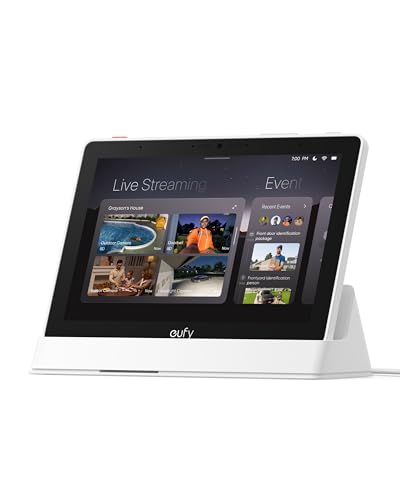
- 8-inch touchscreen shows security activity at a glance
- Supports four simultaneous live camera feeds
- Local event playback and HomeBase 3 summaries
Best For: Households wanting an accessible visual security control panel
Best for Aqara and Matter Integration

- Bridges Aqara Zigbee and Thread devices to Matter
- Local automations with built-in encrypted storage
- IR control, Wi-Fi, PoE, and USB-C power options
Best For: Aqara-centered homes expanding into Matter and Thread
Long-Range Sensor Connectivity

- Up to 2,034-foot reported range
- Smartphone and voice control
- Compact wired plug-in design
Best For: Long-range motion-alert connectivity
All-Protocol Automation Powerhouse

- Seven built-in connectivity technologies
- Works with 50,000+ devices
- Local-first Flow automation
Best For: Large, mixed-brand smart home systems
Tuya Multi-Mode Bridge

- Combines Zigbee 3.0 and Bluetooth mesh
- App, Alexa, and Google Home control
- Supports up to 128 Tuya devices
Best For: Tuya or Smart Life device ecosystems
Best Overall – Aeotec Smart Home Hub
The Aeotec Smart Home Hub is a versatile choice for shoppers comparing smart home hubs that can connect devices across several major protocols. It supports Matter, Zigbee, Z-Wave Plus, Wi-Fi, Alexa, and Google Home, while the SmartThings app handles setup, control, and automations.
Best For: Households building a broad, mixed-brand smart home with lighting, sensors, switches, and voice assistants.
Pros:
- Supports Matter, Zigbee, Z-Wave Plus, Wi-Fi, Alexa, and Google Home.
- Works with thousands of compatible devices through the SmartThings app.
- Offers both Wi-Fi and Ethernet setup options.
- Many automations can run locally for improved speed and reliability.
Cons:
- The Z-Wave Plus certification applies to the V3 model.
- Designed for use in North America.
This is one of the most flexible smart home hubs in the group, particularly if you want one controller for multiple wireless standards. Its compatibility range makes it a practical foundation for a growing connected home.
Best for Eufy Security Systems – eufy HomeBase 3
The eufy Security HomeBase 3 is a security-focused hub rather than a general-purpose smart home controller. It brings compatible eufy cameras, doorbells, and sensors into one system, with local storage, AI facial recognition, and no monthly fee listed in the supplied product details.
Best For: Eufy users who want centralized camera and sensor management with expandable local recording storage.
Pros:
- Includes 16 GB of built-in storage and supports expansion up to 16 TB.
- Supports up to 16 eufy cameras or doorbells plus 34 sensors.
- BionicMind AI facial recognition can help distinguish family members from visitors.
- Features a 100 dB siren and advanced encryption.
Cons:
- Designed for eufy devices rather than broad cross-brand smart home compatibility.
- Expansion storage requires a portable hard drive, which is not included.
- Its connectivity is listed as 2.4 GHz Wi-Fi.
If your priority is home security, this hub offers useful capacity and local-storage options without a monthly fee. It makes the most sense when your cameras, doorbells, and sensors are already part of the eufy ecosystem.
Best for Local Automation – Home Assistant Green
Home Assistant Green | Smart Home hub with Advanced Automation | Official Home Assistant Hardware
Check Price On AmazonHome Assistant Green is a straightforward option for shoppers seeking smart home hubs centered on local control and advanced automation. Home Assistant OS is preinstalled, and the compact fanless unit includes 4 GB of RAM, 32 GB of storage, Ethernet, and USB expansion.
Best For: Users who want a privacy-minded, flexible automation platform and are comfortable expanding connectivity as needed.
Pros:
- Comes with Home Assistant already installed for simple initial setup.
- Keeps home data on the hub and supports viewing, sharing, and exporting it.
- Supports advanced automations across devices and routines.
- Can add Z-Wave, Zigbee, and Thread connectivity through USB devices.
Cons:
- Ethernet is the listed network connection; no built-in Wi-Fi is specified.
- Z-Wave, Zigbee, and Thread require additional USB devices.
- Its flexible platform may be better suited to users willing to configure their smart home.
Home Assistant Green is a strong foundation for local, data-conscious automation, especially if you value control over how devices work together. Budget for extra USB radios if your setup needs protocols beyond the included Ethernet and Bluetooth capabilities.
Best Smart Display Hub – Amazon Echo Hub
The Amazon Echo Hub combines a wall-mountable 8-inch control panel with a built-in smart home hub. It is a convenient choice among smart home hubs for households that want a visual dashboard for devices, cameras, routines, security systems, and media.
Best For: Alexa households that want an always-available touchscreen for centralized smart home control.
Pros:
- Provides a customizable dashboard for devices, cameras, and routines.
- Built-in support includes Wi-Fi, Bluetooth, Zigbee, Matter, Sidewalk, and Thread devices.
- Can help family members arm or disarm compatible security systems.
- Supports wall mounting and optional tabletop placement.
Cons:
- Wall-mount cable pass-throughs, a power-over-Ethernet adapter, and tabletop stands are sold separately.
- Some Ring camera features require Alexa+ and a compatible Ring subscription sold separately.
- Its control experience is centered on Alexa-compatible devices.
The Echo Hub is best viewed as both a controller and a convenient visual interface. Its customizable screen and wide built-in protocol support make it appealing for families who want quick, at-a-glance access to a connected home.
Best for Easy Setup – Hubitat Elevation C-8 Pro
The Hubitat Elevation C-8 Pro is a strong choice among smart home hubs for shoppers who prioritize fast, dependable automation and local control. It supports Matter, Z-Wave, Zigbee, and Bluetooth, works with major voice assistants, and keeps automations running when the internet is unavailable.
Best For: DIY smart home builders who want broad device compatibility, privacy-minded local processing, and advanced routines without a subscription.
Pros:
- Runs automations locally for quick responses and continued operation during internet outages.
- Supports Matter 1.5, Z-Wave 800 Series Long Range, Zigbee 3.0, and Bluetooth.
- Works with Alexa, Google Home, Apple HomeKit, and Ring camera integration.
- Includes advanced Rule Machine automation and AI-assisted routine building with no recurring subscription.
Cons:
- Its advanced automation features may require more setup than simpler hubs.
- The hub is designed primarily for users willing to configure and manage a DIY system.
Choose the C-8 Pro if reliability, flexibility, and local processing matter more than a purely plug-and-play interface. Its multi-protocol support and active community also make it a practical foundation for expanding a mixed-device home.
Best for Security Monitoring – eufy Smart Display E10
The eufy Smart Display E10 takes a different approach to smart home hubs by combining an 8-inch touchscreen with centralized security monitoring. It is designed for households that want quick access to cameras, doorbell alerts, local event playback, and daily activity summaries from one dedicated display.
Best For: Families and security-focused households that want an easy-to-use visual control panel for eufy cameras, doorbells, and property monitoring.
Pros:
- Automatically displays live video and voice alerts for doorbell, lock, and camera activity.
- Shows up to four simultaneous live camera feeds.
- Downloads historical events to local storage for quick playback without buffering.
- Uses HomeBase 3 features for facial and package recognition and daily security summaries.
Cons:
- Its feature set is centered on eufy security monitoring rather than broad multi-brand device automation.
- The large display is less discreet than a compact, screenless hub.
The E10 is best viewed as a security-first smart home hub and control panel, not a universal protocol bridge. Its touchscreen and automatic alerts make it especially useful in a hallway, entry area, or shared household space where everyone can check activity quickly.
Best for Aqara and Matter Integration – Aqara Smart Home Hub M3
The Aqara Smart Home Hub M3 is a versatile option among smart home hubs for users building around Aqara, Matter, and Thread devices. It supports local automations, acts as a Matter bridge, includes a learning IR blaster, and offers both wireless networking and Power over Ethernet for flexible installation.
Best For: Aqara users who want local automation, Matter ecosystem integration, Thread support, and control of compatible infrared appliances such as air conditioners.
Pros:
- Supports Aqara Zigbee and Thread devices while bridging Aqara scenes into Matter ecosystems.
- Local Edge Hub operation can shift compatible automations away from cloud processing.
- 360-degree IR blaster learns commands and can expose a compatible air conditioner to Matter.
- Offers dual-band Wi-Fi, WPA3, PoE, USB-C power options, and encrypted local storage.
Cons:
- Its Zigbee support is for Aqara Zigbee devices rather than third-party Zigbee devices.
- Some cloud-based notifications still require an internet connection.
- A USB power adapter is not included, and Thread repeaters are needed for supported Thread-device capacity.
The M3 makes the most sense when Aqara is central to your setup and you want a bridge into Matter platforms such as Home Assistant. Its wired connectivity, privacy-focused design, and IR control add flexibility, though compatibility limits should be checked before replacing a mixed-brand hub.
Long-Range Sensor Connectivity – YoLink Smart Home Hub
The YoLink Smart Home Hub is a straightforward option for shoppers comparing smart home hubs focused on long-range connectivity and motion alerts. Its wired design, smartphone compatibility, voice control, and reported range of up to 2,034 feet make it a practical fit for extending coverage across a larger property.
Best For: Homes that need a simple, long-range hub for smartphone-connected motion alerts.
Pros:
- Reported maximum range of up to 2,034 feet.
- Supports smartphone compatibility and voice control.
- Compact, plug-in wired design.
Cons:
- This version does not include battery backup.
- The supplied details list fewer protocol and ecosystem features than some more advanced hubs.
The YoLink hub is best considered a focused connectivity solution rather than an all-in-one automation controller. Choose it when range, simple installation, and motion-alert support matter most.
All-Protocol Automation Powerhouse – Homey Pro (2026)
Homey Pro (2026) is a premium choice among smart home hubs for users building a broad, highly automated system. It combines Wi-Fi, Zigbee, Z-Wave Plus, infrared, BLE, Matter, and Thread, while local-first processing, expanded RAM, and Homey Flow support provide room for complex routines and a growing device collection.
Best For: Large or mixed-brand smart homes that need extensive protocol support and advanced local automation.
Pros:
- Supports seven technologies, including Matter and Thread.
- Compatible with more than 50,000 devices from over 1,000 brands.
- Offers local-first processing, energy tracking, and advanced Flow automations.
Cons:
- Its extensive features may be more than needed for a basic setup.
- Compatibility still depends on the specific brand and device.
- The supplied specifications list an IP40 rating, so it is intended for suitable indoor placement.
Homey Pro stands out when interoperability and automation depth are priorities. It is especially compelling for households that want one hub to coordinate diverse devices while keeping much of the processing on the hub itself.
Tuya Multi-Mode Bridge – ZigBee and Bluetooth Gateway
This compact gateway is a practical entry point for smart home hubs if your devices already use the Tuya or Smart Life ecosystem. It combines Zigbee 3.0 and Bluetooth mesh connectivity, supports app and voice control, and can link up to 128 compatible Tuya smart home devices.
Best For: Tuya or Smart Life users who want one small bridge for Zigbee and Bluetooth devices.
Pros:
- Supports Zigbee 3.0 and Bluetooth mesh in one gateway.
- Works with Smart Life/Tuya app remote control.
- Supports Alexa and Google Home voice control.
- Can support up to 128 Tuya smart home devices.
Cons:
- Supports Tuya/Smart Life devices only.
- Requires a 2.4GHz network according to the supplied details.
- Its ecosystem limitation makes it less suitable for mixed-brand setups.
For a compatible Tuya-based installation, this gateway offers useful protocol flexibility in a very small package. Shoppers using devices from several unrelated ecosystems should look toward a broader hub instead.
How We Picked These Smart Home Hubs
We compared these hubs by looking at device compatibility, supported wireless standards, automation capabilities, setup requirements, remote access, voice-assistant support, and the overall ecosystem. We also considered whether each model is best suited to general smart-home control, security devices, local processing, or advanced automation.
Compatibility claims can vary by device generation and region, so check the manufacturer’s current support list before buying. Matter improves cross-platform compatibility, but it does not guarantee that every feature works across every ecosystem.
Quick Comparison
| Best For | Look For | Potential Trade-Off |
|---|---|---|
| Whole-home compatibility | Multiple protocols, including Matter, Zigbee, and Z-Wave | More setup and configuration choices |
| Simple voice control | Alexa, Google Assistant, or an integrated display | Greater dependence on cloud services |
| Advanced automation | Local processing, scenes, schedules, and flexible rules | Steeper learning curve |
| Security ecosystems | Dedicated cameras, sensors, storage, and alarm features | Less flexibility outside that brand |
| Low-cost expansion | Support for the devices you already own | Fewer premium automation features |
Key Buying Factors for Smart Home Hubs
Device and Protocol Compatibility
Start with the products you already own or plan to buy. Zigbee and Z-Wave can connect many sensors, switches, and locks, while Wi-Fi is common for cameras and appliances. Matter and Thread can make newer devices easier to share between ecosystems, but Thread support may require compatible border-router hardware.
Local Versus Cloud Processing
Local automation can keep routines running during an internet outage and may reduce latency. Cloud-based systems are often easier to access remotely and update, but they may depend on account services, subscriptions, or an active internet connection.
Automation Depth and Ease of Use
Some hubs focus on straightforward scenes and voice commands; others offer conditions, variables, schedules, presence detection, and complex device relationships. Choose the simplest platform that can handle your intended routines, rather than paying for complexity you will not use.
Privacy, Security, and Expansion
Review account security, two-factor authentication, camera storage policies, update support, and subscription requirements. It is also wise to check whether the hub supports the brands and device types you may add later.
Who Should Buy Which Smart Home Hubs?
- Choose a broad compatibility hub if you want one platform for devices from several manufacturers.
- Choose a local-automation platform if reliability, customization, and advanced routines matter more than an easy initial setup.
- Choose a security hub if cameras, doorbells, alarms, and proprietary sensors are the center of your system.
- Choose a display-based hub if you want a wall-friendly control panel for scenes, cameras, and household access.
- Choose a compact gateway if you have a small installation and mainly need a bridge for a specific wireless standard or brand.
Before purchasing, list your current devices, identify the protocols they use, and decide whether you prioritize simplicity, privacy, local control, or maximum flexibility. That short checklist will usually narrow these Smart Home Hubs to the best fit for your home.