
The best smart home hubs for seniors make everyday technology easier to manage, from controlling lights and thermostats to checking cameras or calling for help. The right choice depends on whether the priority is voice control, medical safety, caregiver communication, or reliable device compatibility.
We selected 10 practical options for different needs and budgets, including smart displays, emergency alert systems, lighting bridges, IR remotes, and multi-protocol hubs. Use the guide below to compare features and choose a system that fits the user’s abilities, home setup, and support network.
Best 10 Smart Home Hubs for Seniors Picks for 2026
Best Visual Assistant
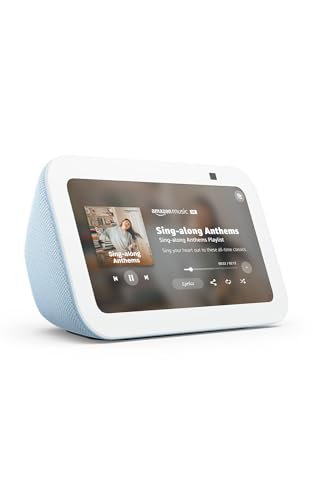
- 5.5-inch screen for weather, news, photos, and calls
- Controls compatible lights, thermostats, and cameras
- Camera shutter and mic-off controls support privacy
Best For: Visual communication and everyday smart-home control
Best Complete Safety System
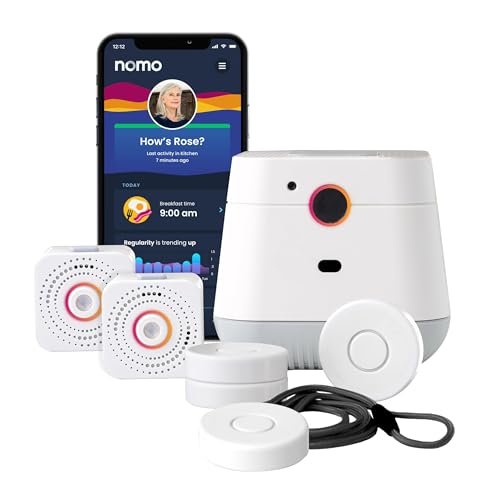
- Hub, two extenders, and wearable Tags included
- Fall detection and caregiver notifications
- Two-way voice communication with 30-day monitoring trial
Best For: Aging-in-place safety and emergency communication
Best Lighting Hub
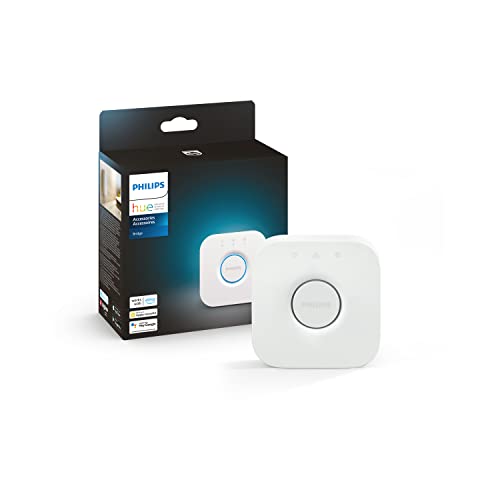
- Manages up to 50 Hue lights and accessories
- Zigbee connection helps reduce Wi-Fi strain
- Supports remote control, automations, assistants, and Matter
Best For: Philips Hue lighting control throughout the home
Best No-Subscription Pager

- Includes a hub and three pre-paired panic buttons
- Room identification, alarm, and app alerts
- IP65 buttons and no required subscription for core alerts
Best For: Room-to-room caregiver calling and emergency alerts
Best for Visual Security
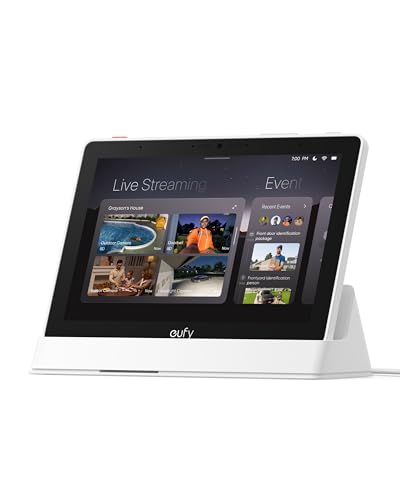
- 8-inch touchscreen for simple monitoring
- Shows up to four live security feeds
- Automatic alerts and local event playback
Best For: Seniors who want an easy-to-read security display
Best for Appliance Control

- Controls 8,000+ infrared brands
- Supports voice commands and Matter
- Includes a built-in 93 dB alarm
Best For: Simplifying control of TVs, climate devices, and appliances
Best for Broad Device Compatibility

- Supports Matter, Zigbee, and Z-Wave Plus
- Works with SmartThings, Alexa, and Google Home
- Uses Wi-Fi or Ethernet connectivity
Best For: Mixed-device homes needing flexible automation
Best IR Compatibility

- Supports 50,000+ infrared appliances
- Alexa, Google Assistant, IFTTT, and Siri support
- Includes temperature and humidity sensor cable
Best For: Homes with multiple IR appliances and 2.4GHz Wi-Fi
Best Easy-Read Controls

- IPS screen shows home conditions at a glance
- Physical dial and customizable scene buttons
- Supports IR, SwitchBot, and Matter ecosystems
Best For: Users who prefer tactile controls and visible home status
Best Simple Starter Hub
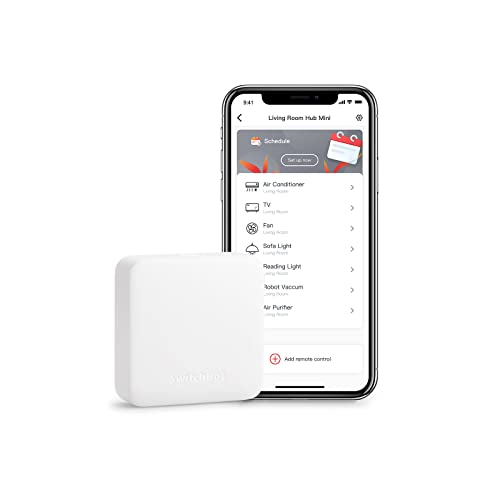
- Learns existing remotes in about five seconds
- Supports Alexa, Google Assistant, Siri, and IFTTT
- Compact USB-powered design for small setups
Best For: Users controlling a few IR appliances with minimal setup
Best Visual Assistant – Echo Show 5
For shoppers comparing smart home hubs for seniors, the Amazon Echo Show 5 combines voice control with a readable 5.5-inch display. It can help with video calls, compatible cameras, weather, news, entertainment, and control of compatible lights and thermostats.
Best For: Seniors and families who want a compact hub for communication, visual information, and compatible smart-home control.
Pros:
- 5.5-inch display shows weather, news, song details, photos, and more.
- Supports video calling, announcements, and camera viewing with compatible devices.
- Can control compatible lights and thermostats, including while away.
- Includes microphone and camera controls plus a physical camera shutter.
Cons:
- Smart-home control depends on compatible devices.
- The built-in display and camera may be unnecessary for shoppers seeking a basic voice-only hub.
The Echo Show 5 is a versatile choice when a senior would benefit from seeing information and staying in touch, not just issuing voice commands. Its privacy controls and compact size add practicality for bedrooms, kitchens, or common areas.
Best Complete Safety System – Nomo Medical Alert System
Among smart home hubs for seniors, the Nomo Medical Alert System is focused on safety rather than entertainment or general device control. Its Smart Hub, two range extenders, and wearable Tags are designed to support fall detection, panic alerts, two-way communication, and caregiver notifications.
Best For: Seniors aging in place who need home coverage, wearable emergency alerts, and caregiver communication.
Pros:
- Includes a hub, two Satellite range extenders, and wearable Tags.
- Tags can detect unusual movement patterns and fall events and notify a trusted Care Circle.
- Hub provides two-way voice communication during emergencies.
- Plug-and-play wireless setup requires no landline, technician visit, or special wiring.
Cons:
- 24/7 RapidSOS monitoring is included for a 30-day trial, then requires a monthly subscription.
- This is a safety-monitoring system rather than a general-purpose hub for lights or entertainment.
The Nomo system makes the most sense when emergency response and caregiver awareness are the priority. The included extenders and battery backup help support coverage, while the subscription cost should be considered after the trial period.
Best Lighting Hub – Philips Hue Bridge
The Philips Hue Bridge is a specialized option among smart home hubs for seniors, built to manage Philips Hue lighting. It provides a stable Zigbee connection, supports control from anywhere, and works with compatible Alexa, Apple HomeKit, Google Assistant, and Matter setups.
Best For: Homes using Philips Hue bulbs and accessories that want reliable lighting schedules, remote control, and broader assistant compatibility.
Pros:
- Supports up to 50 Philips Hue lights and accessories.
- Zigbee connection is designed to reduce strain on Wi-Fi, and Hue lights can work when Wi-Fi is down.
- Enables out-of-home control, automations, and control through supported assistants.
- Receives automatic updates and supports Matter connectivity.
Cons:
- It is primarily a Philips Hue lighting hub, not a complete all-purpose senior care system.
- Some entertainment features, such as HDMI-based syncing, require additional equipment.
- Requires Philips Hue lights or accessories to provide its main benefits.
The Hue Bridge is a strong fit for seniors who already use, or plan to use, Philips Hue lighting. Its reliable dedicated connection and remote access can simplify routines such as scheduled lighting and control from outside the home.
Best No-Subscription Pager – PILSAMAS Caregiver Pager
The PILSAMAS Caregiver Pager offers a straightforward alert setup for families seeking smart home hubs for seniors with an emphasis on calling for help. Its hub connects to 2.4G Wi-Fi for app access, while three pre-paired buttons communicate with the hub over a stated 328-foot range through walls.
Best For: Caregivers who want room-specific alerts, waterproof call buttons, and app notifications without a required subscription.
Pros:
- Includes one hub and three wireless panic buttons.
- Hub identifies the assigned button with a red LED number and audible alarm.
- Buttons can be worn around the neck, wall-mounted, or placed on a table.
- IP65 waterproof buttons are suited to wet areas such as bathrooms.
Cons:
- The hub requires 2.4G Wi-Fi rather than 5G Wi-Fi.
- SMS, call, and email functions require an optional plan.
- It is a caregiver alert system, not a general smart-home controller for lights or thermostats.
For households focused on fast, identifiable help requests, the PILSAMAS system offers useful coverage and flexible button placement. Its free app alerts and no-subscription core service may appeal to families, provided their Wi-Fi setup supports 2.4G connectivity.
Best for Visual Security – eufy Smart Display E10
For shoppers comparing smart home hubs for seniors, the eufy Smart Display E10 stands out as a dedicated touchscreen for viewing and managing compatible security devices. Its 8-inch display can show live camera feeds and provide visible and voice alerts when activity is detected.
Best For: Seniors or families who want an easy-to-read security monitoring screen with hands-free alerts.
Pros:
- 8-inch touchscreen is designed for straightforward use by seniors and children.
- Can display four simultaneous live feeds for at-a-glance property monitoring.
- Provides automatic alerts for doorbell rings, door unlocking, and camera detection.
- Includes local event storage and daily security summaries through HomeBase 3 features.
Cons:
- Its strengths are focused on eufy security monitoring rather than broad appliance control.
- The listed product dimensions appear unusually large for an 8-inch display, so verify the fit before mounting.
The E10 is a strong choice when visibility and security awareness matter more than controlling a wide range of household appliances. The touchscreen and automatic alerts may reduce the need to navigate a phone app.
Best for Appliance Control – Tapo H110 Smart Hub
The Tapo H110 is a practical option for smart home hubs for seniors who want to consolidate several remotes and simplify everyday appliance control. It supports thousands of infrared brands, app access, voice commands, schedules, and Matter-based ecosystem integration.
Best For: Seniors who want hands-free control of TVs, air conditioners, fans, lights, and other household devices.
Pros:
- Supports more than 8,000 infrared brands and 18 appliance types.
- Works with Alexa, Google Assistant, and Siri through Matter.
- Built-in 93 dB alarm provides audible alerts for connected Tapo sensors.
- Supports schedules, automations, remote app access, and location-based control.
Cons:
- Requires 2.4 GHz Wi-Fi for its smart hub connectivity.
- Some features depend on pairing the hub with compatible Tapo sensors or other devices.
- It is corded, so placement needs to be near power.
The H110 can make legacy electronics more approachable by replacing multiple remotes with app or voice control. It is especially useful for routines such as pre-cooling a room or powering down devices at bedtime.
Best for Broad Device Compatibility – Aeotec Smart Home Hub
The Aeotec Smart Home Hub is suited to shoppers seeking smart home hubs for seniors that can grow with a mixed-device household. It works through the SmartThings app and supports Matter, Zigbee, Z-Wave Plus on the V3 model, Wi-Fi, Ethernet, Alexa, and Google Home.
Best For: Seniors with family support who need a flexible hub for lights, sensors, comfort devices, and other compatible smart-home products.
Pros:
- Connects compatible devices across SmartThings, Matter, Zigbee, Z-Wave Plus, and Wi-Fi.
- Supports custom routines and automations through the SmartThings app.
- Offers both Wi-Fi and Ethernet setup options.
- Works with Amazon Alexa and Google Home for voice control.
Cons:
- The broad compatibility may require more setup than a single-purpose display or remote.
- It requires the SmartThings app on Android, iOS, or iPadOS for setup and management.
- Z-Wave Plus support is specified for the V3 model, so model details should be checked.
The Aeotec hub is a capable foundation for a connected home, particularly when different device standards need to work together. Its flexibility is valuable, though a family member may need to help with initial configuration and automation design.
Best IR Compatibility – BroadLink RM4 Mini
For seniors who want straightforward control of a TV, air conditioner, or other infrared appliance, the BroadLink RM4 Mini is a compact choice among smart home hubs for seniors. It supports a large IR device library and lets users control compatible appliances through an app or voice assistant.
Best For: Homes with several infrared entertainment or air-conditioning devices and a compatible 2.4GHz Wi-Fi network.
Pros:
- Supports more than 50,000 IR-controlled appliances, including TVs, air conditioners, streaming players, and sound bars.
- Works with Alexa, Google Assistant, IFTTT, and Siri voice control on iPhone.
- Offers timers, customized scenes, and optional temperature and humidity monitoring with the included sensor cable.
Cons:
- Requires 2.4GHz Wi-Fi; 5GHz and mesh networks are not supported.
- Controls IR devices only, not RF or Bluetooth remotes.
- Needs a clear line of sight because IR signals cannot pass through obstacles.
The RM4 Mini is a practical, low-cost way to add app and voice control to existing IR appliances. Setup limitations matter, but broad compatibility makes it useful for simplifying everyday TV and AC controls.
Best Easy-Read Controls – SwitchBot Hub 3
The SwitchBot Hub 3 is a feature-rich option for seniors who prefer physical controls and visible home information. Its screen, rotary knob, and scene buttons make it one of the more accessible smart home hubs for seniors, while its app and voice integrations support broader automation.
Best For: Seniors who want a readable status display, tactile controls, and integration with SwitchBot, IR, and Matter-compatible devices.
Pros:
- Uses a 2.4-inch IPS screen to display temperature, humidity, weather, and other home information.
- Physical knob and buttons provide tactile control, including four customizable scene buttons.
- Works with more than 100,000 IR appliances and can bridge compatible SwitchBot devices to Matter platforms.
Cons:
- Requires a 2.4GHz Wi-Fi connection for setup and certain integrations.
- Supports IR devices, but not RF products such as ceiling fans and garage door openers.
- Some displayed features require separately sold SwitchBot devices.
Hub 3 stands out when ease of interaction is more important than minimal size. The screen and physical dial reduce reliance on small app controls, while scene buttons can make common routines simpler for seniors and guests.
Best Simple Starter Hub – SwitchBot Hub Mini
The SwitchBot Hub Mini is a compact starter option for seniors who primarily need remote or voice control for a TV, air conditioner, or other IR appliance. Its learning mode can copy an existing remote, making it a simple entry point into smart home hubs for seniors.
Best For: Users who want a small, affordable-feeling setup for a few infrared appliances and SwitchBot devices.
Pros:
- Smart learning mode can mimic an existing remote control in about five seconds.
- Works with Alexa, Google Assistant, Siri, and IFTTT for voice and automation control.
- USB-powered, portable, and able to connect SwitchBot devices and appliances to the internet.
Cons:
- Requires 2.4GHz Wi-Fi; 5GHz Wi-Fi is not supported.
- Infrared signals can be interrupted by walls, metal objects, or other obstructions.
- Its listed maximum supported-device count is 10, making it less suitable for larger setups.
The Hub Mini is best when the goal is uncomplicated control of a small number of appliances. It lacks the Hub 3’s display and physical dial, but its learning mode and compact design can make initial setup less intimidating.
How We Picked the Best Smart Home Hubs for Seniors
We focused on products that can reduce complexity rather than add another difficult device to operate. Our selection considers setup requirements, control methods, compatibility, reliability, accessibility, and the type of problem each hub solves. Voice assistants and large displays can simplify routine tasks, while caregiver pagers and fall-detection systems address safety and communication.
We also included both specialized and flexible hubs. Some products are designed primarily for lighting or infrared appliances; others connect devices across protocols such as Zigbee, Z-Wave, Matter, Bluetooth, and Wi-Fi. Because compatibility varies, confirm that a hub supports the specific lights, sensors, appliances, and assistant platform already in use.
Quick Comparison
| Best For | Recommended Type | What to Look For |
|---|---|---|
| Voice commands and reminders | Smart display | Clear audio, readable screen, and assistant support |
| Emergency communication | Medical alert or caregiver pager | Fall detection, button range, and dependable alerts |
| Smart bulbs | Lighting bridge | Bulb compatibility and local or cloud control |
| TV and appliance control | IR smart hub | Remote compatibility, app simplicity, and placement |
| Mixed smart-home systems | Multi-protocol hub | Matter, Zigbee, Z-Wave, and assistant compatibility |
Key Buying Factors for Smart Home Hubs for Seniors
Ease of Use
Prioritize the control method the user will actually use. Voice commands may be easiest for someone with limited dexterity, while a large screen, physical knob, or dedicated panic button can be better for users who prefer visible or tactile controls. Avoid systems that require frequent app navigation for basic tasks.
Safety and Support
A standard smart-home hub is not automatically a medical alert device. If falls, urgent assistance, or caregiver notifications are central concerns, choose a product specifically designed for those functions. Check alert destinations, subscription requirements, battery life, and whether the system works during an internet or power outage.
Compatibility and Expansion
Look for support for the user’s existing platform, such as Alexa, Google Assistant, Apple Home, SmartThings, or Matter. IR hubs are useful for older TVs and air conditioners, whereas Zigbee and Z-Wave hubs are better suited to compatible sensors, switches, and locks. Matter support can improve future flexibility but does not guarantee every device will work.
Placement, Privacy, and Maintenance
Place microphones, displays, panic buttons, and hubs where they can be reached and heard. Review privacy settings before enabling voice or camera features. Also consider who will handle software updates, Wi-Fi changes, battery replacement, and troubleshooting.
Who Should Buy Which Smart Home Hubs for Seniors?
Choose a smart display for seniors who want voice assistance, reminders, calls, media, or a visual control panel. A medical alert system or caregiver pager is the better fit when rapid help is the main priority. Pick a lighting bridge for straightforward bulb automation, or an IR hub when the goal is replacing confusing TV or appliance remotes.
For households with several types of smart devices, a multi-protocol hub offers the broadest long-term flexibility, provided a family member or caregiver is available to manage setup. If simplicity matters more than expansion, choose the smallest system that solves the immediate problem. A focused, dependable setup is usually more useful than a complex smart home that the senior rarely uses.