
The best audio interface with onboard DSP can improve your sound while reducing the processing load on your computer. These interfaces combine reliable connectivity with built-in mixing, monitoring, or vocal-processing features.
We compare 10 options for streamers, musicians, podcasters, and home studios, covering compact two-input models, dual-PC setups, and higher-channel-count interfaces.
Best 10 Audio Interface with Onboard Dsp Picks for 2026
Best for Streamers

- 80dB gain for XLR microphones
- Onboard voice effects and low-latency monitoring
- Touch controls with Wave Link routing
Best For: Streamers and solo content creators
Best for Flexible Routing

- 18-in/22-out connectivity
- Six DSP mix busses for separate monitor mixes
- Onboard reverb, EQ, and dynamics
Best For: Project studios and performers with complex routing
Best for Hybrid Workflows
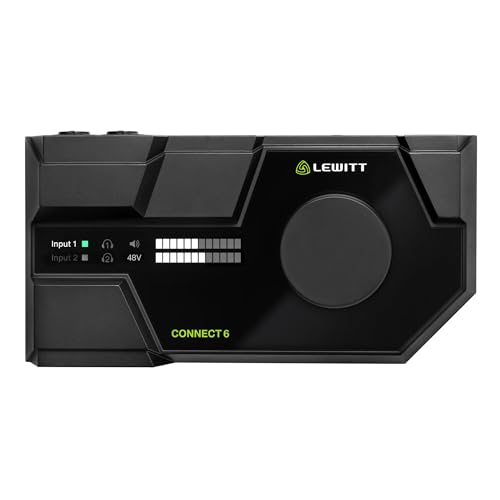
- 72dB gain with low-noise preamps
- DSP effects, virtual channels, and loopback
- Windows, Mac, iOS, and Android integration
Best For: Creators combining recording, streaming, and mobile work
Best for UAD Processing
Universal Audio Apollo Twin X Duo

- UAD-2 DUO near-zero-latency processing
- Unison preamp, amp, and stompbox modeling
- Heritage Edition plug-in bundle included
Best For: Windows producers tracking with UAD plug-ins
Studio DSP Pick

- DSP monitoring with reverb, channel strip, and guitar amp effects
- Two combo inputs with D-PRE preamps and one Hi-Z input
- 32-bit/192kHz audio, MIDI I/O, and full-metal housing
Best For: Compact home studios needing onboard effects and MIDI
Live Mixing Pick

- Four-channel mixer with USB, Bluetooth, and MP3 playback
- +48V phantom power, three-band EQ, and LED peak indicators
- 16-bit DSP processor in a rugged steel chassis
Best For: Live sound, karaoke, DJ sessions, and basic recording
Best All-Around Starter
Focusrite Scarlett 2i2 4th Gen

- Two mic and instrument inputs
- Auto Gain and Clip Safe
- 24-bit/192kHz with recording software
Best For: Solo musicians and home recordists
Best for Streaming DSP

- DSP voice-processing chain
- Dual-PC and multi-channel USB routing
- Designed for streaming and podcasting
Best For: Streamers and podcasters using complex computer setups
Best for Classic Tone

- Tone-shaping preamps
- Compressor presets for key instruments
- 32-bit audio and ADAT expansion
Best For: Producers seeking characterful recording and expansion
Best for Streamers – Elgato Wave XLR MK.2
The Elgato Wave XLR MK.2 is a focused audio interface with onboard DSP for streamers and creators using one XLR microphone. Its 80dB of gain, touch controls, ultra-low-latency monitoring, and Wave Link integration make it practical for managing voice audio during live content.
Best For: Streamers and creators who want simple microphone control, onboard voice processing, and software-based routing.
Pros:
- 80dB of gain supports a broad range of XLR microphones.
- Built-in enhancer, compressor, EQ, and other effects can process the voice signal.
- Touch controls, LED feedback, and Wave Link provide convenient monitoring and routing.
Cons:
- Its two-channel design is less suited to larger recording setups.
- Wave Link requires Windows 11 or an Apple Silicon Mac.
Choose the Wave XLR MK.2 when streaming workflow and hands-on control matter more than extensive I/O. It is a compact, purpose-built option for polished vocal audio.
Best for Flexible Routing – MOTU UltraLite-mk5
MOTU UltraLite-mk5 18x22 USB Audio Interface 3 for Mac, Windows and iOS with mixing and effects
Check Price On AmazonThe MOTU UltraLite-mk5 is a versatile audio interface with onboard DSP designed for recording, monitoring, and multi-output routing. With 18 inputs, 22 outputs, six mix busses, and built-in effects, it suits users who need considerably more connectivity than a basic desktop interface.
Best For: Musicians, project studios, and performers managing multiple inputs, output mixes, and monitoring feeds.
Pros:
- Offers combo mic, line, and hi-Z inputs plus analog, optical, and S/PDIF connectivity.
- DSP-driven CueMix mixing supports separate mixes for output pairs.
- Onboard reverb, parametric EQ, and dynamics processing help shape monitor mixes.
- OLED metering and CueMix 5 control provide detailed monitoring and setup.
Cons:
- Its extensive feature set may be more than a simple two-input setup requires.
- At 2.9 pounds, it is less lightweight than compact desktop interfaces.
The UltraLite-mk5 stands out when flexible signal distribution is a priority. Its combination of I/O, DSP mixing, and computer or iOS compatibility makes it suitable for more involved studio and live-monitoring needs.
Best for Hybrid Workflows – LEWITT Connect 6
The LEWITT Connect 6 is an audio interface with onboard DSP that combines studio-grade preamps, automatic setup, virtual channels, and loopback. It is a strong fit for creators who move between recording, streaming, calls, and mobile production.
Best For: Content creators and musicians who want automatic setup, flexible virtual routing, and desktop or mobile control.
Pros:
- 72dB of gain and low-noise preamps support clean microphone recording.
- Onboard expander, compressor, four-band EQ, and maximizer provide useful processing.
- Virtual channels, mixer, and loopback support hybrid content workflows.
- Control Center works with Windows, Mac, iOS, and Android devices.
Cons:
- The maximum sample rate is 96kHz rather than 192kHz.
- Its feature-rich routing may require more setup than a straightforward interface.
For users who need one interface across recording and online content, the Connect 6 offers a practical balance of processing and routing. Auto Setup and broad device integration further reduce setup friction.
Best for UAD Processing – Universal Audio Apollo Twin X Duo
The Universal Audio Apollo Twin X Duo is an audio interface with onboard DSP built around UAD-2 DUO processing and Unison preamp modeling. It is aimed at Windows users who want to track through vintage-style compressors, EQs, preamps, guitar amps, and other UAD plug-ins with near-zero latency.
Best For: Producers, vocalists, and guitarists seeking UAD plug-in processing and modeled preamp sounds while recording.
Pros:
- UAD-2 DUO processing enables near-zero-latency tracking through supported plug-ins.
- Unison technology provides modeled tube and transformer-based preamps, amps, and stompboxes.
- Includes a Heritage Edition plug-in bundle with compressor, preamp, EQ, and reverb collections.
- Built-in talkback microphone supports communication and recording-session slate use.
Cons:
- The supplied notes identify this model as a Windows USB 3 interface.
- Its workflow centers on the UAD plug-in ecosystem, which may be more specialized than a basic interface.
The Apollo Twin X Duo is the specialist choice here for low-latency UAD production. Its appeal comes from the combination of Unison modeling, onboard processing, and included plug-ins rather than a large quantity of physical I/O.
Studio DSP Pick – Yamaha URX22C
The Yamaha URX22C is a strong choice if you want an audio interface with onboard DSP for low-latency monitoring and built-in effects. Its two combo inputs, Class-A D-PRE preamps, MIDI I/O, and support for up to 32-bit/192kHz audio suit compact home-studio recording setups.
Best For: Home-studio musicians, vocalists, and guitarists who want onboard monitoring effects and MIDI connectivity.
Pros:
- DSP-powered monitoring includes REV-X reverb, Channel Strip, and Guitar Amp Classics.
- Two XLR/TRS combo inputs include Class-A D-PRE preamps, phantom power, and one Hi-Z input.
- Supports 32-bit/192kHz audio, MIDI I/O, and Windows, macOS, and iOS devices.
- Rugged full-metal housing is designed for durability.
Cons:
- Provides only two analog inputs and two main outputs.
- The listed Yamaha warranty applies under specific authorized-retailer and U.S. conditions.
The URX22C stands out for buyers prioritizing dedicated DSP effects and traditional studio features in a compact two-channel interface. It is less suited to larger recording sessions that require many simultaneous inputs.
Creator Connectivity Pick – MAONO P2 Hybrid Interface
The MAONO P2 is a creator-focused audio interface with flexible computer-and-mobile connectivity. While its supplied features emphasize software-based VST effects and loopback rather than dedicated onboard DSP, it offers practical routing, direct monitoring, and controls for podcasts, streams, and music recording.
Best For: Podcasters, streamers, and mobile creators recording with microphones, guitars, computers, and phones.
Pros:
- Dual USB ports support simultaneous computer and phone or iPad connections.
- Two XLR inputs provide up to 56dB of gain and support condenser and dynamic microphones.
- Built-in loopback and ProStudio 2 software support routing desktop audio and adding VST effects.
- Independent mute and monitoring controls, signal indicators, and a compact tilted design suit streaming workflows.
Cons:
- The supplied notes do not specify dedicated onboard DSP processing; effects are described through software.
- Recording quality is specified as 24-bit/192kHz rather than 32-bit audio.
The P2 is a versatile option for creators who need phone-friendly connections and easy loopback routing. Choose it for streaming flexibility rather than for a traditional hardware-DSP effects ecosystem.
Live Mixing Pick – Pyle PMXU43BT.5 Mixer
The Pyle PMXU43BT.5 is primarily a compact four-channel mixer rather than a conventional audio interface with onboard DSP. Its 16-bit DSP processor, USB and Bluetooth playback, phantom power, and multiple mixer inputs make it practical for live sound, karaoke, DJ use, and basic computer recording.
Best For: Live performers, karaoke users, DJs, and streamers who need mixer-style controls with USB and Bluetooth playback.
Pros:
- Includes USB, flash-reader, MP3, and Bluetooth playback options.
- Four-channel layout provides XLR and 1/4-inch inputs, stereo line inputs, and a headphone output.
- Offers +48V phantom power, three-band EQ on channels, and LED peak indicators.
- Steel chassis and sealed rotary controls are suited to regular live use.
Cons:
- It is a mixer with a 16-bit DSP processor, not a clearly specified dedicated interface-DSP monitoring system.
- Its listed 16-bit processing is less detailed than the higher-resolution specifications of the other options.
- The supplied notes do not identify included recording software or a detailed computer-interface workflow.
The PMXU43BT.5 makes the most sense when hands-on mixing, wireless playback, and live inputs matter more than studio-style DSP plug-in monitoring. For music production, verify that its USB recording capabilities match your workflow.
Best All-Around Starter – Focusrite Scarlett 2i2 4th Gen
The Focusrite Scarlett 2i2 4th Gen is a practical audio interface with onboard DSP-style recording conveniences, including Auto Gain, Clip Safe, and Air mode. With two inputs, 24-bit/192kHz support, and broad Mac, Windows, and iOS compatibility, it suits musicians building a compact home setup.
Best For: Solo musicians, vocalists, guitarists, and first-time home recordists who need two inputs and guided level control.
Pros:
- Two mic preamps and Hi-Z instrument inputs support simultaneous recording.
- Auto Gain and Clip Safe help prevent poorly set recording levels.
- 120dB dynamic range, Air mode, and 24-bit/192kHz recording support detailed tracks.
- Includes Pro Tools Intro+, Ableton Live Lite, Cubase LE, and Hitmaker Expansion.
Cons:
- Its two-input design is limiting for larger recording sessions.
- The supplied notes do not list built-in DSP effects or mixing features comparable to a dedicated streaming interface.
The Scarlett 2i2 is a strong value when recording quality and ease of use matter more than extensive onboard processing. Choose it for straightforward music production rather than complex multi-computer routing.
Best for Streaming DSP – BEACN Studio Dark
The BEACN Studio is a purpose-built audio interface with onboard DSP for streamers, gamers, and podcasters. Its processing chain includes EQ, compression, expander/gate, noise suppression, and low-frequency enhancement, while dual USB connectivity supports routing audio between computers, consoles, and phones.
Best For: Streamers, podcasters, and creators who want hands-on voice processing and dual-PC audio control.
Pros:
- Onboard DSP provides EQ, compression, gating, noise suppression, and more.
- Ultra-low-noise preamp and USB-C XLR microphone connection target clear spoken audio.
- Proprietary dual USB technology supports up to eight channels of digital audio.
- BEACN App and BEACN Link enable detailed routing, profiles, and remote assignments.
Cons:
- Its feature set is focused on streaming, gaming, and podcasting rather than traditional multi-input music recording.
- The supplied details emphasize XLR and USB inputs but do not specify instrument input support.
For creators comparing an audio interface with onboard DSP, BEACN Studio stands out for real-time voice shaping and flexible computer routing. It is less compelling if your priority is recording multiple microphones or instruments in a conventional studio workflow.
Best for Classic Tone – Universal Audio Volt 2 Max
The Universal Audio Volt 2 Max combines tone-shaping preamps with onboard-style processing for recording vocals, guitar, and bass. Classic compressor presets, 32-bit audio, MIDI connectivity, and support for UAD plug-ins and LUNA make it a versatile choice for producers who want polished results with a compact interface.
Best For: Musicians and producers seeking characterful preamps, quick compression presets, and a broader production setup.
Pros:
- Tone-shaping preamps add a character-focused recording option.
- Classic compressor presets are tuned for vocals, guitar, and bass.
- 32-bit audio and up to 192kHz support target detailed recording.
- MIDI, ADAT expansion, UAD plug-in support, and LUNA integration offer workflow flexibility.
Cons:
- The supplied notes do not specify the number of physical analog inputs.
- Its one-year warranty is shorter than the three-year warranty listed for the Scarlett 2i2.
- Some of its ecosystem benefits depend on UAD plug-ins or the LUNA workstation.
The Volt 2 Max is a compelling audio interface with onboard DSP-oriented features for users who value tone and quick processing presets. Its expansion and software connections also make it better suited to a growing production system than a basic two-channel starter setup.
How We Picked the Best Audio Interface with Onboard Dsp
We evaluated each model for its DSP features, input and output flexibility, connection options, monitoring performance, software support, and intended use. We also considered whether the onboard processing is genuinely useful in day-to-day workflows, rather than treating a long feature list as a substitute for practical value.
The selection includes dedicated streaming mixers, compact recording interfaces, hybrid USB models, and larger interfaces suited to home studios or live production. Because DSP implementations vary widely, we considered both the available effects and how easily users can control routing, monitoring, and mixes.
Quick Comparison
| Best For | What to Look For |
|---|---|
| Solo recording | Two quality combo inputs, low-latency monitoring, and straightforward software |
| Streaming | Fast mic processing, physical controls, loopback, and flexible routing |
| Podcasting | Multiple microphone inputs, headphone monitoring, and simple mix control |
| Dual-PC workflows | Independent computer connections, routing flexibility, and reliable USB operation |
| Expanded studios | More inputs and outputs, monitor control, and comprehensive DSP mixing |
Key Buying Factors for an Audio Interface with Onboard Dsp
DSP Effects and Monitoring
Check exactly what the DSP can do. Some interfaces provide compression, equalization, reverb, amp simulation, or channel-strip processing; others focus mainly on routing and low-latency monitoring. Confirm whether effects are available during live monitoring, recording, or both.
Inputs, Outputs, and Connectivity
Choose enough microphone, instrument, and line inputs for your current setup, with room for likely upgrades. USB-C is common, but compatibility with Mac, Windows, iOS, or Android devices can differ. MIDI, Bluetooth, loopback, and multiple headphone outputs may also matter for specific workflows.
Software and Ease of Use
Powerful DSP is less useful if routing software is confusing. Look for clear control applications, saved presets, physical gain and monitor controls, and dependable driver support. Streamers should prioritize fast access to mute, mix, and processing controls.
Audio Quality and Latency
Bit depth and sample-rate claims are only part of the picture. Pay attention to preamp quality, headphone output strength, converter performance, and the interface’s ability to provide stable, low-latency monitoring under load.
Who Should Buy Which Audio Interface with Onboard Dsp?
Streamers and creators: Choose a model with accessible DSP mic processing, loopback, and convenient physical controls. These features can simplify live production and reduce reliance on software plug-ins.
Singers, musicians, and solo producers: A compact two-input interface is usually the best balance of price, quality, and simplicity. Prioritize clean preamps, instrument inputs, and dependable monitoring.
Podcasters and interview setups: Look for multiple mic inputs, separate headphone control, easy routing, and enough gain for the microphones you plan to use.
Home studios and expanding rigs: A higher-channel-count interface is worth considering if you need external hardware, several performers, or multiple monitor feeds. Buy for realistic expansion needs rather than maximum specifications alone.