
The best audio interface with low latency makes recording and monitoring feel immediate, whether you are tracking vocals, playing guitar, streaming, or producing music at home.
We compare 10 options across connectivity, input flexibility, monitoring features, sound quality, and ease of setup so you can choose the right fit for your workflow and budget.
Best 10 Audio Interface with Low Latency Picks for 2026
Versatile Multitrack Choice

- 4x4 USB-C I/O with two microphone preamps
- Hardware monitoring, LCD screen, and loopback
- Supports 24-bit/192kHz audio and MIDI I/O
Best For: Multitrack recording, podcasting, and flexible routing
Compact Starter Pick
Focusrite Scarlett Solo 3rd Gen

- One XLR mic preamp plus a Hi-Z instrument input
- Air mode and Gain Halos for recording workflows
- 24-bit/192kHz recording with bundled software
Best For: Solo vocals, guitar, bass, and beginner home studios
Two-Channel Monitoring Pick

- 2-in/2-out USB-C interface with two preamps
- Hardware monitoring for low-latency workflows
- 24-bit/192kHz support and over 6GB of free content
Best For: Home recording with two microphones or instruments
Streaming Effects Specialist

- 80dB gain for XLR microphones
- Ultra-low-latency 24-bit/48kHz monitoring
- Onboard DSP effects and Wave Link routing
Best For: Streaming, podcasting, and processed XLR voice recording
Best All-Rounder

- 24-bit/192kHz recording with 106dB dynamic range
- ASIO-compatible routing with virtual channels and loopback
- Direct monitoring, 48V phantom power, and broad device support
Best For: Beginners, streamers, podcasters, and musicians
Best Simple Setup
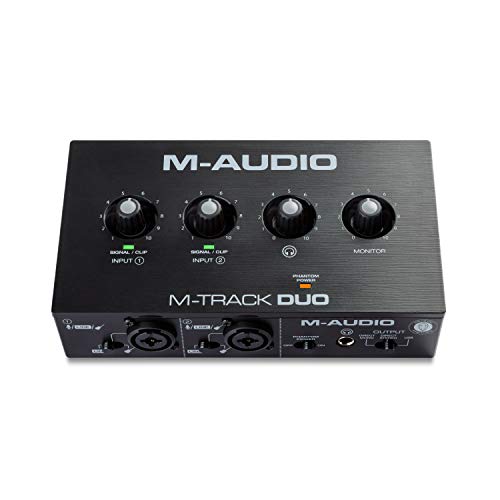
- Two combo inputs for mic, line, and instrument sources
- USB/Direct switch for zero-latency monitoring
- Includes MPC Beats and supports Ableton Live Lite
Best For: Home recording, podcasting, and live streaming
Best Value Features

- Combo inputs for microphones, instruments, and line-level signals
- Mono or stereo direct monitoring for delay-free playback
- 48V phantom power and monitor outputs included
Best For: Budget home recording and podcasting setups
Portable Recording Pick
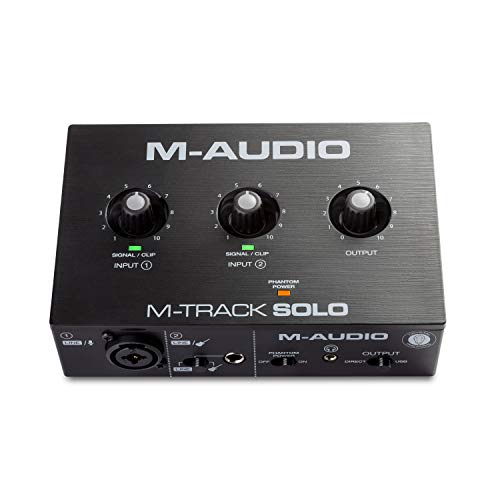
- Zero-latency USB/Direct monitoring
- XLR, line, and instrument inputs
- Compact design with MPC Beats included
Best For: Portable podcasting, guitar, vocal recording, and livestreaming
Budget Starter Pick
XTUGA Q-12 USB Audio Interface

- 16-bit/48 kHz recording resolution
- 48V phantom power for condenser mics
- USB-powered plug-and-play operation
Best For: Beginner computer recording, karaoke, and streaming
Flexible Monitoring Pick

- Zero-latency USB/Direct monitoring
- Two combo inputs with 48V phantom power
- RCA and 1/4-inch output flexibility
Best For: Compact guitar, vocal, podcast, and streaming setups
Versatile Multitrack Choice – MOTU M4
The MOTU M4 is a flexible audio interface with low latency for recording, mixing, podcasting, and other setups that need more than two inputs or outputs. Its 4×4 USB-C connectivity, two microphone preamps, hardware monitoring, MIDI I/O, LCD screen, and loopback support make it a well-equipped Mac, PC, or iOS option.
Best For: Musicians, podcasters, and creators who need four-in/four-out connectivity and hardware monitoring.
Pros:
- 4-in/4-out USB-C connectivity supports more involved recording and routing setups.
- Hardware monitoring, an LCD screen, and loopback add practical workflow features.
- Supports up to 24-bit/192kHz audio and includes MIDI I/O.
- Compatible with Mac, PC, and iOS devices.
Cons:
- Its larger I/O layout may be more than a simple vocal or guitar setup requires.
- The notes identify two microphone preamps, so not all four inputs are described as mic inputs.
The M4 stands out when connectivity and monitoring flexibility matter more than having the smallest possible interface. It is a strong fit for expanding recording and podcasting workflows.
Compact Starter Pick – Focusrite Scarlett Solo 3rd Gen
The Focusrite Scarlett Solo 3rd Gen is a compact audio interface with low latency for recording vocals, guitar, bass, and other solo sources. It combines an XLR microphone preamp, a Hi-Z instrument input, Air mode, Gain Halos, and 24-bit/192kHz converters in a small USB-C-compatible setup.
Best For: Solo musicians, vocalists, guitarists, and podcasters starting a compact home recording setup.
Pros:
- Provides one XLR mic preamp and one Hi-Z instrument input.
- Air mode can add extra clarity to acoustic instruments.
- Records and mixes at up to 24-bit/192kHz.
- Includes software and content such as Pro Tools Intro+, Ableton Live Lite, Cubase LE, and Hitmaker Expansion.
Cons:
- Two-channel design is less suitable for recording multiple microphones at once.
- Its listed frequency response is 20kHz, which may matter to buyers comparing specifications closely.
The Scarlett Solo is a straightforward choice when you primarily record one microphone and one instrument. Its compact format and included software make it especially approachable for first-time creators.
Two-Channel Monitoring Pick – MOTU M2
The MOTU M2 is a compact two-in/two-out audio interface with low latency for home recording and monitoring. It offers two preamps, USB-C connectivity, hardware monitoring, and 24-bit/192kHz support while remaining compatible with macOS, Windows, and iOS.
Best For: Home musicians and creators who want two inputs, hardware monitoring, and high-resolution recording.
Pros:
- Two-in/two-out design suits basic stereo or two-source recording.
- Two preamps provide input flexibility for microphones and other sources.
- Hardware monitoring helps support low-latency recording workflows.
- Supports 24-bit/192kHz audio and includes over 6GB of free content.
Cons:
- Two inputs and two outputs may limit larger recording or routing setups.
- The supplied compatibility details list Windows specifically, while the product bullets also mention macOS and iOS.
The M2 is a sensible middle ground for users who want more capability than a basic solo interface without moving to a larger multichannel unit. Hardware monitoring and two preamps are its key workflow advantages.
Streaming Effects Specialist – Elgato Wave XLR MK.2
The Elgato Wave XLR MK.2 is an audio interface with low latency designed around XLR microphones, voice processing, and streaming control. It combines 80dB of gain, an integrated DSP effects chain, touch controls, LED feedback, and Wave Link software for routing and monitoring.
Best For: Streamers, podcasters, and creators using an XLR microphone who want onboard effects and software-based audio control.
Pros:
- 80dB of gain is designed to drive a broad range of XLR microphones.
- Ultra-low-latency monitoring is specified at 24-bit/48kHz.
- Onboard voice enhancement, compression, EQ, and other DSP effects are available.
- Touch mute, LED feedback, Wave Link integration, and Stream Deck support streamline control.
Cons:
- XLR-only input makes it less versatile for direct instrument recording.
- Wave Link requires Windows 11 or higher, or macOS 14.2 or higher with Apple Silicon.
- The listed monitoring resolution is 24-bit/48kHz rather than 192kHz.
The Wave XLR MK.2 is best viewed as a creator-focused control hub rather than a general-purpose multichannel interface. Its strongest advantages are microphone gain, real-time effects, and hands-on streaming workflow control.
Best All-Rounder – MAONO PS22 Lite
If you want an audio interface with low latency for recording, streaming, and guitar or vocal work, the MAONO PS22 Lite is a versatile compact option. It combines 24-bit/192kHz recording, direct monitoring, 48V phantom power, and ASIO-compatible routing software in a beginner-friendly design.
Best For: Beginners, streamers, podcasters, and musicians who need flexible PC, Mac, or iPad connectivity.
Pros:
- 24-bit/192kHz recording with a 106dB dynamic range.
- Supports condenser and dynamic microphones with up to 56dB of preamp gain and 48V phantom power.
- ProStudio Routing Software adds virtual channels and loopback options, with ASIO support for low-latency output.
- Compact design includes direct monitoring and compatibility with popular DAWs.
Cons:
- The feature-rich routing software may be more than a basic setup requires.
- The supplied notes do not specify the exact number of input channels.
The PS22 Lite stands out when you want recording quality and streaming flexibility in a small package. Its direct monitoring and ASIO-compatible workflow make it a practical audio interface with low latency, while the intuitive modes help newer creators get started quickly.
Best Simple Setup – M-AUDIO M-Track Duo
The M-AUDIO M-Track Duo is a straightforward audio interface with low latency for podcasting, recording, and live streaming. Its two combo inputs accept microphones, instruments, or line-level sources, while the USB/Direct switch enables zero-latency monitoring.
Best For: Home users who want a simple two-input interface for vocals, guitar, podcasts, or livestreams.
Pros:
- Two combo XLR/line/instrument inputs with phantom power.
- USB/Direct switch provides zero-latency monitoring.
- Includes 1/4-inch headphone and stereo main outputs for flexible monitoring.
- Comes with MPC Beats and supports Ableton Live Lite.
Cons:
- Maximum sample rate is 48kHz, lower than some competing models.
- The supplied notes do not list advanced loopback or virtual-channel features.
Choose the M-Track Duo if dependable essentials matter more than extensive software routing. Its dual inputs, transparent Crystal preamps, and USB/Direct monitoring switch make it an accessible choice for a compact recording or streaming station.
Best Value Features – Wrugste 2-In/2-Out Interface
The Wrugste 2-in/2-out is designed for buyers seeking an audio interface with low latency at a basic, feature-focused price point. It offers combo inputs, direct monitoring, 48V phantom power, and claimed 24-bit/192kHz audio for microphones, guitars, and line-level equipment.
Best For: Budget-conscious home recordists who need direct monitoring and broad software compatibility.
Pros:
- Combo XLR and 1/4-inch inputs support microphones, instruments, and line-level signals.
- Mono and stereo direct-monitoring modes provide delay-free input monitoring.
- Includes 48V phantom power for compatible condenser microphones.
- Provides left and right 1/4-inch TRS outputs for powered studio monitors.
Cons:
- Brand recognition may be a consideration for buyers who prefer established manufacturers.
- The supplied details list both 24-bit/192kHz marketing and a 96kHz maximum sample rate, so specifications should be verified before purchase.
- The notes do not specify dedicated ASIO support.
The Wrugste offers an appealing collection of core recording controls, especially its direct-monitoring modes and included cables and adapter. It is worth considering for a simple PC, Mac, or Linux setup, but buyers should confirm the sample-rate specifications and compatibility for their exact workflow.
Portable Recording Pick – M-Audio M-Track Solo
The M-AUDIO M-Track Solo is a practical audio interface with low latency for podcasting, recording, and live streaming. Its USB/Direct switch supports zero-latency monitoring, while the combo input, instrument input, and transparent Crystal Preamp cover common home-recording setups.
Best For: Beginners and creators recording vocals, guitar, podcasts, or livestream audio on Mac or PC.
Pros:
- USB/Direct switch enables zero-latency monitoring.
- Includes an XLR/line input with phantom power and a line/instrument input.
- Compact 10.6-ounce design with headphone and stereo RCA outputs.
- Includes MPC Beats and supports Ableton Live Lite.
Cons:
- Maximum sample rate is limited to 48 kHz.
- Only two input channels are provided.
The M-Track Solo keeps the workflow simple while offering useful input and monitoring flexibility. It is a strong fit when portability and straightforward zero-latency monitoring matter more than extensive I/O.
Budget Starter Pick – XTUGA Q-12 USB Audio Interface
The XTUGA Q-12 is a budget-focused audio interface with low latency for beginners building a two-channel computer recording setup. It offers XLR and 3.5mm microphone inputs, switchable 48V phantom power, and USB plug-and-play operation without an external adapter.
Best For: Students, beginners, home karaoke users, and streamers seeking simple computer-based recording.
Pros:
- Supports 16-bit/48 kHz audio resolution.
- Provides switchable 48V phantom power for condenser microphones.
- Includes XLR and 3.5mm microphone inputs.
- USB-powered plug-and-play design requires no external adapter.
Cons:
- Two-channel design limits larger recording setups.
- Inputs are focused on XLR and 3.5mm microphone connections.
The Q-12 emphasizes accessible setup and low-cost functionality. Its straightforward USB connection and low-latency positioning make it a sensible starting point for basic vocals, streaming, and home recording.
Flexible Monitoring Pick – Mini 2-Channel USB Interface
This mini 2-channel model is an audio interface with low latency designed for recording, streaming, and podcasting. It combines two combo XLR/mic/line inputs, 48V phantom power, USB/Direct monitoring, and multiple RCA or 1/4-inch output options in a portable format.
Best For: Guitarists, vocalists, podcasters, and producers who need flexible connections in a compact setup.
Pros:
- USB/Direct switch provides zero-latency monitoring.
- Two combo XLR/mic/line inputs support microphones, guitars, and line sources.
- 48V phantom power and an ultra-low-noise design support condenser microphones.
- Offers headphone, stereo 1/4-inch, and RCA connection options.
Cons:
- Maximum sample rate is limited to 48 kHz.
- Two-channel input capacity may not suit larger sessions.
- Compatibility is listed for Mac OS and Windows XP or later, rather than a broad range of platforms.
The mini interface stands out for giving a small setup several monitoring and output choices. It is well suited to creators who want easy plug-and-play recording with flexible speaker, amplifier, and headphone connections.
How We Picked the Best Audio Interface with Low Latency
We evaluated these interfaces against the features that matter most in real recording and streaming setups: monitoring delay, driver and USB performance, preamp quality, input and output count, phantom power, headphone monitoring, portability, and software compatibility. We also considered how easily each model fits a specific use case, from a single microphone at a desk to stereo instruments and small home-studio sessions.
Low latency depends on more than a product specification. Computer performance, buffer size, drivers, sample rate, and the software you use all affect responsiveness. Interfaces with direct monitoring can reduce the audible delay further by routing incoming sound straight to the headphones or speakers.
Quick Comparison
- Best all-around flexibility: MOTU M4, with multiple inputs, outputs, and useful metering.
- Best compact two-input option: MOTU M2, offering strong monitoring features in a smaller format.
- Best beginner-friendly choice: Focusrite Scarlett Solo, designed for simple vocal or instrument recording.
- Best streaming-focused option: Elgato Wave XLR MK.2, with a workflow centered on microphone control and DSP.
- Best value picks: M-AUDIO M-Track Duo, M-Track Solo, MAONO PS22 Lite, and the listed compact USB interfaces.
Key Buying Factors for an Audio Interface with Low Latency
Input and Output Count
Choose based on what you record now and what you may add later. A solo singer or guitarist may need one microphone input, while stereo keyboards, two microphones, or a small podcast setup can justify two or more inputs. Separate monitor outputs are useful for speakers, while a dedicated headphone output is essential for private tracking.
Monitoring and Driver Performance
Look for direct monitoring, dependable USB connectivity, and stable drivers for your operating system. A low buffer setting can reduce software monitoring delay, but it also demands more from your computer. Interfaces with clear monitoring controls make it easier to balance live input against playback.
Microphone Support and Sound Quality
Condenser microphones require switchable 48V phantom power. Check the available gain before pairing an interface with a quiet dynamic microphone, and consider whether you need instrument inputs for guitar or bass. Higher sample-rate support is useful, but clean preamps and reliable operation matter more than headline numbers alone.
Controls and Everyday Usability
Large level controls, input meters, independent headphone volume, and accessible mute or monitor controls can make a bigger practical difference than extra specifications. For streaming, DSP effects, loopback, or software mixing may be especially valuable.
Who Should Buy Which Audio Interface with Low Latency?
Choose a flexible two- or four-input interface if you record multiple sources, stereo instruments, or plan to expand your home studio. Choose a compact single-input model for solo vocals, guitar, voice-over, or simple mobile setups. Choose a streaming-oriented interface if microphone control, software routing, and quick mute or mix adjustments are central to your workflow. Choose a budget model if you are starting out and mainly need phantom power, headphone monitoring, and dependable connections without paying for unused inputs.
Before buying, confirm USB compatibility, included cables, operating-system support, and the number of outputs you need. The right Audio Interface with Low Latency should match both your current setup and the next stage of your recording or streaming plans.