
Choosing the right display can make a bigger difference to your workflow than almost any other desk upgrade. For computer monitors for graphic design, color accuracy, resolution, panel quality, and ergonomics matter just as much as screen size.
Below, we’ve rounded up 10 strong options for different budgets and use cases, from value-focused 1440p models to professional 4K creator monitors built for precise editing and reliable everyday work.
Best 10 Computer Monitors for Graphic Design Picks for 2026
ProColor Precision Pick
ASUS ProArt PA278QV 27 Inch QHD Monitor

- Calman Verified with Delta E < 2
- 100% sRGB / 100% Rec. 709 coverage
- Fully adjustable 27-inch IPS panel
Best For: designers who need dependable color accuracy on a 27-inch QHD screen
Detail-Rich 4K Value Pick
LG 27US550-W 27-inch UltraFine 4K Monitor

- 3840 x 2160 4K UHD IPS panel
- Up to 90% DCI-P3 with HDR10
- Fully adjustable stand with swivel and pivot
Best For: photo and video editors who want 4K clarity and broad color expression
Compact Color-Accuracy Pick
ASUS ProArt PA248QV 24 Inch WUXGA Monitor

- Calman Verified with DeltaE < 2
- 100% sRGB / Rec.709 coverage
- 16:10 WUXGA panel with adjustable stand
Best For: designers who want accurate color in a compact 24-inch format
High-Refresh Creator Pick
Dell S2725QC 27-inch 4K USB-C Monitor

- 4K IPS display with 99% sRGB
- 120Hz refresh rate with FreeSync Premium
- USB-C with up to 65W power delivery
Best For: creators who want a sharp 4K monitor with modern connectivity and smooth motion
Ultra-Detail 4K Editing Pick

- 27-inch 4K UHD panel with high pixel density
- IPS viewing with HDR10 and 178-degree angles
- Eye Saver Mode and TUV-certified comfort features
Best For: Photo and video editors who want a crisp 4K workspace
Color-Critical Pro Choice

- Factory-calibrated Delta E < 2 accuracy
- 99% DCI-P3 and 99% Adobe RGB coverage
- USB-C 96W power delivery with ergonomic stand
Best For: Color-critical designers and Mac-based creative workflows
Fast QHD Work-and-Play Option

- 27-inch QHD panel with 99% color gamut
- 144Hz refresh rate with 1ms MPRT
- Height, tilt, swivel, and pivot adjustments
Best For: Mixed creative work, desktop use, and light gaming
Budget 24-inch FHD Option
Philips 24-inch FHD 100Hz VA Monitor

- 23.8-inch Full HD display
- VA panel with wide viewing angles
- 100Hz refresh and bezel-free design
Best For: Entry-level design and everyday creative work
Ultrawide Workspace Pick
Samsung 34-inch ViewFinity S50GC

- 3440 x 1440 ultrawide resolution
- HDR10 with over 1 billion colors
- PBP and PIP for multitasking
Best For: Photo and video editing with lots of on-screen workspace
High-Refresh QHD Value Choice
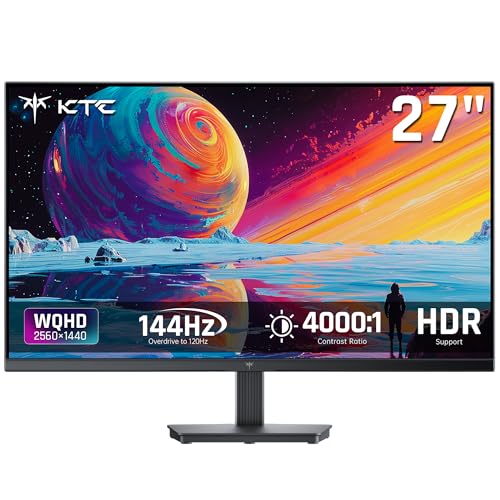
- 27-inch QHD 2560 x 1440 display
- 129% sRGB and 109% DCI-P3 specs
- 144Hz refresh with Adaptive Sync
Best For: Mixed-use creators who want sharp detail and smooth motion
ProColor Precision Pick – ASUS ProArt PA278QV 27 Inch QHD Monitor
If you’re comparing computer monitors for graphic design, the ASUS ProArt PA278QV is built around color accuracy and workflow comfort. Its Calman Verified panel, Delta E < 2 tuning, and 100% sRGB / 100% Rec. 709 coverage make it a practical fit for creative work where dependable color matters.
Best For: Designers and editors who want a calibrated 27-inch QHD display with flexible ergonomics.
Pros:
- Calman Verified with Delta E < 2 for accurate out-of-box color
- 100% sRGB and 100% Rec. 709 coverage for creative workflows
- 27-inch 2560 x 1440 IPS panel with wide viewing angles
- Fully adjustable stand plus flicker-free and blue light filtering
Cons:
- 75Hz refresh rate is modest if you also want fast gaming performance
- QHD resolution is lower than 4K for ultra-fine detail work
- Black finish and professional styling are understated rather than premium-looking
Overall, this ProArt model is a strong all-around choice for design-focused users who value validated color and a comfortable desk setup over extra resolution or gaming features.
Detail-Rich 4K Value Pick – LG 27US550-W 27-inch UltraFine 4K Monitor
For computer monitors for graphic design, the LG 27US550-W focuses on sharp 4K detail and a wide color range. Its 27-inch IPS panel, 3840 x 2160 resolution, HDR10 support, and up to 90% DCI-P3 expression make it appealing for creatives working with high-detail imagery.
Best For: Photo and video editors who want a 4K display with broad color expression and easy layout management.
Pros:
- 4K UHD resolution for crisp detail and workspace clarity
- Up to 90% DCI-P3 color gamut expression with HDR10 support
- IPS panel with wide viewing angles for collaborative viewing
- Height, swivel, pivot, and tilt adjustments for flexible positioning
Cons:
- 60Hz refresh rate is basic compared with faster displays
- 1-year parts and labor warranty is shorter than some competitors
- No USB-C connectivity listed, so cable management may be less streamlined
This LG UltraFine is a sensible pick if your priority is detailed 4K editing and strong color presentation in a straightforward, adjustable package.
Compact Color-Accuracy Pick – ASUS ProArt PA248QV 24 Inch WUXGA Monitor
If you want computer monitors for graphic design in a smaller footprint, the ASUS ProArt PA248QV is a practical fit. It combines 100% sRGB / Rec.709 coverage, DeltaE < 2 accuracy, and a 1920 x 1200 16:10 panel that gives you a little extra vertical space for tools and timelines.
Best For: Designers who prefer a compact monitor with accurate color and extra vertical workspace.
Pros:
- Calman Verified with DeltaE < 2 for dependable color accuracy
- 100% sRGB and Rec.709 coverage for creative and video work
- 16:10 WUXGA layout adds useful vertical room for panels and documents
- Fully adjustable stand plus anti-glare screen for longer sessions
Cons:
- 24.1-inch size is smaller than many design-focused 27-inch displays
- 1920 x 1200 resolution is not as detailed as 4K options
- Not ideal if you want a large canvas for complex multitasking
As a compact ProArt display, this model makes sense for creators who want accurate color and a productive 16:10 workspace without moving up to a larger monitor.
High-Refresh Creator Pick – Dell S2725QC 27-inch 4K USB-C Monitor
The Dell S2725QC stands out among computer monitors for graphic design if you also want a smoother all-purpose desktop experience. It pairs a 27-inch 4K IPS screen with 99% sRGB, USB-C connectivity with up to 65W power delivery, and ComfortView Plus to reduce blue light without sacrificing color accuracy.
Best For: Creators who want 4K detail, USB-C simplicity, and a faster refresh rate.
Pros:
- 4K 3840 x 2160 IPS panel with 99% sRGB for vivid color
- 120Hz refresh rate and FreeSync Premium for smoother motion
- USB-C single-cable setup with up to 65W power delivery
- ComfortView Plus reduces blue light while preserving color accuracy
Cons:
- Color gamut is listed at 99% sRGB, so it is less broad than DCI-P3-focused panels
- Designed as a general desktop monitor, not a dedicated pro-graphics display
- Premium extras like higher-end studio calibration are not listed in the specs
This Dell is a smart choice if you want a sharp 4K creative monitor that also feels modern and responsive for everyday work.
Ultra-Detail 4K Editing Pick – Samsung 27" ViewFinity S7
For computer monitors for graphic design, the Samsung 27" ViewFinity S7 is built around sharp 4K UHD resolution and a high pixel density that helps reveal fine detail in layouts, photos, and video work. Its IPS panel, HDR10 support, and 178-degree viewing angle make it a practical choice when you want consistent visuals for editing and review.
Best For: Designers and photo/video editors who want a 27-inch 4K monitor with strong detail and dependable color-focused viewing.
Pros:
- 4K UHD resolution with high pixel density for detailed creative work
- IPS panel and 178-degree viewing angle for consistent image quality
- HDR10 support for improved contrast with darker blacks and brighter highlights
- Eye Saver Mode and TUV-certified eye comfort features for longer sessions
Cons:
- 60Hz refresh rate is geared more toward editing than motion-heavy use
- Includes HDMI and DisplayPort, but connectivity is more basic than USB-C models
- No factory-calibrated color claim is listed in the supplied details
This Samsung is a sensible fit if your priority is crisp 4K detail and comfortable day-to-day editing. It looks especially appealing for creators who want a straightforward display for business, photo, and video tasks without extra bells and whistles.
Color-Critical Pro Choice – ASUS ProArt PA279CRV
The ASUS ProArt PA279CRV is one of the strongest computer monitors for graphic design if color accuracy is your top priority. It pairs a 27-inch 4K display with 99% DCI-P3 and 99% Adobe RGB coverage, factory calibration to Delta E < 2, and a Calman Verified profile, making it a highly practical option for precise visual work.
Best For: Designers, Mac users, and color-focused creators who need accurate 4K output and flexible connectivity.
Pros:
- Factory-calibrated with Delta E < 2 color accuracy and Calman Verified tuning
- Wide color gamut with 99% DCI-P3 and 99% Adobe RGB coverage
- USB-C with 96W power delivery plus DisplayPort, HDMI, and USB hub
- Ergonomic stand with tilt, swivel, pivot, and height adjustment
Cons:
- 60Hz refresh rate is aimed at professional work rather than fast-motion use
- Premium feature set may be more than casual users need
- To get the full pro workflow benefit, color-managed work is the main use case
For design work where accurate color matters more than gaming features, this ASUS stands out. The combination of calibration, broad gamut coverage, and USB-C convenience makes it an efficient creative workstation display.
Fast QHD Work-and-Play Option – Dell 27 Plus QHD S2725DSM
If you want computer monitors for graphic design that also handle general desktop use well, the Dell 27 Plus QHD Monitor offers a balanced 27-inch QHD panel with 99% color gamut coverage, IPS viewing angles, and a clean Ash White finish. It is less focused on strict color calibration than a pro art display, but its sharper-than-1080p resolution and adjustable stand make it a versatile everyday choice.
Best For: Designers who want a smooth QHD monitor for mixed creative, desktop, and light gaming use.
Pros:
- QHD 2560×1440 resolution gives more workspace than standard Full HD
- 144Hz refresh rate and 1ms MPRT provide smooth motion handling
- IPS panel with 178-degree viewing angle and 99% color gamut
- Height, tilt, swivel, and pivot adjustments improve desk ergonomics
Cons:
- Not as color-focused as a dedicated pro graphics monitor
- 8ms response time is not tuned for demanding motion work
- HDMI/DisplayPort connectivity is practical, but there is no USB-C listed
This Dell makes sense when you want a monitor that can support design work without giving up smooth performance for everyday use. It is a flexible pick for buyers who value a sharper QHD canvas and easy adjustability.
Budget 24-inch FHD Option – Philips 24-inch FHD 100Hz VA Monitor
If you need computer monitors for graphic design on a tighter budget, this Philips 23.8-inch display gives you Full HD resolution, a VA panel, and wide viewing angles in a simple, work-friendly package. It is better suited to general design work, layout tasks, and everyday content creation than to color-critical professional production, but the sharp 1920 x 1080 image and 16.7 million colors make it a practical starter monitor.
Best For: Entry-level designers, office creatives, and anyone who wants a compact, affordable screen for everyday design tasks.
Pros:
- Full HD 1920 x 1080 resolution on a 23.8-inch screen
- VA panel with 178-degree viewing angles and deeper blacks
- 100Hz refresh rate and FreeSync support for smoother motion
- Three-sided bezel-free design works well in multi-monitor setups
Cons:
- FHD resolution is less spacious than QHD or ultrawide options
- Glossy screen finish may be less ideal in bright workspaces
- Limited connectivity with only HDMI and VGA
This Philips model is a sensible pick if you want a clean, compact monitor for design work without spending on higher-end panels or extra screen space. It focuses on core usability and consistent viewing rather than advanced creator features.
Ultrawide Workspace Pick – Samsung 34-inch ViewFinity S50GC
For computer monitors for graphic design, this Samsung 34-inch ultrawide is built around screen space and multitasking. The 21:9 Ultra-WQHD resolution gives you room for timelines, toolbars, and side-by-side windows, while HDR10 and the wide 3440 x 1440 canvas make it a strong fit for photo and video editing workflows.
Best For: Designers who want a wide workspace for editing, multitasking, and keeping multiple panels open at once.
Pros:
- 34-inch Ultra-WQHD 3440 x 1440 resolution with a 21:9 aspect ratio
- HDR10 supports over 1 billion colors for richer-looking content
- PBP and PIP help when reviewing two sources or running two programs
- 100Hz refresh rate and FreeSync keep motion smooth
Cons:
- Not as tall as a dual-monitor setup for some vertical workflows
- Color gamut is listed at 72, so it may not suit demanding color-critical users
- 34-inch ultrawide size needs more desk space
This Samsung is a smart choice if your design work benefits from horizontal room more than maximum pixel density. It emphasizes productivity, split-screen flexibility, and a comfortable eye-care feature set.
High-Refresh QHD Value Choice – KTC 27-inch QHD 144Hz Monitor
If you want computer monitors for graphic design that also handle fast-moving content, this KTC 27-inch QHD display offers a sharp 2560 x 1440 image, strong contrast, and factory-calibrated color specs. It is aimed more at versatile productivity and gaming than at pro-grade creator calibration, but the 129% sRGB coverage and 109% DCI-P3 rating make it appealing for design-focused users who want a lively, detailed panel.
Best For: Designers who want a sharp 27-inch QHD screen with strong contrast and a high refresh rate.
Pros:
- QHD 2560 x 1440 resolution gives plenty of room for design tools and timelines
- 129% sRGB and 109% DCI-P3 color specs support vibrant visuals
- 144Hz refresh rate with Adaptive Sync for smooth motion
- 4000:1 contrast and matte finish help image depth and reduce glare
Cons:
- Positioned primarily as a gaming monitor rather than a creator-first display
- 27-inch screen may not offer the workspace of an ultrawide
- Built-in focus is on speed and contrast, not advanced professional calibration features
This KTC model is a compelling middle ground if you want sharper-than-FHD clarity and smoother motion without moving up to a larger ultrawide. It is especially attractive for mixed-use setups where design work and entertainment share the same screen.
How We Picked the Best Computer Monitors for Graphic Design
We focused on the traits that matter most for design work: accurate color performance, sharpness, usable screen size, reliable panel types, and workstation-friendly features such as USB-C, adjustable stands, and VESA support. We also considered how well each display fits common creative workflows, including photo editing, illustration, layout design, and general content creation.
For Computer Monitors for Graphic Design, a monitor does not need to be the most expensive option to be useful. The best picks balance image quality, ergonomics, and value, while giving you enough resolution and workspace to see details clearly.
Quick Comparison
If you want the most straightforward setup, 27-inch IPS models with QHD or 4K resolution are the safest all-around choice. QHD screens tend to offer a strong mix of sharpness and affordability, while 4K displays are better for fine detail, high-resolution assets, and more precise editing. A 24-inch 16:10 monitor can be excellent if you want extra vertical space, and ultrawide models are helpful if your workflow benefits from side-by-side panels.
Key Buying Factors for Computer Monitors for Graphic Design
Color Accuracy
Look for wide sRGB coverage at minimum, and consider displays with strong out-of-the-box tuning if you want less setup time. If you work across multiple media types, broader color support can be useful, but accurate calibration is still the real priority.
Resolution and Screen Size
27-inch QHD is a common sweet spot for design, offering enough pixel density without making UI elements too small. 27-inch 4K displays provide even finer detail, while 24-inch WUXGA or FHD options can work well for tighter budgets or compact desks.
Panel Type and Uniformity
IPS panels are usually the safest choice for design because they provide strong viewing angles and more consistent color. VA panels can offer better contrast, but they may be less ideal for exact color-critical work if consistency is your top concern.
Connectivity and Ergonomics
USB-C, DisplayPort, and reliable HDMI support make a monitor easier to integrate with modern laptops and desktops. Height adjustment, tilt, swivel, pivot, and VESA mounting can also improve comfort during long editing sessions.
Who Should Buy Which Computer Monitors for Graphic Design?
Choose a QHD IPS monitor if you want the best blend of value and productivity. Pick a 4K creator monitor if your work depends on fine detail, print-oriented projects, or a cleaner on-screen workspace. Go for a 24-inch model if space is limited, and consider an ultrawide if you regularly juggle timelines, toolbars, or multiple windows. If you need a secondary display for general creative use, a budget-friendly 100Hz screen can still be a practical choice, as long as you are not relying on it for color-critical final approval.