
Choosing the right display can make a bigger difference to your edits than almost any other upgrade. The best computer monitors for photo editing help you see accurate color, consistent contrast, and fine detail before you print or publish.
This roundup focuses on creator-friendly 24-inch to 27-inch models with strong resolution, solid panel quality, and practical connectivity for modern editing workflows.
Best 10 Computer Monitors for Photo Editing Picks for 2026
Color-Accurate 4K Workhorse
ASUS ProArt PA279CRV 27 Inch 4K USB-C Monitor

- 99% DCI-P3 and 99% Adobe RGB coverage
- Factory calibrated to Delta E < 2
- USB-C with 96W power delivery
Best For: Photographers and creatives who need precise color and 4K detail
Balanced QHD Productivity Pick
Dell UltraSharp U2724D 27-Inch Monitor

- 27-inch QHD resolution for a crisp workspace
- 120Hz panel with smooth scrolling
- Ambient Light Sensor adjusts brightness and color
Best For: Editors who want comfort, smooth motion, and a sharp QHD display
Versatile 4K Creator Display
LG 27UP850K-W 27-Inch Ultrafine Monitor

- 27-inch 4K UHD panel for sharp detail
- Up to 95% DCI-P3 color gamut
- USB-C with up to 90W power delivery
Best For: Creators who want 4K clarity, good color, and flexible connectivity
Compact Budget ProArt Option
ASUS ProArt PA247CV 24-Inch USB-C Monitor

- 100% sRGB and 100% Rec. 709 coverage
- Factory calibrated with Delta E < 2 accuracy
- USB-C with 65W power delivery
Best For: Creators who want accurate color in a compact 24-inch monitor
Best for Easy Setup

- 27-inch 4K IPS panel with 99% sRGB
- ComfortView Plus reduces blue light by up to 35%
- Height, pivot, swivel, and tilt adjustments
Best For: Editors who want sharp 4K detail with reliable sRGB color and easy comfort adjustments
Pro-Grade Color Tuner

- Calman Verified with Delta E < 2 accuracy
- 100% sRGB and 100% Rec. 709 coverage
- Adjustable stand and integrated USB hub
Best For: Photographers and creators who want factory-calibrated color and ergonomic flexibility
Wide-Gamut Budget 4K Option
CUNPU 27" 4K Photo Video Editing Monitor

- 100% DCI-P3 coverage with 1.07 billion colors
- 27-inch 4K IPS panel for sharp detail
- PBP and PiP modes for multitasking
Best For: Editors who want a 4K IPS monitor with wide gamut color and multitasking features
Color-Accurate 24" ProArt
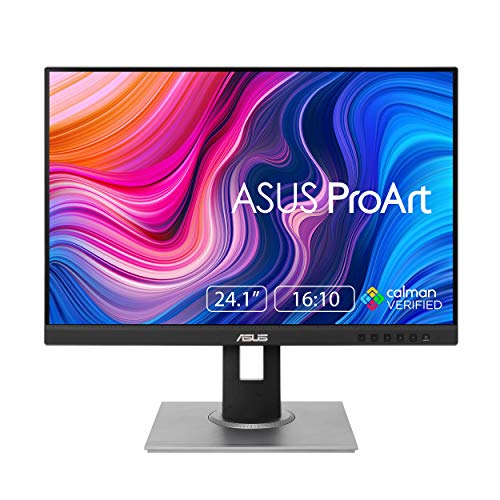
- 100% sRGB/Rec.709 coverage with DeltaE < 2
- 16:10 WUXGA panel adds vertical workspace
- Ergonomic stand with height, pivot, swivel, tilt
Best For: Photographers who need dependable color accuracy in a compact monitor
Creator-Friendly 4K Pick
Samsung ViewFinity S7 27" S70D

- 27-inch 4K UHD panel with HDR10
- HDMI, DP, USB-A, and USB-B ports
- Tool-free Easy Setup Stand
Best For: Photo editors who want sharp 4K detail and simple setup
High-Resolution 4K Workhorse

- 27-inch 4K IPS panel with HDR10
- 178-degree viewing angle for consistent visuals
- Display Manager adds split screen and KVM tools
Best For: Editors who want a sharp 4K IPS monitor for multitasking
Color-Accurate 4K Workhorse – ASUS ProArt PA279CRV 27 Inch 4K USB-C Monitor
If you want computer monitors for photo editing, the ASUS ProArt PA279CRV is built around color accuracy and a sharp 27-inch 4K workspace. Its factory calibration, wide Adobe RGB and DCI-P3 coverage, and USB-C connectivity make it a strong fit for image-heavy editing where consistency matters.
Best For: Photographers and creatives who want accurate color, 4K detail, and a flexible USB-C setup.
Pros:
- 99% DCI-P3 and 99% Adobe RGB coverage for wide color reproduction
- Factory calibrated to Delta E < 2 and Calman Verified for color precision
- 27-inch 4K panel gives plenty of space for editing and reviewing details
- USB-C with 96W power delivery plus DisplayPort, HDMI, and USB hub
Cons:
- 60Hz refresh rate is aimed at work, not fast motion
- 4K resolution may require scaling preferences to suit your workflow
Overall, this is the most editor-focused option in the group, especially if you value factory calibration and broad-gamut color over gaming-style extras.
Balanced QHD Productivity Pick – Dell UltraSharp U2724D 27-Inch Monitor
Dell UltraSharp 27 Monitor - U2724D 68.47cm (27), W128815277 (U2724D 68.47cm (27))
Check Price On AmazonThe Dell UltraSharp U2724D is a practical choice for computer monitors for photo editing when you want a clean, comfortable desktop setup without jumping to 4K. Its QHD resolution, 120Hz panel, and built-in ambient light sensor make it well suited to long editing sessions in changing room lighting.
Best For: Editors who want a sharp 27-inch display with smooth scrolling and adaptive brightness.
Pros:
- 27-inch QHD panel offers a sharper workspace than standard Full HD
- 120Hz refresh rate delivers smoother movement and scrolling
- Ambient Light Sensor helps adjust brightness and color temperature
- Ergonomic stand supports height, tilt, swivel, and pivot adjustments
Cons:
- Color specs are less specialized than a true wide-gamut photo monitor
- No 4K resolution for users who want maximum image detail
This model is a strong everyday editing monitor if you prioritize comfort, flexible ergonomics, and a crisp QHD canvas over extreme resolution.
Versatile 4K Creator Display – LG 27UP850K-W 27-Inch Ultrafine Monitor
The LG 27UP850K-W is a versatile option for computer monitors for photo editing, especially if you want 4K resolution, wide color support, and a USB-C connection that can handle power and data. With HDR support and an ergonomic stand, it works well as a central monitor for both editing and general creative use.
Best For: Creators who want a flexible 4K monitor with good color range and convenient USB-C connectivity.
Pros:
- 27-inch 4K UHD panel provides sharp detail for image work
- Up to 95% DCI-P3 color gamut supports vibrant color reproduction
- USB-C with up to 90W power delivery plus DisplayPort and dual HDMI
- Ergonomic stand supports height, tilt, and pivot adjustment
Cons:
- 60Hz refresh rate keeps it focused on productivity rather than motion
- Color coverage is good, but not as extensive as some pro-grade wide-gamut displays
For editors who want a feature-rich 4K monitor that can also handle streaming and everyday use, this LG lands in a very practical middle ground.
Compact Budget ProArt Option – ASUS ProArt PA247CV 24-Inch USB-C Monitor
If you need computer monitors for photo editing but want a smaller, more affordable workspace, the ASUS ProArt PA247CV is a straightforward choice. It offers factory calibration, 100% sRGB and Rec. 709 coverage, and USB-C connectivity in a 24-inch Full HD package that suits tighter desks and lighter editing needs.
Best For: Photographers and content creators who want accurate color in a compact 24-inch format.
Pros:
- 100% sRGB and 100% Rec. 709 support for standard creative work
- Factory calibrated and Calman Verified with Delta E < 2 accuracy
- USB-C with 65W power delivery plus HDMI, DisplayPort, and USB hub
- 5-year warranty adds long-term peace of mind
Cons:
- Full HD resolution is less detailed than 4K options
- 24-inch screen size gives less room for timelines and palettes
This is a sensible pick if you value reliable color accuracy and USB-C convenience, but do not need a large 4K panel for every project.
Best for Easy Setup – Dell 27 Monitor S2725QS
If you’re shopping for computer monitors for photo editing, the Dell S2725QS is an easy pick when you want sharp 4K detail, wide IPS viewing angles, and reliable 99% sRGB color coverage. It also adds ComfortView Plus and an anti-glare matte finish, which makes longer editing sessions easier on the eyes without giving up color accuracy.
Best For: Editors who want a 27-inch 4K IPS monitor with strong sRGB coverage and comfortable all-day use.
Pros:
- 4K UHD resolution delivers crisp detail for retouching and zoomed-in edits.
- 99% sRGB and IPS technology support accurate, vibrant color.
- ComfortView Plus reduces harmful blue light emissions by up to 35%.
- Height, pivot, swivel, and tilt adjustments make it easy to dial in your setup.
Cons:
- 99% sRGB is strong for web and general photo work, but not as broad as some wide-gamut panels.
- The built-in speakers are a bonus, but they are not the main reason to buy this monitor.
Overall, this Dell is a practical balanced choice for photo editors who value sharp 4K output, dependable color, and ergonomic flexibility. It fits especially well in a mixed work-and-creativity setup.
Pro-Grade Color Tuner – ASUS ProArt PA278QV
For computer monitors for photo editing, the ASUS ProArt PA278QV stands out as a creator-focused QHD display with Calman Verified accuracy and Delta E < 2. Its 100% sRGB and 100% Rec. 709 coverage make it a strong fit for color-conscious editing, while the matte IPS panel keeps images consistent from wide viewing angles.
Best For: Photographers and creators who want factory-calibrated color accuracy and a flexible, work-friendly 27-inch display.
Pros:
- Calman Verified with Delta E < 2 accuracy for true-to-life color.
- 100% sRGB and 100% Rec. 709 coverage support editing and content workflows.
- 27-inch 2560 x 1440 IPS panel offers clear detail and stable viewing angles.
- Highly adjustable stand plus USB hub help keep a creative desk organized.
Cons:
- QHD resolution is less detailed than 4K for ultra-fine retouching.
- 75Hz refresh rate is fine for editing, but not a standout for motion-heavy use.
This ProArt model is built for users who care more about color precision than flashy specs. If accurate image work is your priority, it delivers a very focused toolset.
Wide-Gamut Budget 4K Option – CUNPU 27" 4K Photo Video Editing Monitor
If you need computer monitors for photo editing with wide-gamut 4K detail, the CUNPU 27-inch monitor offers 100% DCI-P3 coverage, 1.07 billion colors, and a sharp 3840 x 2160 panel. It also includes PBP and PiP, which can be handy if you like comparing references or keeping another source visible while you work.
Best For: Editors who want a 27-inch 4K IPS display with wide color coverage and multitasking features.
Pros:
- 100% DCI-P3 color coverage and 1.07 billion colors support rich image work.
- 4K UHD resolution on a 27-inch IPS panel delivers sharp, detailed visuals.
- PBP and PiP modes add useful multitasking flexibility.
- FreeSync and G-Sync support help keep motion smoother in mixed-use setups.
Cons:
- 300 nits brightness is solid, but not especially high.
- 70Hz refresh rate is adequate, though not as smooth as higher-refresh alternatives.
This CUNPU monitor is a strong fit if you want wide color coverage and 4K clarity without losing practical extras. It leans more toward versatile productivity than premium calibration-focused editing.
Color-Accurate 24" ProArt – ASUS ProArt PA248QV
If you want computer monitors for photo editing with reliable color and a practical workspace layout, the ASUS ProArt PA248QV is built around accuracy. Its 100% sRGB/Rec.709 coverage, DeltaE < 2 calibration, and WUXGA 16:10 panel make it a strong fit for editing stills and video in a compact desktop setup.
Best For: Photographers and content creators who need dependable color accuracy in a smaller, ergonomic monitor.
Pros:
- 100% sRGB/Rec.709 coverage with DeltaE < 2 for accurate color work
- 16:10 WUXGA resolution gives extra vertical space for timelines and toolbars
- IPS panel, Calman Verified support, and anti-glare screen help long editing sessions
- Height, pivot, swivel, and tilt adjustments improve comfort and positioning
Cons:
- 24-inch 1920 x 1200 resolution is smaller than 27-inch 4K alternatives
- 75Hz refresh rate is fine for editing, but not a major advantage
- Best suited to color-managed work rather than high-end wide-gamut demands
This is a well-rounded pick if color fidelity matters more than maximum screen size. The ProArt line focuses on repeatable, creator-friendly accuracy, and this model adds useful ergonomics plus a long warranty.
Creator-Friendly 4K Pick – Samsung ViewFinity S7 27" S70D
For computer monitors for photo editing, the Samsung ViewFinity S7 brings the kind of 4K detail that makes retouching, layout checks, and fine adjustments easier to judge. The 27-inch 3840 x 2160 panel, HDR10 support, and wide connectivity make it a practical creator monitor for a clean desktop workflow.
Best For: Photo editors who want a sharp 4K workspace with easy setup and broad device support.
Pros:
- 4K UHD resolution provides strong detail and more usable screen space
- HDR10 and wide color support improve contrast and color richness
- Easy Setup Stand needs no tools or screws
- Includes HDMI, DP, USB-A, and USB-B connectivity for a flexible workspace
Cons:
- 60Hz refresh rate is standard, not aimed at motion-focused use
- 1,000:1 contrast ratio is solid, but not exceptional for a pro display
- Eye comfort features are useful, though the panel is still tuned more for productivity than premium color grading
This model is a smart choice if you want the clarity of 4K without a complicated setup. It balances creator-focused features with everyday convenience, which makes it easy to recommend for mixed editing and office use.
High-Resolution 4K Workhorse – Samsung ViewFinity S7 S70H
The Samsung ViewFinity S7 S70H is a straightforward option among computer monitors for photo editing if your priority is crisp detail and a clean, productivity-first layout. Its 27-inch 4K IPS panel, HDR10 support, and 178-degree viewing angle make it well suited to careful image review and everyday creative work.
Best For: Editors who want a sharp 4K IPS monitor with practical workspace tools.
Pros:
- 4K UHD resolution with high pixel density for detailed image editing
- IPS panel and 178-degree viewing angle help maintain consistent visuals
- HDR10 support and 0.99 color gamut coverage support accurate-looking content
- Samsung Display Manager adds split screen, brightness control, KVM, and PIP/PBP tools
Cons:
- 60Hz refresh rate is standard for productivity, not a performance feature
- 1-year warranty is shorter than some creator-focused alternatives
- Connectivity is limited to HDMI and DP, so there are fewer built-in port options than on some rivals
If you want a no-nonsense 4K panel for editing and multitasking, this monitor does the basics well. The extra software tools are especially useful if your workspace also handles general business tasks.
How We Picked the Best Computer Monitors for Photo Editing
We focused on Computer Monitors for Photo Editing that balance color accuracy, sharpness, and usability. Priority went to IPS panels, high-resolution options, wide-gamut support, factory calibration or creator-focused tuning, and features that help with long editing sessions such as USB-C, ergonomic stands, and low-reflection finishes.
Quick Comparison
For most photographers, 27-inch 4K models offer the best mix of workspace and detail. If you edit on a tighter budget, a 27-inch QHD display can still deliver a comfortable canvas. For color-critical work, look for strong factory calibration and broad coverage of common color spaces such as sRGB and DCI-P3.
Key Buying Factors for Computer Monitors for Photo Editing
Resolution and Screen Size
Higher resolution matters because it lets you inspect images more precisely. A 27-inch 4K panel is often the sweet spot, while 24-inch monitors can be a smart choice for smaller desks or users who prefer simpler scaling.
Panel Type and Color Performance
IPS is usually the best choice for photo work because it offers stable viewing angles and dependable color. Pay attention to factory calibration, color gamut claims, and whether the monitor supports hardware calibration or creator modes.
Connectivity and Workflow
USB-C is especially useful if you want a cleaner desk and one-cable laptop connection. Extra video inputs, built-in hubs, and easy switch features can also streamline work across multiple devices.
Ergonomics and Long-Session Comfort
A height-adjustable stand, tilt, pivot, and swivel support make it easier to maintain a good editing posture. Eye-care features can also reduce fatigue during longer retouching sessions.
Who Should Buy Which Computer Monitors for Photo Editing?
If you want the most balanced setup for serious editing, choose a 27-inch 4K monitor with strong color coverage and USB-C. If you prioritize value and everyday editing, a QHD option may be enough. If you work across print, web, and multiple devices, favor models with flexible ports and creator-oriented calibration tools. Casual photographers and students may prefer a simpler 24-inch display that still offers accurate color without taking up much space.
In short, the best Computer Monitors for Photo Editing are the ones that match your workflow, desk space, and accuracy needs—not just the highest specs on paper.