
If your workspace is short on room, the right display can make a small desk feel much more usable. The best compact monitors balance screen size, image quality, and stand design without crowding your setup.
Below, we focus on practical picks for everyday work, student use, and light entertainment, with options that fit tighter spaces while still delivering a comfortable viewing experience.
Best 10 Computer Monitors for Small Desks Picks for 2026
Ultra-Compact FHD Pick

- 21.5-inch size suits tight desks
- 100Hz refresh with Adaptive-Sync
- Full HD VA panel with strong contrast
Best For: compact desks needing smoother everyday use
Budget Legacy Option
ViewSonic 19" Compact WXGA Monitor

- Very compact 19-inch footprint
- HDMI and VGA for broad compatibility
- Flicker-Free and Blue Light Filter
Best For: tight desks and basic office or legacy device use
Balanced Small-Desk Choice

- 23.8-inch Full HD display
- 100Hz with FreeSync support
- Bezel-free design saves visual space
Best For: small desks that can fit a 24-inch productivity monitor
Extra-Slim Everyday Pick

- Slim 19-inch footprint for tight spaces
- 1440 x 900 resolution with matte finish
- HDMI and VGA for broad device support
Best For: compact desks needing a thin, practical everyday display
Compact office monitor
Acer 21.5-inch FHD 100Hz Office Monitor

- 21.5-inch size fits small desks well
- 1080p resolution keeps text sharp
- 100Hz and 1ms support smoother motion
Best For: Small desks, office work, and light gaming
Slim modern monitor
LG 24U411A-B 24-inch IPS 120Hz Monitor
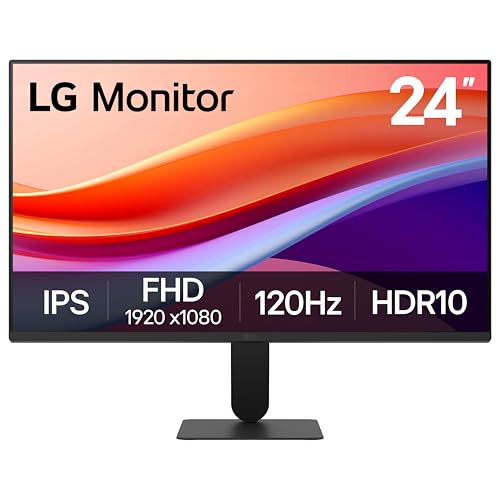
- Virtually borderless design looks clean on small desks
- IPS Full HD panel gives sharp wide-angle viewing
- 120Hz refresh rate supports smooth motion
Best For: Compact workspaces that need a clean, modern display
Compact all-rounder
Samsung 22-inch S30GD IPS 100Hz Monitor

- 22-inch footprint suits tighter desks
- IPS panel keeps colors consistent
- 100Hz refresh and eye-comfort features add value
Best For: Small desks, everyday productivity, and casual use
Compact 22-Inch 144Hz Pick for Small Desks
22-inch 144Hz monitor with built-in speakers

- 22-inch 1080p panel fits tighter setups better than larger screens
- 144Hz refresh rate and 1ms response time suit casual gaming
- Built-in speakers and slim bezels help keep desks uncluttered
Best For: Small desks, light gaming, and all-in-one everyday use
Portable 15.6-Inch Second Screen for Tight Spaces
Portable 15.6-inch IPS monitor with USB-C

- 1.43-pound, 0.31-inch design is easy to move and store
- USB-C and mini HDMI support simple plug-and-play use
- IPS panel with HDR and low blue light suits everyday viewing
Best For: Portable productivity, travel, and temporary second-screen setups
Ultra-Compact FHD Pick – Philips 22" 100Hz VA Monitor
If you need computer monitors for small desks, this 21.5-inch Philips keeps the footprint modest while still giving you Full HD 1080p clarity. It pairs a 100Hz refresh rate with Adaptive-Sync, so everyday work, streaming, and light gaming all feel smooth without demanding much space.
Best For: Small desks that need a compact monitor with sharper Full HD detail and smooth motion.
Pros:
- 21.5-inch viewable size fits tighter workspaces more easily than larger screens
- 100Hz refresh rate and Adaptive-Sync help reduce stutter in motion
- VA panel delivers strong contrast with deeper blacks and brighter whites
- Flicker-Free, Blue Light Filter, and Eye Care features support comfortable viewing
Cons:
- Only one HDMI port is listed
- Glossy finish may not suit every bright room
- Smaller size means less screen real estate than 24-inch options
Overall, this is a smart space-saving choice if you want a compact monitor that still feels modern and responsive. It balances size, image quality, and everyday comfort well for cramped desks.
Budget Legacy Option – ViewSonic 19" Compact WXGA Monitor
For computer monitors for small desks, this ViewSonic is one of the easiest fits thanks to its 19-inch compact design. Its 1366 x 768 resolution and 60Hz refresh rate are aimed at basic office work, study, and legacy systems where small size and simple compatibility matter most.
Best For: Very tight desk spaces, basic productivity, and older devices that still need HDMI or VGA.
Pros:
- Compact 19-inch size is well suited to small desks and home offices
- HDMI and VGA inputs support modern and legacy hardware
- Flicker-Free and Blue Light Filter features add viewing comfort
- ViewMode presets make it easy to switch between common tasks
Cons:
- Lower 1366 x 768 resolution is not as sharp as Full HD
- 60Hz refresh rate is basic rather than fast
- Viewing angle is more limited than many larger VA panels
This monitor makes sense when desk space is the top priority and you do not need premium resolution. It is a practical, no-frills option for everyday tasks and compatibility-focused setups.
Balanced Small-Desk Choice – Philips 24" FHD 100Hz Monitor
If you want computer monitors for small desks but still want more workspace than a 19-inch panel, this 23.8-inch Philips is a strong middle ground. It offers Full HD resolution, a 100Hz refresh rate, and a near bezel-free design that can make a compact setup feel cleaner and more efficient.
Best For: Small desks that can handle a 24-inch screen and need a balanced mix of productivity and smooth motion.
Pros:
- 23.8-inch Full HD screen gives more usable space without becoming oversized
- 100Hz refresh rate and FreeSync support smoother visuals
- Three-sided virtually bezel-free design works well for multi-monitor setups
- EasyRead mode is useful for long document-heavy work sessions
Cons:
- Uses a glossy screen finish
- Consumes more power than the smaller Philips model listed here
- Still larger than a true compact 19- to 22-inch desk saver
This model is the best all-rounder in the group if your desk can fit a 24-inch class display. It gives you noticeably more screen area than the smallest options while staying practical for compact workspaces.
Extra-Slim Everyday Pick – 19" HD+ Thin Monitor
Among computer monitors for small desks, this 19-inch model stands out for its slim profile and modest physical size. With 1440 x 900 resolution, HDMI and VGA support, and a matte anti-glare finish, it is aimed at simple desktop, laptop, and retail-style setups where space efficiency matters.
Best For: Small desks that need a thin, basic monitor with legacy-friendly connectivity and a compact layout.
Pros:
- 19-inch size and thin design help it fit cramped work surfaces
- 1440 x 900 resolution is a step above basic entry-level HD
- HDMI and VGA inputs make it flexible for older and newer devices
- Matte anti-glare screen and Flicker-Free/Low Blue Light features add comfort
Cons:
- Not Full HD, so it is less sharp than the Philips options
- 110-degree viewing angle is narrower than many alternatives
- Only one HDMI port is listed
This is a sensible choice when you want a small, thin display more than a feature-rich one. It fits the role of a straightforward everyday monitor for compact desks and simple tasks.
Compact office monitor – Acer 21.5-inch FHD 100Hz Office Monitor
If you’re shopping for computer monitors for small desks, this Acer 21.5-inch display is a straightforward fit thanks to its compact footprint and 16:9 Full HD panel. The 100Hz refresh rate, 1ms response time, and Adaptive-Sync support make it a practical choice for everyday work, light gaming, and smooth scrolling without taking up much space.
Best For: Budget-minded buyers who want a smaller monitor for office tasks, general desktop use, and occasional gaming on a tight desk.
Pros:
- 21.5-inch size is easier to place on cramped desks than larger 24-inch models.
- Full HD 1080p resolution keeps text and details clear for business and personal use.
- 100Hz refresh rate and 1ms response time help motion look smoother.
- ZeroFrame design can make multi-monitor setups feel less cramped.
Cons:
- VA panel and 250-nit brightness are more basic than some IPS alternatives.
- Only one HDMI port is listed, so connectivity is limited.
- Tilt adjustment is the only stand adjustment mentioned.
Overall, this Acer is a compact, value-focused pick for smaller workspaces where screen size, simple setup, and smooth everyday performance matter more than premium extras.
Slim modern monitor – LG 24U411A-B 24-inch IPS 120Hz Monitor
For computer monitors for small desks, this LG 24-inch model aims to balance screen space with a slim, clean design. Its virtually borderless edges, slim stand base, and 24-inch Full HD IPS panel make it a strong choice when you want a modern look and a little more room for multitasking without adding visual bulk.
Best For: Users who want a tidy, modern monitor for a compact workspace, with smooth motion for work and occasional gaming.
Pros:
- Virtually borderless 3-side design helps keep a small desk looking uncluttered.
- IPS panel with Full HD resolution provides sharp visuals from wide viewing angles.
- 120Hz refresh rate offers smoother motion for scrolling, work, and gaming.
- Reader Mode, Flicker Safe, and tilt adjustment support more comfortable long sessions.
Cons:
- At 24 inches, it takes a bit more desk space than a 21.5-inch monitor.
- Only HDMI connectivity is listed in the supplied details.
- Brightness is rated at 250 nits, which is fairly standard rather than exceptional.
In practice, this LG is the most polished-looking option here for a smaller desk, especially if you want a slim frame, smooth refresh, and a monitor that feels easy to live with every day.
Compact all-rounder – Samsung 22-inch S30GD IPS 100Hz Monitor
This Samsung 22-inch model is a practical option if you’re comparing computer monitors for small desks and want something compact but capable. The IPS panel, 100Hz refresh rate, and slim border bezels keep it simple and space-friendly for everyday desktop use, with extra eye-comfort features for longer sessions.
Best For: Buyers who want a small, lightweight monitor for basic productivity, casual entertainment, and a neat-looking desk setup.
Pros:
- 22-inch size and lightweight 4.6-pound build make it easy to fit into tighter spaces.
- IPS panel delivers consistent color across the screen and from different angles.
- 100Hz refresh rate helps reduce lag and motion blur in daily use.
- Blue light reduction, flicker reduction, and tilt adjustment support comfortable viewing.
Cons:
- Response time is listed at 5ms, so it is not the fastest gaming option here.
- Only one HDMI port is listed in the details.
- Glossy screen finish may be less ideal in bright environments than matte alternatives.
As a compact all-around monitor, the Samsung S30GD keeps things tidy while still offering the basics most small-desk users need: clear 1080p visuals, a smooth 100Hz refresh, and eye-comfort features for long work sessions.
Compact 22-Inch 144Hz Pick for Small Desks – 22-inch 144Hz monitor with built-in speakers
If you want computer monitors for small desks without giving up smooth motion, this 22-inch Sceptre is a practical middle ground. Its 1080p resolution keeps text and windows readable at a modest footprint, while the nearly bezel-free design helps it feel less bulky on crowded setups.
Best For: Budget-conscious buyers who want a compact monitor for work, light gaming, or a dual-monitor setup on a small desk.
Pros:
- 22-inch size is easier to fit than larger desktop monitors.
- 144Hz refresh rate and 1ms response time support smoother gaming.
- Built-in speakers help reduce desk clutter.
- Blue-light shift is useful for longer sessions.
Cons:
- 1080p is the maximum resolution, so it is not ideal if you want extra screen detail.
- Only one HDMI port is listed.
- Built-in speakers are convenient, but not a replacement for dedicated audio.
Overall, this is a sensible small-desk monitor if you want a compact display that can handle both everyday use and casual gaming. The slim bezel and built-in speakers make it easier to keep a tight workspace clean and functional.
Ultra-Compact 15.6-Inch Desk Saver – 15.6-inch small monitor with HDMI and VGA
For computer monitors for small desks, this 15.6-inch SKitphrati is built around saving space first. The compact VA panel, 1080p resolution, and slim body make it easy to place on a crowded table or use as a simple everyday display without overwhelming the setup.
Best For: Users who need the smallest practical desktop monitor for a tight workspace, laptop use, or a basic home office.
Pros:
- 15.6-inch size is ideal when desk space is very limited.
- 1080p resolution and 99% sRGB coverage support sharp, colorful everyday use.
- HDMI and VGA give it flexible connection options.
- 75Hz refresh rate and eye-care features suit long sessions.
Cons:
- Smaller screen means less room for multitasking than a 22-inch model.
- 75Hz is more basic than higher-refresh gaming monitors.
- It is positioned as a personal monitor, so it is not aimed at larger workspace needs.
This is the most space-conscious option here, and that is its main advantage. If your desk is tiny and you mainly want a simple, compact screen for work or general use, it keeps the footprint low while still offering full HD resolution.
Portable 15.6-Inch Second Screen for Tight Spaces – Portable 15.6-inch IPS monitor with USB-C
If your goal is computer monitors for small desks and you also need flexibility, this Yxk portable monitor stands out. At just 1.43 pounds and 0.31 inch thick, it is easy to move, store, or position as a second screen without permanently taking up much space.
Best For: Laptop users, travelers, and anyone who wants a portable second screen that can disappear when not in use.
Pros:
- Ultra-slim and lightweight design is ideal for cramped desks and travel.
- IPS panel, HDR support, and low blue light aim for comfortable viewing.
- USB-C and mini HDMI make plug-and-play setup simple.
- Built-in speakers add convenience for casual use.
Cons:
- Requires compatible USB-C DP Alt Mode or Thunderbolt support for full USB-C use.
- 60Hz refresh rate is less suited to fast gaming than higher-refresh monitors.
- Best as a secondary display rather than a full desktop centerpiece.
This is the most flexible option in the group if desk space is precious and portability matters. It works best as a temporary or secondary screen, especially when you want a display that can be packed away after work or meetings.
How We Picked These Computer Monitors for Small Desks
We prioritized compact footprints, sensible screen sizes, and stands that don’t eat up valuable desk real estate. We also looked at resolution, panel quality, refresh rate, connectivity, and extras like VESA support, flicker reduction, and slim bases. For Computer Monitors for Small Desks, the goal is not just a smaller screen, but a better overall fit for limited space.
Quick Comparison: What Matters Most
In a tight setup, a 22- to 24-inch monitor is often the sweet spot for balance, while 15.6- to 19-inch models work well for ultra-compact desks or secondary screens. IPS panels usually offer stronger viewing angles and color consistency, while VA panels can provide better contrast. If you want smoother scrolling or casual gaming, look for 100Hz or higher. If your desk is especially narrow, a slim stand or VESA-mountable design can make a big difference.
Key Buying Factors for Computer Monitors for Small Desks
Physical Footprint
Check the stand depth, not just the screen size. A monitor with a slim base or mounting support can free up space for a keyboard, notebook, or speaker.
Screen Size and Resolution
A larger screen is not always worse for small desks if the stand is compact. Full HD is the most common choice, but make sure the pixel density still looks sharp at your typical viewing distance.
Panel Type and Comfort
IPS is usually best for all-day work, shared viewing, and color consistency. VA can be a solid alternative if you prefer deeper contrast. Features like flicker-free backlighting and low-blue-light modes can reduce strain during long sessions.
Ports and Flexibility
HDMI is essential for most modern setups, while USB-C can simplify portable or laptop-based use. VGA may still help with older devices. If you want more flexibility later, VESA compatibility is worth having.
Refresh Rate and Use Case
For office work, 60Hz to 100Hz is plenty. If you also game or want smoother motion, a higher refresh rate can improve responsiveness without taking up more space.
Who Should Buy Which Computer Monitors for Small Desks?
If you mainly need a workspace monitor, choose a 22- to 24-inch model with a stable, compact stand. If your desk is truly tiny, a 15.6- to 19-inch display may be the better fit. Students and remote workers should lean toward IPS models with eye-comfort features, while casual gamers may want a higher-refresh option. Portable monitors are best for laptop users who need a flexible second screen more than a permanent desktop display.
For most buyers, the best choice is the monitor that fits your desk first and your workload second. When space is limited, smart ergonomics matter as much as picture quality.