
Ultrawide displays can make a huge difference in both work and play, giving you more room for timelines, spreadsheets, and side-by-side windows without adding a second screen.
In this roundup, we focus on ultrawide computer monitors that balance screen size, resolution, refresh rate, and features so you can pick the right fit for your setup.
Best 10 Ultrawide Computer Monitors Picks for 2026
Work-Friendly Ultrawide
LG 34WR55QK-B 34-inch 3440x1440 Curved Monitor

- 3440 x 1440 ultrawide screen for multitasking
- USB-C with up to 65W power delivery
- OnScreen Control and PBP support split workflows
Best For: Laptop users and office multitaskers
Immersive Gaming Curve
Samsung Odyssey G5 34-inch 1000R Ultrawide

- 1000R curve for immersive gaming
- 165Hz refresh rate with 1ms response time
- FreeSync Premium reduces tearing and stutter
Best For: Gamers who want immersion and fast motion handling
Budget Productivity Pick
LG 34U530A-W 34-inch WFHD IPS Ultrawide
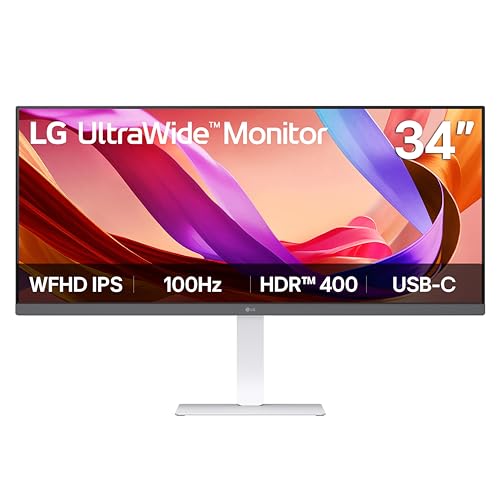
- 2560 x 1080 IPS ultrawide for extra workspace
- USB-C, HDMI, and DisplayPort support
- Built-in speakers and adjustable stand
Best For: Budget-minded multitaskers and everyday users
Balanced Office Ultrawide
Samsung ViewFinity S50GC 34-inch

- 3440 x 1440 Ultra WQHD for roomy multitasking
- PBP and PIP support two sources
- Eye Saver Mode and Flicker Free improve comfort
Best For: Office users and light creative work
Budget Ultrawide Gaming Pick
Gawfolk 34" 165Hz UWQHD Curved Monitor
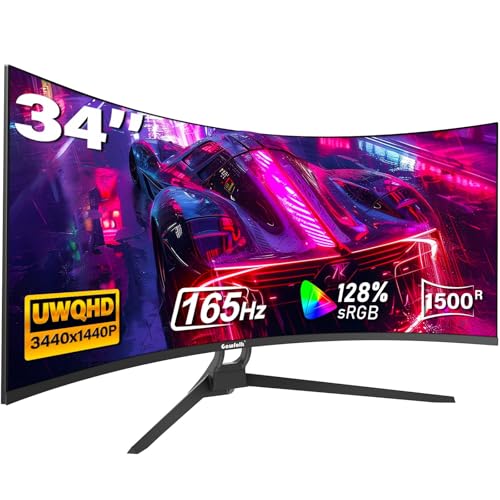
- 3440 x 1440 ultrawide panel with 1500R curve
- 165Hz refresh rate with FreeSync support
- 2 HDMI and 2 DisplayPort inputs for flexibility
Best For: Buyers who want an affordable curved ultrawide for gaming and multitasking
Comfort-Focused Office Ultrawide
Dell 34 S3425DW USB-C Curved Monitor

- ComfortView Plus cuts harmful blue light by up to 35%
- USB-C with up to 65W power delivery simplifies setup
- 3440 x 1440 VA panel with 120Hz and FreeSync Premium
Best For: Work-from-home users and professionals who want a comfortable, tidy ultrawide
High-Refresh Gaming Ultrawide
SANSUI 34" 200Hz AI Curved Monitor

- Up to 200Hz refresh rate with 1ms response time
- 3440 x 1440 Fast VA panel with 1500R curve
- HDMI 2.1, DP 1.4, and AI gaming tools
Best For: Gamers who want a very fast curved ultrawide with extra assist features
Immersive Gaming Pick
CRUA 34" 165Hz Curved Ultrawide

- 165Hz with FreeSync for smoother motion
- 3440×1440 34-inch curved ultrawide panel
- 2x HDMI, 2x DP, and 3.5mm audio port
Best For: Fast-paced gaming and everyday multitasking
Performance Value Pick

- Up to 180Hz/165Hz with 1ms MPRT
- 3440×1440 WQHD on a 21:9 curved screen
- 99% sRGB plus built-in speakers
Best For: Speed-focused gaming and wide-screen productivity
Work-First Choice

- 3440×1440 21:9 screen for multitasking
- 120Hz refresh with 5ms response time
- LG Switch, Reader Mode, and ergonomic adjustments
Best For: Work, browsing, and comfortable everyday use
Work-Friendly Ultrawide – LG 34WR55QK-B 34-inch 3440×1440 Curved Monitor
If you’re comparing ultrawide computer monitors for productivity, the LG 34WR55QK-B is built around screen space and practical desk-friendly features. Its 34-inch 21:9 WQHD panel, USB-C connectivity, and 100Hz refresh rate make it a strong fit for everyday work, light multimedia, and multitasking.
Best For: Laptop users, office multitaskers, and anyone who wants a clean single-monitor workflow with USB-C.
Pros:
- 3440 x 1440 ultrawide resolution gives you room for multiple windows on one screen.
- USB-C supports up to 65W power delivery for simpler laptop setup.
- OnScreen Control and Picture-by-Picture help organize split-screen workflows.
- Reader Mode, HDR10, and 99% sRGB support add comfort and color quality.
Cons:
- 5ms response time and 100Hz refresh are more work-focused than competitive gaming focused.
- VA panel behavior may not suit buyers who specifically want IPS viewing characteristics.
Overall, this LG is a practical ultrawide pick if your priority is efficiency, cable simplicity, and a flexible workspace. It balances good image quality with features that make daily use easier.
Immersive Gaming Curve – Samsung Odyssey G5 34-inch 1000R Ultrawide
Among ultrawide computer monitors aimed at gaming, the Samsung Odyssey G5 stands out for its aggressive 1000R curve and fast panel specs. The 34-inch WQHD resolution, 165Hz refresh rate, and 1ms response time are designed to keep motion smooth and gameplay responsive.
Best For: Gamers who want a deep curved ultrawide view and fast motion handling.
Pros:
- 1000R curvature creates a more enveloping gaming view.
- 165Hz refresh rate and 1ms response time help reduce motion blur.
- AMD FreeSync Premium helps reduce tearing, stutter, and input latency.
- HDR10 adds better color accuracy and highlights small details in scenes.
Cons:
- Brightness is listed at 250 cd/m2, which is modest compared with some alternatives.
- Single HDMI port limits flexibility for multi-device setups.
If gaming is the main reason you want an ultrawide, this Samsung leans hard into immersion and speed. It is less about office convenience and more about fast, cinematic play.
Budget Productivity Pick – LG 34U530A-W 34-inch WFHD IPS Ultrawide
This LG is a useful option if you want ultrawide computer monitors for productivity without jumping to a higher-resolution 3440 x 1440 panel. Its 2560 x 1080 IPS display gives you extra horizontal space, while the 100Hz refresh rate and USB-C make daily work and casual media smoother.
Best For: Budget-conscious buyers who want an ultrawide for multitasking, work, and general use.
Pros:
- 21:9 WFHD screen adds horizontal space for multitasking.
- USB-C, DisplayPort, and HDMI provide flexible connection options.
- Built-in speakers with Waves MaxxAudio reduce the need for extras.
- Height, tilt, and swivel adjustments make it easier to fit your desk setup.
Cons:
- 2560 x 1080 resolution is less detailed than 3440 x 1440 ultrawides.
- Single HDMI and single USB port may feel limited for some users.
This model makes sense when you want a wide workspace, solid color, and everyday comfort more than maximum sharpness. It is a sensible step into the ultrawide format.
Balanced Office Ultrawide – Samsung ViewFinity S50GC 34-inch
The Samsung ViewFinity S50GC is a straightforward choice for ultrawide computer monitors when you want more room to work without moving into a gaming-first design. Its 3440 x 1440 Ultra WQHD resolution, 100Hz refresh rate, and PBP/PIP support make it well suited to multitasking, light creative work, and general desktop use.
Best For: Users who want a clean ultrawide workspace for office tasks, photo/video work, and light gaming.
Pros:
- 3440 x 1440 Ultra WQHD resolution gives you substantial screen real estate.
- PBP and PIP let you use two sources at once.
- HDR10, AMD FreeSync, and 100Hz support smooth and polished everyday use.
- Eye Saver Mode and Flicker Free features are built for comfort during long sessions.
Cons:
- Brightness is listed at 300 cd/m2, so it is not aimed at very bright-room performance.
- It uses a basic 100Hz ceiling rather than a high-refresh gaming spec.
For buyers who want an ultrawide that handles work first and entertainment second, this Samsung is nicely balanced. It focuses on usability, comfort, and a clean screen layout rather than flashy extras.
Budget Ultrawide Gaming Pick – Gawfolk 34" 165Hz UWQHD Curved Monitor
If you’re comparing ultrawide computer monitors for gaming and multitasking, this Gawfolk 34-inch model focuses on the core specs that matter: a 3440 x 1440 UWQHD panel, 165Hz refresh rate, and 1500R curve. It offers a wide 21:9 workspace with support for FreeSync, making it a straightforward option for smoother motion in games and extra screen room for work.
Best For: Budget-minded buyers who want a curved ultrawide for gaming and everyday multitasking.
Pros:
- 165Hz refresh rate and 1ms response time for fluid gameplay.
- 3440 x 1440 ultrawide resolution with 1500R curvature for a more immersive view.
- FreeSync support and multiple inputs, including 2 HDMI and 2 DisplayPort ports.
- 128% sRGB coverage and HDR support for richer-looking visuals.
Cons:
- Brightness is rated at 300 cd/m², which is modest for a premium HDR experience.
- External audio isn’t a highlighted strength in the supplied notes.
Overall, the Gawfolk leans hard into value and speed rather than extras. If your priority is a capable ultrawide display for gaming and productivity without overcomplicating the purchase, this is a practical fit.
Comfort-Focused Office Ultrawide – Dell 34 S3425DW USB-C Curved Monitor
Among ultrawide computer monitors, this Dell 34-inch model is aimed at comfort and desk simplicity. It pairs a 3440 x 1440 VA panel with 120Hz refresh, FreeSync Premium, and USB-C connectivity, making it a strong fit for long work sessions, mixed desktop use, and some light creative work.
Best For: Professionals who want a comfortable, tidy ultrawide for work and everyday use.
Pros:
- Improved ComfortView Plus reduces harmful blue light emissions by up to 35%.
- USB-C connectivity with up to 65W power delivery helps reduce cable clutter.
- 99% sRGB and 95% DCI-P3 coverage support vivid, accurate-looking color.
- 120Hz refresh rate, FreeSync Premium, and ultra-low 0.03ms response time.
Cons:
- Not as fast on paper as 165Hz or 200Hz gaming-focused ultrawides.
- Designed around desk use rather than a heavily gaming-centric feature set.
This Dell stands out for practicality: eye comfort, strong color, and a cleaner single-cable setup. If you want an ultrawide that supports productivity first while still feeling smooth, it is an easy model to shortlist.
High-Refresh Gaming Ultrawide – SANSUI 34" 200Hz AI Curved Monitor
If you want one of the faster ultrawide computer monitors in this group, the SANSUI 34-inch model pushes up to 200Hz and pairs that with a 3440 x 1440 Fast VA panel. It adds gaming-focused AI tools, HDMI 2.1 support, and an ergonomic stand, so it is built for users who want speed, flexibility, and extra display features.
Best For: Gamers and power users who want a fast ultrawide with extra AI-enhanced gaming tools.
Pros:
- Up to 200Hz refresh rate with 1ms response time for fast motion.
- 3440 x 1440 ultrawide resolution with 1500R curve and 21:9 aspect ratio.
- HDMI 2.1 and DisplayPort 1.4 inputs support high-refresh connections.
- Includes AI features like crosshair, blue light reduction, sniper scope, and AI PQ.
Cons:
- No built-in speakers, so you will need external audio.
- Its feature set is heavily gaming-oriented, which may be more than some office users need.
Overall, the SANSUI is the most speed-focused option here and adds plenty of gamer-friendly extras. If high refresh rate and visual assist tools matter more than a minimalist setup, this ultrawide is a strong contender.
Immersive Gaming Pick – CRUA 34" 165Hz Curved Ultrawide
If you want ultrawide computer monitors for gaming or mixed-use desktop work, this CRUA 34-inch model delivers a big 3440×1440 canvas with a 1500R curve for a more wrapped-around view. The 165Hz refresh rate and FreeSync support are the headline features here, while the 120% sRGB claim and 300 cd/m² brightness give it a stronger color-focused pitch than many budget gaming ultrawides.
Best For: Gamers and multitaskers who want a curved 34-inch ultrawide with high refresh and broad connectivity.
Pros:
- 165Hz refresh rate with FreeSync for smoother gameplay and reduced tearing
- 3440×1440 resolution on a 34-inch 21:9 curved panel
- 120% sRGB wide color gamut and 4000:1 contrast
- 2x HDMI, 2x DisplayPort, and 3.5mm audio port for flexible hookups
Cons:
- HDMI is limited to up to 100Hz, so DP is needed for the full refresh rate
- No built-in speakers
- Brightness is 300 cd/m², which is solid but not especially high
The CRUA stands out if your priority is a fast, curved ultrawide experience without moving up to a premium price tier. It looks especially practical for gaming setups that also need enough screen space for office tasks or editing work.
Performance Value Pick – Sceptre 34" 180Hz Ultrawide
For shoppers comparing ultrawide computer monitors, this Sceptre 34-inch model leans heavily into speed and value-oriented features. You get a 3440×1440 WQHD panel, up to 180Hz/165Hz refresh support, 1ms MPRT response, and 99% sRGB coverage, making it a strong fit for gaming and general productivity on one wide screen.
Best For: Users who want a fast ultrawide monitor with strong color coverage and a feature-rich spec sheet.
Pros:
- Up to 180Hz/165Hz refresh support with 1ms MPRT
- 3440×1440 ultrawide resolution with 21:9 aspect ratio
- 99% sRGB color coverage and AMD FreeSync Premium
- Built-in speakers plus 2x DisplayPort, 2x HDMI, and audio out
Cons:
- Brightness is listed at 280 cd/m², which may not suit very bright rooms
- The large 34-inch curved design takes substantial desk space
- Backcover LED lighting may be unnecessary if you prefer a simple look
This Sceptre model is appealing if you want a spec-forward ultrawide that balances gaming speed, wide screen real estate, and practical connectivity. It’s a particularly easy shortlist candidate when you want strong refresh performance without giving up productivity-friendly width.
Work-First Choice – LG 34" UltraWide WQHD 120Hz
If you want ultrawide computer monitors mainly for work, browsing, and comfortable day-to-day use, this LG 34-inch UltraWide is built around that need. The 3440×1440 21:9 display gives room for multiple apps, while the 1800R curve, 120Hz refresh rate, and 5ms response time keep it flexible for both office tasks and lighter gaming.
Best For: Office users and hybrid shoppers who want a clean, comfortable ultrawide for work and light entertainment.
Pros:
- 3440×1440 21:9 UltraWide panel for multitasking
- 120Hz refresh rate with 5ms response time
- Up to 99% sRGB and HDR10 support for balanced color
- LG Switch, Reader Mode, tilt, and height adjustability add convenience
Cons:
- Brightness is 250 cd/m², so it is not the brightest option here
- Only one HDMI port is listed
- It is more work-oriented than a high-end gaming display
The LG makes a strong case if your ultrawide monitor needs to support focused work first and gaming second. Its mix of screen space, software controls, and ergonomic flexibility makes it easy to live with on a daily basis.
How We Picked These Ultrawide Computer Monitors
We prioritized the specs that matter most for real-world use: panel size, resolution, refresh rate, curvature, connectivity, and comfort features. We also looked for a mix of models suited to office work, creative multitasking, and gaming, so this list covers different budgets and priorities.
When comparing Ultrawide Computer Monitors, it helps to think beyond screen width alone. A sharp 3440 x 1440 panel, for example, often delivers a better all-around experience than a lower-resolution ultrawide if you plan to sit close or use it for text-heavy work.
Quick Comparison: What Matters Most
For productivity, prioritize resolution, USB-C, and eye comfort features. For gaming, focus on refresh rate, response time, and adaptive sync. If you want one display for both, aim for a middle ground: a 34-inch class monitor with WQHD resolution and at least 100Hz usually offers the best balance.
Curvature can also change the experience. Tighter curves like 1000R or 1500R can feel more immersive in games, while gentler curves such as 1800R often feel more natural for spreadsheets, browsing, and general office use.
Key Buying Factors for Ultrawide Computer Monitors
Resolution and Sharpness
Most buyers should target WQHD (3440 x 1440) if their budget allows. It gives you a cleaner image and better text clarity than WFHD (2560 x 1080), especially on a 34-inch panel.
Refresh Rate and Motion
If you game or scroll a lot, look for 100Hz or higher. Higher refresh rates make motion feel smoother, but they matter most when paired with a capable graphics card and the right port connection.
Ports and USB-C Convenience
USB-C is especially useful for laptop users because it can simplify your desk with a single cable for display and, on some models, power. HDMI and DisplayPort remain important for desktops and gaming systems.
Panel Type and Comfort
IPS panels usually offer better viewing angles and color consistency, while VA panels often deliver stronger contrast. Eye care features, low blue light modes, and flicker reduction can matter a lot for long work sessions.
Who Should Buy Which Ultrawide Computer Monitors?
If you want a productivity-first setup, choose a monitor with strong USB-C support, good ergonomics, and at least 3440 x 1440 resolution. If your main priority is gaming, a higher refresh rate model with adaptive sync and a more aggressive curve may be the better fit.
For mixed use, Ultrawide Computer Monitors in the 34-inch WQHD category are the safest all-around choice. They offer enough screen space for multitasking without demanding an oversized desk or an expensive GPU.