
Choosing the right player can make digital signage easier to manage, more reliable, and far more effective for day-to-day promotions.
This roundup of digital signage players for small businesses focuses on straightforward setup, content compatibility, remote management, and the features that matter most in real-world use.
Best 9 Digital Signage Players for Small Businesses Picks for 2026
Best for Easy Content Updates

- Cloud-controlled updates with a mobile app
- Free plan includes tech support and 50 slides
- 4K playback with HDMI, USB, and Ethernet
Best For: Small businesses that want simple cloud-managed signage and quick content updates.
Best for Small Spaces
BrightSign LS425 Digital Signage Appliance
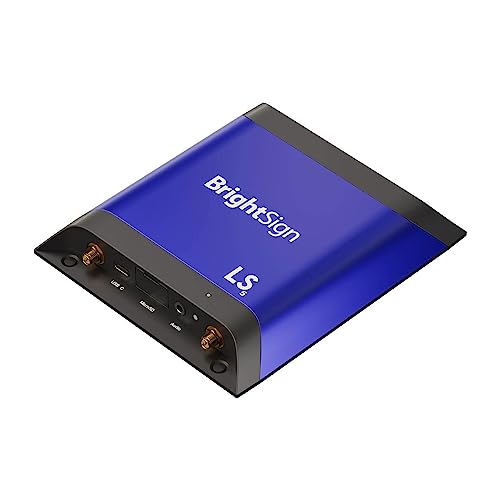
- Compact ultra-thin design for tight installs
- Supports HD/4K video, HTML5, and audio
- BrightSign OS improves reliability and uptime
Best For: Small businesses needing a slim, dependable signage player for compact installations.
Best for Reliable Playback
mediaDROID+ Digital Signage Player

- Dedicated Android signage player with watchdog support
- HDMI, WiFi, and Ethernet for flexible installs
- 16GB cache helps maintain uninterrupted playback
Best For: Small businesses that need a dependable, always-on signage player.
Best for High-Performance Content
BrightSign HD225 Digital Signage Appliance

- 4K60p HDR10 playback for polished visuals
- Full HD motion graphics and dual video decoding
- Flexible ports for interactive business displays
Best For: Small businesses needing a powerful signage player for advanced content and interactivity.
Best for Offline Reliability
Mini Max Digital Signage Media Player
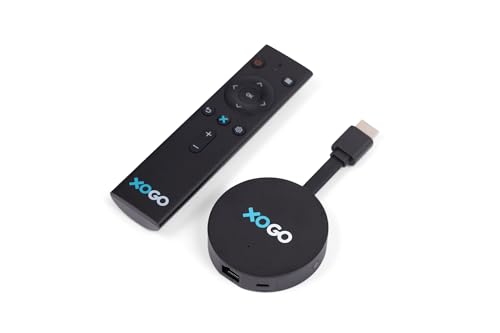
- Smooth 4K playback with scheduled playlists
- Cloud-managed content that keeps running offline
- Compact build with WiFi 6, ethernet, and HDMI CEC
Best For: Small businesses that want simple cloud control and dependable signage playback even when internet service is spotty.
Best for Secure 4K Signage
BrightSign LS445 4K Media Player
- 4K UHD, HD, and HTML5 playback
- Free Control Cloud for remote management
- Compact body with locking power cord
Best For: Small businesses needing a compact, secure player for reliable commercial signage.
Best Budget 4K Player
Micca 4K Ultra-HD Media Player

- Affordable plug-and-play signage player
- 4K HDMI plus analog AV support
- Auto-play, loop, and resume playback
Best For: Small businesses that need a simple, low-cost player for looping menu boards and promo screens.
Best for No-Subscription Control
Smart 4K Signage Player for TVs

- No-subscription CMS keeps operating costs lower
- Central remote control works across locations
- Supports horizontal and vertical signage layouts
Best For: Small businesses that want TV-based signage with remote control and no monthly CMS fees.
Best for Offline Playback

- Auto-play, auto-loop, and resume for 24/7 operation
- No Wi‑Fi, app, or subscription required
- Supports up to 8TB USB and 1TB MicroSD storage
Best For: Businesses that want a simple, offline digital signage player for dependable screen loops.
Best for Easy Content Updates – EZ AD TV 4K Signage Player
If you need one of the more approachable digital signage players for small businesses, EZ AD TV is built around simple cloud control, fast content updates, and a free plan that can get a basic display running without much setup. It’s a practical fit for shops, cafes, offices, and menu boards that want to rotate promotions, videos, and slides from a TV.
Best For: Small businesses that want an easy-to-manage signage player with cloud updates, mobile control, and flexible content tools.
Pros:
- Cloud-based updates and mobile app make day-to-day changes convenient
- Supports 4K playback with HDMI, Ethernet, USB, and memory card connectivity
- Free plan includes tech support and up to 50 slides per box
- Built-in templates, video tools, and YouTube loading help speed up creation
Cons:
- Free tier is limited to 50 slides per device
- Advanced features may require a paid plan
- Works best for businesses comfortable managing content through a cloud app
Overall, EZ AD TV stands out if you want a signage player that prioritizes convenience over complexity. For small teams comparing digital signage players for small businesses, it offers a strong mix of easy content management, flexible display layouts, and a low-friction starting point.
Best for Small Spaces – BrightSign LS425 Digital Signage Appliance
If you need one of the more compact digital signage players for small businesses, the BrightSign LS425 is built to handle everyday storefront, lobby, or menu-board playback without taking up much room. It supports HD and 4K video, HTML5 content, graphics, and digital audio, making it a flexible fit for simple but polished displays.
Best For: Small businesses that want a slim, reliable signage player for tight spaces, single-screen setups, and mixed media content.
Pros:
- Plays HD and 4K video, HTML5, graphics, and digital audio smoothly
- Ultra-thin design fits easily into tight install locations
- BrightSign OS is designed for reliability, security, and uptime
- Works in connected or offline environments and supports touchscreen use
Cons:
- Single-player appliance may be more than needed for very basic signage
- Not the cheapest option if you only need simple looping video
For buyers comparing digital signage players for small businesses, the LS425 stands out for its compact form factor and dependable performance. It is a smart choice when you want professional-looking playback in a space-saving package rather than a feature-heavy system.
Best for Reliable Playback – mediaDROID+ Digital Signage Player
If you want digital signage players for small businesses that prioritize uptime over bells and whistles, the mediaDROID+ is built for that job. It combines a dedicated Android-based player, wired or wireless connectivity, and local storage cache to keep content playing smoothly on shop-floor screens, menus, and lobby displays.
Best For: Small businesses that need a dependable, always-on signage player for HD videos, animations, and cloud-managed content.
Pros:
- Dedicated signage hardware with Android OS and a custom watchdog for stable playback
- 16GB local cache helps reduce interruptions during content delivery
- Supports HDMI, WiFi, and Ethernet for flexible screen setups
- Works with DigitalSignage.com cloud tools and SignPlayer/SignStudio
Cons:
- 16GB storage is modest if you need lots of local media
- Most useful if you plan to use the DigitalSignage.com ecosystem
For small business buyers who want a proven, purpose-built option, the mediaDROID+ stands out for reliability and straightforward deployment. It’s a strong fit when you need digital signage players for small businesses that can run all day with minimal maintenance.
Best for High-Performance Content – BrightSign HD225 Digital Signage Appliance
If you need one of the more capable digital signage players for small businesses, the BrightSign HD225 is built for polished motion graphics, 4K HDR playback, and interactive deployments. It’s a strong fit when your screens need to do more than loop basic slides—think menus, lobbies, conference rooms, and data-driven displays.
Best For: Small businesses that want a reliable signage player for 4K video, full HD motion graphics, and interactive content.
Pros:
- Plays 4K60p video with HDR10 for sharper, more vibrant displays.
- Supports Full HD motion graphics, dual HD decoding, and responsive touch interaction.
- Includes flexible I/O like USB, serial, GPIO, IR, and Ethernet for advanced setups.
- Works well for dashboards, room booking, and other data-connected signage.
Cons:
- More feature-rich than many basic entry-level signage players.
- May be overkill if you only need simple slideshow playback.
Overall, the HD225 is a smart pick if you want a more capable player that can scale from simple screens to interactive displays. For businesses comparing digital signage players for small businesses, it stands out for performance, connectivity, and room to grow.
Best for Offline Reliability – Mini Max Digital Signage Media Player
If you need one of the more dependable digital signage players for small businesses, the XOGO Mini Max is built for simple setup, cloud-managed scheduling, and smooth 4K playback. It is a strong fit for storefronts, lobbies, restaurants, and other locations where you want content to keep running with minimal hands-on upkeep.
Best For: Small businesses that want an easy-to-manage signage player with offline caching and compact hardware.
Pros:
- Plays smooth 4K video and supports scheduled playlists, images, URLs, and widgets
- Cloud-based management with cached content helps signage keep playing if internet drops
- Compact design with WiFi 6, ethernet, 32GB storage, and HDMI for easy mounting
- HDMI CEC remote controls TV power and volume for simpler day-to-day use
Cons:
- Requires the XOGO Manager app, so it is best if you want cloud-based control
- Not the most advanced option for teams that need deep enterprise signage features
For small teams that value reliability over complexity, the Mini Max is a practical pick among digital signage players for small businesses. Its offline caching, compact footprint, and easy screen control make it a good fit for businesses that want signage to just work.
Best for Secure 4K Signage – BrightSign LS445 4K Media Player
If you want one of the more dependable digital signage players for small businesses, the BrightSign LS445 is built for simple commercial displays that need 4K playback, HTML5 content, and reliable remote management. It’s a strong fit when you need a compact player that can run in tight spaces and stay on all day with minimal fuss.
Best For: Small businesses that want a compact, secure signage player for 4K menus, promos, and scheduled content.
Pros:
- Plays 4K, HD, HTML5, graphics, and digital audio for flexible signage layouts
- Runs BrightSign OS with a free Control Cloud subscription for remote management
- Ultra-thin design and locking power cord make installation easier behind displays
Cons:
- Ethernet-first setup may not suit locations that need built-in Wi-Fi
- Less ideal if you need a full-featured interactive kiosk platform
Overall, the LS445 stands out among digital signage players for small businesses that prioritize stability, security, and a compact footprint over extra bells and whistles. It’s a practical choice for straightforward commercial signage where dependable playback matters most.
Best Budget 4K Player – Micca 4K Ultra-HD Media Player
The Micca 4K is a simple, low-cost option for digital signage players for small businesses that need automatic looping content without a full CMS setup. It plays media from USB or microSD, supports 4K output, and can be hidden behind a display for a clean install.
Best For: Shops, cafés, lobbies, and offices that want an affordable plug-and-play player for menus, promos, or welcome screens.
Pros:
- Automatic autoplay, looping, and resume make signage playback easy to manage.
- Supports 4K HDMI output plus analog AV for older screens and mixed setups.
- Reads USB drives and microSD cards, so content updates stay straightforward.
- Compact design can be tucked out of sight behind a TV or monitor.
Cons:
- No built-in networking or cloud-based remote management.
- Limited to local file playback from removable media.
For small teams that just need dependable looping playback, this Micca model covers the basics well. It’s a practical pick among digital signage players for small businesses when simplicity, cost, and 4K support matter more than advanced software features.
Best for No-Subscription Control – Smart 4K Signage Player for TVs
If you want a flexible option among digital signage players for small businesses, this Android-based player is designed to turn a standard TV into a remote-managed advertising display without a recurring CMS fee. It’s a practical fit for shops, cafés, offices, and multi-location setups that want centralized control and simple playback on horizontal or vertical screens.
Best For: Small businesses that want a one-time hardware purchase, remote content management, and easy TV-based signage without monthly software costs.
Pros:
- No subscription CMS, which helps keep ongoing costs down
- Remote central control for one display or multiple locations
- Supports both horizontal and vertical layouts
- Works as an Android 4K media player for TV-based signage
Cons:
- Setup requires registering and managing the CMS account yourself
- Best suited to users comfortable with basic digital signage software
For buyers comparing digital signage players for small businesses, this model stands out most for its no-fee CMS and remote management features rather than premium hardware extras. It’s a strong value choice if your main goal is reliable playback and centralized content control on existing screens.
Best for Offline Playback – ACEMAX 4K Signage Player
If you want one of the more straightforward digital signage players for small businesses, this ACEMAX unit is built around simple offline playback. Load videos or playlists to a USB drive or MicroSD card, connect it to a display, and it will auto-play, loop, and resume without needing Wi‑Fi, an app, or a subscription.
Best For: Shops, restaurants, kiosks, and other businesses that want a low-maintenance player for always-on screen content.
Pros:
- Auto-play, auto-loop, and resume support for 24/7 signage use
- No internet required, with true plug-and-play USB or MicroSD setup
- Supports up to 8TB USB storage and 1TB MicroSD cards
- 4K H.265 playback with HDMI plus AV output for modern or older displays
Cons:
- Not a networked CMS player for remote content management
- Storage-based workflow can be less convenient for frequent updates
For small businesses that care more about reliability than cloud features, this is a practical signage box that keeps content running with minimal setup. It fits well among digital signage players for small businesses when offline playback, large local storage, and broad display compatibility matter most.
How We Picked the Best Digital Signage Players for Small Businesses
We focused on Digital Signage Players for Small Businesses that balance ease of setup, stable playback, and practical control options. Priority went to models that support common business use cases such as menus, promos, announcements, and looping displays without unnecessary complexity.
We also looked at content formats, cloud or local management, connectivity, storage options, and whether the player is a good fit for single-location shops or multi-screen setups.
Quick Comparison
Cloud-managed players are best if you want to update content remotely and keep screens in sync across locations. Android-based and HTML5-capable players offer more flexibility for mixed media and interactive layouts. USB or microSD players are usually the simplest choice if you want low-maintenance playback with minimal networking.
Key Buying Factors for Digital Signage Players for Small Businesses
Content Management
Decide whether you need cloud software, non-subscription CMS tools, or simple plug-and-play playback. Cloud systems are more convenient for frequent updates, while offline players can be easier to maintain in basic setups.
Media Support and Resolution
Check support for the file types you already use, especially 4K video, HTML5 content, and common image formats. If your displays are modern and large, 4K support can help keep visuals sharp.
Connectivity
Wi-Fi and Ethernet are useful for remote updates, but some businesses prefer players that work without internet access. If your signage rarely changes, offline playback may be the simplest route.
Storage and Performance
More RAM and internal storage can improve smooth playback, especially for heavier content or longer playlists. For lightweight loops, smaller devices may be perfectly sufficient.
Reliability and Uptime
Look for auto-play, loop playback, and 7×24 stability if you need the display to run all day with little supervision. For small businesses, dependable operation often matters more than advanced features.
Who Should Buy Which Digital Signage Players for Small Businesses?
If you want easy remote updates, choose a cloud-based player. If you need a budget-friendly, low-maintenance option for simple loops, a USB or microSD player makes sense. If you expect to run richer layouts, web content, or 4K media, an Android or HTML5-capable model is usually the better fit.
For most small businesses, the best choice is the player that matches your update workflow, display quality, and technical comfort level rather than the one with the longest feature list.