
The best smart displays do more than answer questions. They bring calendars, timers, recipes, video, music, calls, and connected-home controls into view when voice commands alone are not enough.
This roundup compares 10 options ranging from compact bedside displays to oversized kitchen hubs and dedicated pixel-art décor, helping you match screen size and features to the way you use your home.
Best 10 Smart Displays Picks for 2026
Best Overall

- 11-inch Full-HD touchscreen with expanded viewing area
- Spatial audio and built-in smart-home hub
- Video calling, Alexa+, photos, and everyday organization
Best For: All-around home entertainment, organization, and smart-home control
Best Decorative Pick
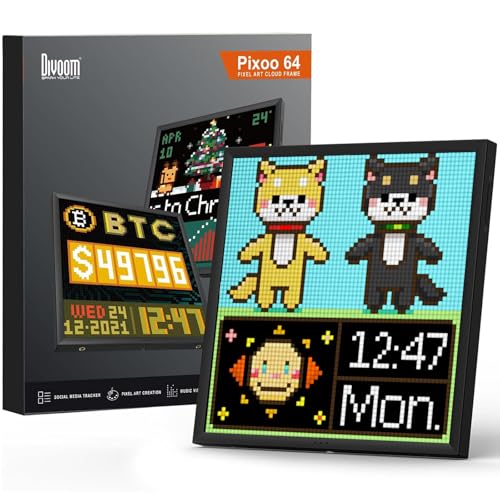
- 64×64 LED panel for animated pixel art
- App-controlled designs, GIFs, clocks, and messages
- Works on desks, shelves, or walls with USB power
Best For: Gaming rooms and creative spaces needing customizable visual decor
Best for Family Organization

- Large 15.6-inch Full-HD shared screen
- Widgets for calendars, lists, weather, and smart-home control
- Built-in Fire TV with included remote
Best For: Kitchens and common areas used for family planning and entertainment
Best Wall-Mounted Controller
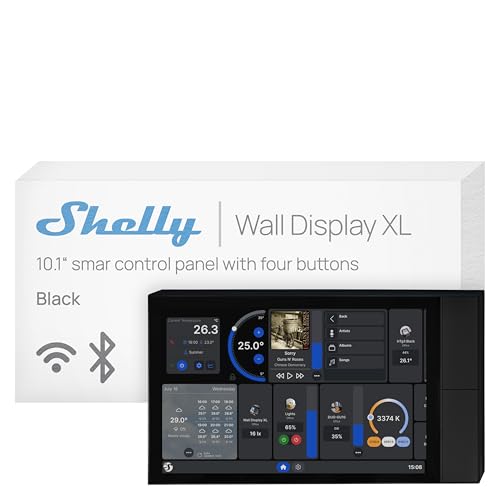
- 10.1-inch touchscreen with four customizable buttons
- Built-in 5A relay for compatible appliance control
- Integrates with Shelly, Home Assistant, Alexa, Google, and HomeKit
Best For: Permanent, wall-mounted smart-home control and automation
Best Large-Screen Hub

- 21-inch Full HD screen for shared spaces
- Built-in Fire TV and smart-home dashboard
- Auto-framing video calls with privacy controls
Best For: Large kitchens and family organization
Best All-Around Display

- 8.7-inch HD touchscreen with more viewing area
- Spatial audio and up to 2x the bass of its predecessor
- Built-in smart-home hub and auto-framing calls
Best For: Everyday home control and entertainment
Best Compact Option

- Space-saving 5.5-inch smart display
- Improved bass and clearer vocals
- Camera, calls, photos, and smart-home control
Best For: Nightstands, desks, and small rooms
Best Large-Screen Pick

- 11-inch Full-HD touchscreen with expanded viewing area
- Spatial audio and stronger bass for streaming
- Built-in smart-home hub and auto-framing camera
Best For: Large rooms, entertainment, and comprehensive smart-home control
Best Compact Blue Option
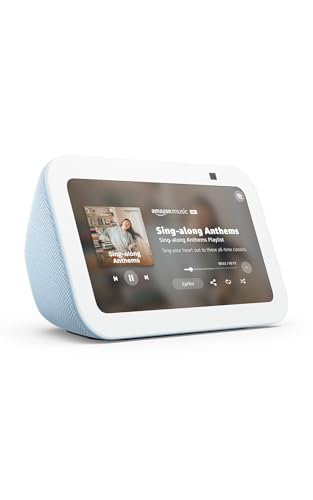
- Compact 5.5-inch display for daily information
- Deeper bass and clearer vocals in a small design
- Camera, video calls, and smart-home controls
Best For: Small spaces, nightstands, and everyday Alexa assistance
Best Compact White Option
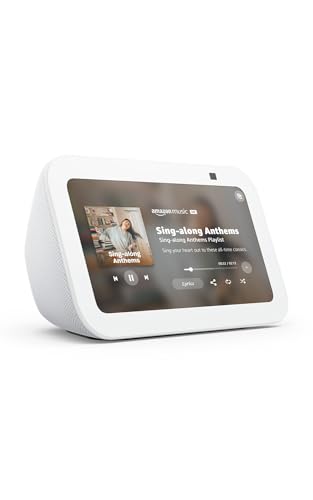
- Glacier White finish for a neutral look
- 5.5-inch display with streaming and photo features
- Video calling, camera viewing, and device control
Best For: Compact setups that favor a light-colored design
Best Overall – Amazon Echo Show 11
The Amazon Echo Show 11 is a versatile choice among smart displays, combining a vibrant Full-HD touchscreen with spatial audio, Alexa+ support, video calling, and built-in smart-home control. Its larger viewing area makes recipes, calendars, streaming content, and camera feeds easier to see.
Best For: Households wanting one smart display for entertainment, organization, calls, and Alexa-compatible device control.
Pros:
- 11-inch Full-HD screen with 60% more viewing area than the Echo Show 8 (2025 release)
- Spatial audio, wider soundstage, crisper vocals, and up to twice the bass of the Echo Show 8 (2023 release)
- Built-in smart-home hub with camera viewing and routine support
- Centered auto-framing camera with 3.3x zoom and noise reduction
Cons:
- Alexa+ features may depend on availability or subscription requirements
- Its larger size may be less suitable for compact spaces
The Echo Show 11 is the most balanced option here for users who want a full-featured smart display rather than a dedicated control panel or decorative screen. Privacy controls, including microphone and camera disable buttons, add reassurance for common household use.
Best Decorative Pick – Divoom Pixoo-64 Pixel Display
The Divoom Pixoo-64 is a specialized smart display for pixel art rather than a general-purpose home assistant. Its 64×64 LED panel connects to Wi-Fi and the Divoom app, letting you show animations, clocks, messages, images, GIFs, and community-created designs.
Best For: Gaming rooms, desks, shelves, bedrooms, and creative spaces that need customizable pixel-art decor.
Pros:
- 10.3-inch display with a 64×64 LED pixel-art panel
- App supports custom designs, animations, images, GIFs, and community content
- Useful for themed displays, animated clocks, messages, and decorative effects
- Can be placed on a desk, shelf, or wall and runs from USB power
Cons:
- Requires a 2.4GHz Wi-Fi connection for app features
- App-based control may be less immediate than a physical smart-home panel
- Low pixel resolution is intended for pixel art, not detailed video viewing
The Pixoo-64 works best when visual personality matters more than traditional smart-display functions. It is a fun, highly customizable accent for a gaming setup or creative room, but it is not designed to replace an Alexa-style information and home-control display.
Best for Family Organization – Amazon Echo Show 15
The Amazon Echo Show 15 is a large-format smart display built around shared household information. Its 15.6-inch Full-HD screen supports customizable widgets for calendars, to-do lists, weather, and smart-home controls, while built-in Fire TV adds a convenient entertainment hub.
Best For: Families that want a prominent kitchen or common-area display for schedules, lists, streaming, and home control.
Pros:
- Large 15.6-inch Full-HD screen is well suited to shared viewing
- Customizable widgets help organize calendars, lists, weather, and smart-home information
- Built-in Fire TV supports services including Prime Video, Netflix, YouTube, and Apple TV
- Centered auto-framing camera offers a wide field of view and 3.3x zoom
Cons:
- Its large format requires more wall or counter space
- Some streaming services may require subscriptions
- More screen size may be unnecessary for users wanting a compact bedside or countertop display
The Echo Show 15 is a strong organizational centerpiece, especially where multiple people need to see the same information. Choose it over smaller smart displays when the larger screen and Fire TV integration are priorities.
Best Wall-Mounted Controller – Shelly Wall Display XL
The Shelly Wall Display XL is a purpose-built smart display for fixed smart-home control. Installed in a standard electrical wall box, it combines a 10.1-inch touchscreen, four customizable buttons, a built-in 5A relay, and integrations with the Shelly app, Home Assistant, Alexa, Google, and HomeKit.
Best For: Homes, apartments, hotels, and commercial spaces needing a permanent wall-mounted control point for lights, appliances, automations, and audio.
Pros:
- 10.1-inch touchscreen with four customizable physical buttons
- Built-in 5A relay can control compatible lights, fans, heaters, coffee makers, and more
- Works with Shelly Smart Control, Home Assistant, Alexa, Google, and HomeKit
- Can control Bluetooth or Sonos audio and supports schedules and scenes
Cons:
- Requires wall installation and a neutral wire
- Designed for fixed smart-home control rather than general streaming or video calls
- Relay is rated for 5A, so connected loads must remain within that specification
The Shelly Wall Display XL is the practical choice when smart-home controls should be accessible without reaching for a phone. Its installation requirements make it less flexible than countertop smart displays, but the combination of touch, buttons, relay control, and automation support is well suited to permanent placement.
Best Large-Screen Hub – Echo Show 21
If you want smart displays to serve as a central family dashboard, the Amazon Echo Show 21 combines a spacious 21-inch Full HD screen with built-in Fire TV, Alexa, video calling, and smart-home controls. Its size makes calendars, shopping lists, weather, photos, and other widgets easy to keep in view.
Best For: Kitchens and shared spaces where a large organization and entertainment hub makes sense.
Pros:
- Large 21-inch Full HD display with customizable widgets.
- Built-in Fire TV with a remote and access to popular streaming apps.
- Centered, auto-framing camera with wide field of view, 3.3x zoom, and noise reduction.
- Smart-home dashboard, photo slideshow, and multiple privacy controls.
Cons:
- The large footprint may be impractical for smaller counters or rooms.
- Some streaming services may require subscriptions.
The Echo Show 21 is the most room-oriented option here, prioritizing visibility and organization over compact placement. Choose it when you have the space and want one display to handle household planning, entertainment, calls, and smart-home control.
Best All-Around Display – Echo Show 8
For a balanced smart-display setup, the redesigned Amazon Echo Show 8 offers an 8.7-inch HD touchscreen, spatial audio, a built-in smart-home hub, and Alexa+ features. It is sized for everyday use while still supporting recipes, calendars, entertainment, camera feeds, and video calls.
Best For: Bedrooms, kitchens, and living spaces needing capable smart-home and media features without a very large screen.
Pros:
- Vibrant 8.7-inch HD display with 15% more viewing area than the 2023 Echo Show 8.
- Spatial audio with crisper vocals, a wider sound stage, and up to twice the bass versus the 2023 release.
- Built-in smart-home hub for controlling compatible devices without a separate hub.
- Centered, auto-framing camera with 3.3x zoom and noise reduction.
Cons:
- Its screen is less suitable than the Echo Show 21 for viewing shared dashboards from across a room.
- Some Alexa+, streaming, or shopping features may depend on supported services or subscriptions.
The Echo Show 8 is the most versatile middle-ground choice in this lineup. It delivers stronger audio and broader smart-home capabilities than a basic compact display while avoiding the space demands of a 21-inch model.
Best Compact Option – Echo Show 5
The Amazon Echo Show 5 is a compact choice for smart displays, with a 5.5-inch screen for quick views of weather, news, calls, photos, and compatible camera feeds. Its small footprint suits nightstands, desks, and other spaces where a larger screen would be unnecessary.
Best For: Small rooms, bedside tables, desks, and basic Alexa smart-home control.
Pros:
- Compact 5.5-inch design for limited counter or tabletop space.
- Deeper bass and clearer vocals for music, podcasts, shows, and other media.
- Supports compatible smart-home controls, camera viewing, video calling, and announcements.
- Includes a camera shutter, mic/camera-off button, and recycled materials in key components.
Cons:
- The smaller display provides less room for calendars, recipes, and detailed visual information.
- The 2 MP camera is less advanced than the auto-framing cameras on the Echo Show 8 and 21.
The Echo Show 5 focuses on convenience and minimal space usage. It is a practical entry point for basic calls, media, photo display, and smart-home commands, but shoppers wanting a richer visual dashboard or more advanced calling should consider a larger model.
Best Large-Screen Pick – Echo Show 11
The Echo Show 11 is a strong choice among smart displays if you want a roomy screen for entertainment, recipes, calendars, video calls, and smart-home control. Its Full-HD 11-inch display, spatial audio, and built-in smart-home hub make it especially useful in shared living spaces.
Best For: Shoppers who want a large, feature-rich smart display for media, household organization, and connected-device control.
Pros:
- Large Full-HD screen with 60% more viewing area than the Echo Show 8 (2025 release).
- Spatial audio with clearer vocals, a wider soundstage, and up to twice the bass of the Echo Show 8 (2023 release).
- Built-in smart-home hub, camera viewing, routines, and hands-free device control.
- Centered auto-framing camera with 3.3x zoom for video calls.
Cons:
- Its larger footprint may be less suitable for compact counters or nightstands.
- The feature set may be more than needed for shoppers seeking a basic display.
Choose the Echo Show 11 when screen size and versatility matter most. It combines a more immersive viewing experience with practical household tools and layered camera and microphone privacy controls.
Best Compact Blue Option – Echo Show 5
The Echo Show 5 is a compact smart display for keeping news, weather, music, cameras, and calls within easy reach. Its 5.5-inch screen fits naturally on a nightstand, desk, or kitchen counter while still adding Alexa-powered smart-home controls.
Best For: Shoppers who want a small smart display for everyday information, entertainment, video calling, and basic home monitoring.
Pros:
- Compact 5.5-inch display shows news, weather, song titles, and compatible camera feeds.
- Updated audio provides deeper bass and clearer vocals.
- Built-in camera supports video calls, check-ins, and compatible video-doorbell viewing.
- Includes a camera shutter, mic/camera-off button, and recycled materials.
Cons:
- The smaller screen is less suited to watching shows or viewing detailed information from across a room.
- The 2 MP camera is more basic than the camera on the Echo Show 11.
The Cloud Blue Echo Show 5 makes sense when counter space is limited and you still want a versatile Alexa display. It delivers useful connected features in a small form while offering straightforward privacy controls.
Best Compact White Option – Echo Show 5
The Glacier White Echo Show 5 is a practical smart display for shoppers who want a compact Alexa device with a clean, neutral finish. It provides at-a-glance information, streaming, camera viewing, video calls, and control of compatible lights and thermostats.
Best For: Buyers who prefer a Glacier White compact display for bedrooms, desks, kitchens, or other space-conscious setups.
Pros:
- Small 5.5-inch screen fits easily on a nightstand or counter.
- Streams music, podcasts, and shows with deeper bass and clearer vocals.
- Built-in camera supports calls, household check-ins, and compatible doorbell viewing.
- Rotating photo display, camera shutter, and mic/camera-off button add convenience and privacy.
Cons:
- The compact display offers less viewing area for video and detailed content than larger smart displays.
- The 2 MP camera is a basic option for video calling.
Pick this Glacier White version if you want the Echo Show 5’s compact feature set and prefer its lighter finish. It is well suited to close-range use where space, photos, calls, and simple smart-home control are priorities.
How We Picked These Smart Displays
We selected products across several practical categories rather than treating screen size as the only deciding factor. The lineup includes compact displays for nightstands and desks, mid-size models for everyday media and household tasks, large kitchen-oriented hubs, a dedicated smart-home control panel, and a Wi-Fi pixel display for decorative use.
Our comparison emphasizes visible information, audio and video capabilities, placement flexibility, smart-home compatibility, ease of daily use, and the type of household each device suits best. Product specifications and advertised features can vary by region, software version, and connected services, so confirm compatibility before buying.
Quick Comparison
| Type | Best For | Main Advantage | Potential Limitation |
|---|---|---|---|
| Compact smart display | Bedside tables and desks | Small footprint and accessible price | Less room for video and multi-panel information |
| Mid-size smart display | General household use | Balanced viewing area, audio, and placement flexibility | Not as immersive as larger hubs |
| Large smart display | Kitchens and family command centers | More room for calendars, recipes, video, and controls | Needs more wall or counter space |
| Smart-home control panel | Centralized device management | Purpose-built touchscreen controls | May require closer attention to ecosystem compatibility |
| Pixel display | Decor and visual personalization | Eye-catching programmable artwork | Not a full assistant or media hub |
Key Buying Factors for Smart Displays
Screen Size and Placement
Choose the smallest screen that remains comfortable to read from your usual position. Compact models work well beside a bed or on a crowded desk, while 10-inch-and-larger screens are easier to use for recipes, calendars, video, and shared household information. Check depth, wall-mounting requirements, viewing angle, and nearby power access before ordering.
Entertainment and Audio
If the display will replace a small speaker or television for occasional viewing, prioritize screen resolution, speaker performance, streaming support, and any built-in TV platform. Spatial audio or stronger bass may improve music and video, but expectations should remain realistic compared with dedicated speakers or a full-size television.
Smart-Home Compatibility and Privacy
Verify that the display works with your preferred voice assistant, cameras, lights, thermostats, and other devices. Also consider microphone and camera controls, physical privacy shutters where available, account requirements, software support, and whether the interface is easy for every household member to understand.
Power, Mounting, and Everyday Usability
Most Smart Displays are designed for a fixed powered location. Look for a stable stand or suitable mounting option, cable-management flexibility, responsive touch controls, readable text, and useful routines. A device that is easy to glance at and operate will usually deliver more value than one with specifications you rarely use.
Who Should Buy Which Smart Displays?
Choose a compact model if you want alarms, timers, music, calls, weather, and occasional video without sacrificing much surface space. Choose a mid-size display for the best all-purpose balance in a bedroom, office, or smaller kitchen.
Choose a large kitchen hub if shared calendars, recipes, household organization, and video are central to your routine and you have adequate counter or wall space. Choose a dedicated control panel when smart-home management is the priority rather than general entertainment.
Choose a pixel display if your main goal is programmable visual décor for a gaming room, office, or living space. Before purchasing any of these Smart Displays, identify the room, viewing distance, services you already use, and the tasks you want the device to simplify.