
The best wireless smart displays do more than show content: they can organize your home, control connected devices, stream entertainment, support presentations, or provide portable signage.
Our 2026 roundup covers compact voice assistants, family dashboards, battery-powered touchscreens, mobile TVs, commercial displays, and specialty control panels so you can match the hardware to your space and routine.
Best 10 Wireless Smart Displays Picks for 2026
Best for Big-Screen Flexibility
ApoloSign 32-Inch Portable Smart TV

- 32-inch 1080p 10-point touchscreen
- Up to 6 hours of cordless use
- Android 16 with Google Play and 128GB storage
Best For: Mobile family entertainment, work, and interactive displays
Best Compact Alexa Hub

- Compact 5.5-inch smart display
- Video calls and compatible camera viewing
- Privacy shutter and mic/camera controls
Best For: Personal Alexa assistance and smart-home control
Best for Wireless Work Mirroring

- AirPlay and Miracast support
- 8000mAh battery for 4–5 hours
- 1080p matte IPS display with wired inputs
Best For: Portable second-screen productivity and travel
Best Family Organization Hub

- 15.6-inch Full HD family display
- Customizable widgets and built-in Fire TV
- Auto-framing video calls and smart-home controls
Best For: Kitchen organization, family schedules, and entertainment
Best for Portable Signage
15.6-Inch Battery-Powered Smart Display
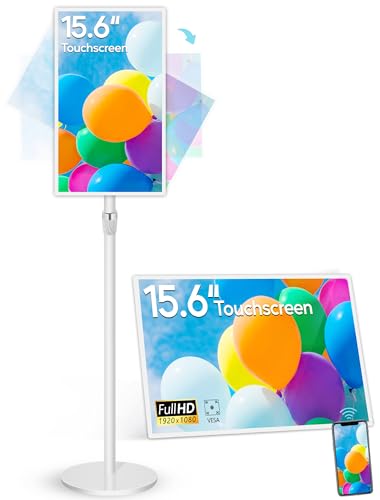
- 10-point touchscreen with 1080p resolution
- Wireless mirroring and Android 13 app support
- Built-in 10,000mAh battery with 4–6-hour use
Best For: Portable retail, restaurant, classroom, and promotional displays
Best for Security Monitoring

- Automatic camera and doorbell event alerts
- Four simultaneous live security feeds
- Local event playback and easy touchscreen controls
Best For: Eufy-centered home security monitoring
Best for Large Venues
65-Inch 4K Digital Signage Kiosk

- Large floor-standing screen for high visibility
- Android, Wi-Fi, HDMI, and USB playback options
- Split-screen layouts, autoplay, and timed operation
Best For: Indoor retail, hospitality, healthcare, and public-venue signage
Best Rolling Display
32-Inch Portable Touchscreen TV

- Up to 10 hours of cordless use
- Wireless casting plus HDMI connectivity
- Rolling, rotating, height-adjustable stand
Best For: Large-screen room-to-room entertainment and presentations
Best Low-Power Dashboard
reTerminal E1002 Color E Ink Display

- Color E Ink remains clear in bright light
- Up to three months in deep-sleep mode
- Home Assistant and no-code dashboard support
Best For: Custom smart-home and information dashboards
Best Family Calendar

- 1280x800 touchscreen for shared schedules
- 5MP camera and dual speakers for calls
- Wall mount and desktop stand included
Best For: Family planning and compact home communication
Best for Big-Screen Flexibility – ApoloSign 32-Inch Portable Smart TV
If you want wireless smart displays that can move beyond a desk or countertop, the ApoloSign combines a large 32-inch touchscreen with a rolling stand and rechargeable battery. It supports streaming, browsing, video calls, recipes, workouts, and presentations, while Android 16 and Google Play provide access to a broad selection of apps.
Best For: Families, home offices, classrooms, gyms, salons, and small businesses that need a movable, interactive display.
Pros:
- Large 1080p 10-point touchscreen for interactive use.
- Built-in 15,000mAh battery provides up to 6 hours of cordless entertainment.
- Rolling stand, HDMI, wireless mirroring, Wi-Fi 6, and 128GB of storage add flexibility.
Cons:
- At over 60 inches tall with its stand, it requires substantial floor space.
- Wireless mirroring does not support AirPlay, Google Cast, or streaming casting services.
The ApoloSign is the most versatile option here for users who want a genuinely mobile, room-to-room smart display. Its size and stand make it less compact than conventional countertop models, but the touchscreen, battery, and dashboard features expand its usefulness well beyond television viewing.
Best Compact Alexa Hub – Echo Show 5
The Echo Show 5 is a compact choice among wireless smart displays, adding Alexa controls, a 5.5-inch screen, video calling, and smart-home access in a small footprint. It is designed for quick glances at news and weather, streaming audio and select video, and keeping an eye on compatible cameras.
Best For: Bedrooms, nightstands, desks, kitchens, and Alexa-centered smart-home control.
Pros:
- Small 5.5-inch display fits easily on a nightstand or desk.
- Supports video calls, camera viewing, announcements, and photo slideshows.
- Includes camera shutter and mic/camera-off controls for added privacy.
Cons:
- The compact screen is less suitable for group viewing or detailed visual tasks.
- Its smart-home and content features work best within compatible Alexa-supported services and devices.
Choose the Echo Show 5 when convenience and compact size matter more than screen area. It is a practical personal assistant and smart-home controller, with improved bass and clearer vocals making it more useful for casual listening as well.
Best for Wireless Work Mirroring – 15.6-Inch Portable Monitor
This 15.6-inch portable monitor is one of the more work-focused wireless smart displays, supporting AirPlay and Miracast for compatible phones, tablets, Macs, Windows laptops, and PCs. Its built-in battery, matte screen, automatic phone rotation, and wired backup connections make it useful for travel and flexible workstations.
Best For: Remote workers, travelers, students, and users who need a portable second screen or phone-mirroring display.
Pros:
- AirPlay and Miracast support wireless mirroring from many devices.
- 8000mAh battery provides approximately 4 to 5 hours of cordless use.
- 1080p IPS matte display offers 400-nit brightness, 60Hz refresh, and 125% sRGB coverage.
Cons:
- It is not a touchscreen and does not include Bluetooth or Google Cast.
- Netflix, Hulu, and other streaming apps do not support wireless casting because of HDCP restrictions.
- Some devices, including Google Pixel, Chromebook, and gaming systems, require a wired connection.
This monitor is a strong fit for productivity rather than standalone entertainment. Wireless mirroring is convenient, but the stated streaming and device limitations mean buyers should confirm compatibility before treating it as a general-purpose media display.
Best Family Organization Hub – Echo Show 15
The Echo Show 15 is a wall-oriented family hub that combines a 15.6-inch Full HD display with customizable widgets, Fire TV, smart-home controls, photos, and video calling. Among wireless smart displays, it is especially suited to shared spaces where calendars, lists, entertainment, and camera feeds need to remain visible.
Best For: Kitchens and family common areas that need organization tools alongside streaming and smart-home control.
Pros:
- 15.6-inch 1080p screen provides room for calendars, to-do lists, weather, and other widgets.
- Built-in Fire TV supports apps such as Prime Video, Netflix, YouTube, and Apple TV.
- Centered auto-framing camera offers a wide field of view and 3.3x zoom for video calls.
Cons:
- Some entertainment services require subscriptions.
- Its feature-rich design is more than needed for users seeking a simple smart speaker or small display.
- Video calling and camera features may require privacy-conscious setup, despite the included shutter and controls.
The Echo Show 15 is the most capable shared-household option in this group. Its large screen and widgets make it useful for family coordination, while Fire TV and smart-home tools prevent it from being limited to a calendar display.
Best for Portable Signage – 15.6-Inch Battery-Powered Smart Display
This compact option stands out among wireless smart displays for businesses that need interactive content without keeping the screen plugged in continuously. It combines a 15.6-inch touchscreen, Android 13, autoplay, wireless screen mirroring, and a built-in 10,000mAh battery rated for approximately 4–6 hours of use.
Best For: Retail counters, restaurants, hotels, classrooms, and other indoor spaces needing portable advertising or interactive content.
Pros:
- 10-point capacitive touchscreen with 1920×1080 resolution and a 178-degree viewing angle.
- Supports wireless screen sharing from iOS, Android, Windows, and macOS through the Eshare app.
- Android 13 supports app installation, autoplay, split-screen content, and timer controls.
- Includes a battery, adjustable stand, VESA mounting holes, HDMI, USB, microSD, and Ethernet connectivity.
Cons:
- Battery life is limited to approximately 4–6 hours per charge.
- The 15.6-inch screen may be too small for large venues or long-distance viewing.
- The supplied specifications identify the native display resolution as 1920×1080, despite the listing’s 2K wording.
This is a flexible, feature-rich pick when portability and touch interaction matter more than screen size. Its commercial ports and mounting options also make it adaptable for permanent installations.
Best for Security Monitoring – Eufy Smart Display E10
The Eufy Smart Display E10 is a security-focused choice among wireless smart displays. Rather than serving primarily as an advertising screen, its 8-inch touchscreen acts as a smart home hub for viewing cameras, receiving alerts, and reviewing locally stored events.
Best For: Homes using compatible Eufy security devices that want a dedicated, easy-to-use monitoring panel.
Pros:
- Automatically shows live video and provides voice alerts for doorbell, lock, and camera events.
- Can display four simultaneous live camera feeds.
- Downloads historical events to local storage for quick replay without buffering.
- 8-inch touchscreen is designed to be accessible for children and seniors and includes a charging station and wall mount.
Cons:
- Its functionality is centered on Eufy security monitoring rather than general-purpose media or signage.
- An existing compatible Eufy camera and security setup may be needed to use its main features.
- The supplied listing does not specify wireless networking details or broad third-party device compatibility.
Choose this display if your priority is convenient, at-a-glance security awareness. Its automatic alerts, multi-camera view, and local event playback make it more specialized than a general smart screen.
Best for Large Venues – 65-Inch 4K Digital Signage Kiosk
For businesses that need a highly visible installation, this 65-inch floor-standing kiosk offers a large-format alternative among wireless smart displays. Its Android system, Wi-Fi, built-in media player, automatic playback, and split-screen tools support advertising, announcements, wayfinding, and brand presentations.
Best For: Retail stores, malls, airports, hospitals, restaurants, and other indoor venues requiring large-format digital signage.
Pros:
- Large 65-inch IPS display with a 178-degree viewing angle for broad visibility.
- Android, Wi-Fi, USB, HDMI, and network connectivity support flexible content playback and updates.
- Automatic playback, remote control operation, timer scheduling, and customizable split-screen layouts.
- Floor-standing kiosk design and a stated three-year warranty for quality defects.
Cons:
- Its floor-standing form is less portable than compact or battery-powered displays.
- The supplied notes refer to both 4K in the title and FHD in the display description, so buyers should confirm the actual resolution.
- Designed for indoor use, limiting suitability for outdoor installations.
This kiosk is a strong fit when screen presence and flexible signage playback are the main priorities. Confirm the final resolution and installation requirements before ordering, especially for a large commercial deployment.
Best Rolling Display – 32-Inch Portable Touchscreen TV
For shoppers comparing wireless smart displays that can move beyond a single room, this 32-inch Android 15 touchscreen TV combines a rolling stand, built-in battery, wireless casting, and Google Play access. Its large screen and multiple control options make it more versatile than a conventional stationary display.
Best For: Cordless entertainment, video calls, workouts, presentations, and flexible room-to-room viewing.
Pros:
- 38,400mAh battery provides up to 10 hours of cordless use, depending on conditions.
- Wireless casting, HDMI, Bluetooth control, and a touchscreen support varied setups.
- 360-degree rotation, height adjustment, and five caster wheels improve portability.
- 8GB RAM and 128GB storage support apps, downloads, and everyday multitasking.
Cons:
- Its 45-pound structure is less convenient to move than a small countertop display.
- Actual battery life varies with brightness, volume, Wi-Fi, and app usage.
This is the most capable choice here for users who want wireless smart-display features on a genuinely large, movable screen. It is especially appealing when one display needs to serve several rooms or activities.
Best Low-Power Dashboard – reTerminal E1002 Color E Ink Display
This reTerminal E1002 is a specialized wireless smart display for dashboards rather than streaming video. Its color E Ink screen remains readable in bright light, while Wi-Fi connectivity, SenseCraft HMI, and smart-home compatibility support customized information panels.
Best For: Home Assistant dashboards, smart-office information boards, maker projects, and always-available reminders.
Pros:
- 7.3-inch color E Ink Spectra 6 display stays clear in bright light.
- Up to three months of battery life is possible in deep-sleep mode with six-hour refresh intervals.
- No-code SenseCraft HMI supports drag-and-drop dashboard creation and templates.
- Works with Home Assistant, ESPHome, TRMNL plugins, GPIO, I²C, SPI, and Grove expansion.
Cons:
- E Ink refresh behavior makes it better suited to dashboards than fast-changing video.
- Its maker-oriented features may require more setup than a ready-made family calendar.
Choose this display when low power, sunlight readability, and customization matter more than entertainment features. It offers an unusually flexible foundation for DIY smart-home and productivity dashboards.
Best Family Calendar – 8-Inch Wireless Smart Display
For households seeking wireless smart displays focused on organization and communication, this 8-inch digital calendar pairs a 1280×800 touchscreen with calendar synchronization, media casting, and video-call hardware. Its wall mount and desktop stand make placement flexible.
Best For: Family schedules, shared household planning, video calls, and compact home communication.
Pros:
- 8-inch 1280×800 touchscreen supports calendar management and compatible apps.
- Built-in 5MP camera and dual speakers support video calls.
- Bluetooth 5.0 and media-casting features add everyday flexibility.
- Wall mount, desktop stand, HDMI, USB, RS232, and 3.5mm connectivity support varied installations.
Cons:
- The supplied notes do not specify battery operation, so it is best treated as a powered display.
- Software update support is listed as unknown.
- At 8 inches, it provides less viewing area than the 32-inch rolling model.
This model is a practical fit for a kitchen, hallway, desk, or family command center where scheduling and communication are the priority. Its camera, speakers, and mounting options broaden its usefulness beyond a basic calendar.
How We Picked the Best Wireless Smart Displays
We compared these Wireless Smart Displays by intended use rather than treating every screen as interchangeable. Key considerations included display size and resolution, operating system, wireless connectivity, touch and voice controls, battery operation, camera and speaker features, storage, mounting or stand design, and suitability for home or commercial environments.
We also considered setup flexibility and ecosystem compatibility. A display designed for Alexa or a specific smart-home platform may be convenient, while an Android or Google-certified model can offer broader app access. Commercial signage products were assessed for visibility, durability, positioning, and continuous-use potential rather than household convenience alone.
Quick Comparison
- Best for Alexa and compact spaces: Amazon Echo Show 5.
- Best for kitchen organization and entertainment: Amazon Echo Show 15.
- Best for mobile large-screen viewing: the 32-inch and 32-inch-class portable displays on wheels.
- Best for portable presentations or mirroring: the battery-powered 15.6-inch wireless monitor.
- Best for digital signage: the 15.6-inch touchscreen signage display or 65-inch floor-standing kiosk.
- Best for smart-home dashboards: eufy Security Smart Display E10 or reTerminal E1002.
- Best for family scheduling: the 8-inch digital calendar display.
Key Buying Factors for Wireless Smart Displays
Screen Size, Placement, and Portability
Choose the smallest screen that remains readable from its normal viewing distance. Compact displays work well on counters and desks; 15.6-inch models suit planning and presentations; larger wheeled screens are better for shared viewing, demonstrations, and flexible room-to-room use. Check the footprint, stand adjustment, wheel quality, and storage requirements before buying.
Power and Wireless Connections
Battery capacity matters when a display will move frequently or operate away from an outlet. Confirm expected runtime rather than relying only on the battery rating. For wireless use, check Wi-Fi standards, Bluetooth support, AirPlay or Miracast compatibility, and whether the product requires a particular app or account.
Software, Controls, and Privacy
Android, Fire TV, Alexa, Google-certified, eufy, and specialized dashboard platforms provide different app libraries and control methods. Touchscreens are useful for direct interaction, while voice remotes and microphones improve hands-free use. If a camera or microphone is included, look for physical controls, privacy settings, and a practical way to disable them.
Audio, Storage, and Durability
Built-in speakers vary widely, so prioritize clearer audio or external-output support for media-heavy use. More storage helps with apps and downloaded content, while commercial displays may emphasize scheduled playback instead. For business installations, verify operating-temperature guidance, warranty coverage, portrait or landscape support, and serviceability.
Who Should Buy Which Wireless Smart Displays?
Buy a compact Echo Show if you want an easy voice assistant, timers, calls, and smart-home controls. Choose a larger Echo Show 15 when family organization and streaming belong in a shared kitchen or living area. For flexible viewing around the home, a wheeled Android display offers the most mobility, while a battery-powered monitor is better for laptops, phones, and presentations.
Families focused on schedules should consider the dedicated digital calendar. Smart-home enthusiasts may prefer a purpose-built eufy or Home Assistant-compatible panel. Businesses, retailers, and event operators should choose a signage model based on brightness, mounting, playback management, and operating endurance—not consumer smart features alone.