
Choosing smart home hubs for elderly parents means balancing convenience with clarity, reliability, and ease of use. The right setup can simplify lighting, reminders, security alerts, and caregiver communication without making daily routines feel complicated.
This roundup includes dedicated caregiver call buttons, app-connected alerts, and flexible smart home hubs. Compare each option’s controls, connectivity, automation support, and learning curve before choosing a system for your parent’s home.
Best 10 Smart Home Hubs for Elderly Parents Picks for 2026
Best for Simple In-Home Alerts

- Two call buttons with a portable receiver
- 500+ ft stated open-area range
- 55 tones and up to 110 dB volume
Best For: Simple caregiver alerts inside the home
Best for a Tapo Sensor Ecosystem

- Supports up to 64 Tapo devices
- Built-in chime and up to 90 dB siren
- Requires 2.4GHz Wi-Fi
Best For: Tapo-based sensors and smart-home automations
Best for Remote Family Notifications
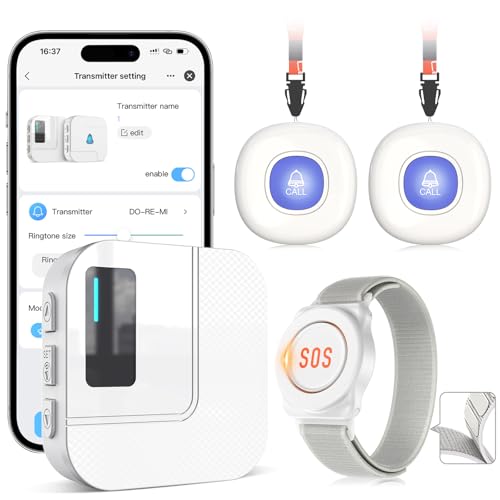
- App alerts plus local receiver alarms
- Shared notifications for family members
- Includes two call buttons and a watch button
Best For: Remote caregiver awareness and emergency calls
Best for Full Smart-Home Control

- Customizable 8-inch control dashboard
- Supports Wi-Fi, Zigbee, Matter, Thread, and more
- Controls compatible security devices and routines
Best For: Centralized control of a broad Alexa smart home
Safety Alert Pick

- Remote app alerts when a door or window opens
- Loud receiver with 32 melodies and five volume levels
- Expandable and supports shared caregiver notifications
Best For: Caregivers focused on door-opening alerts
Lighting Control Pick

- Integrates with Alexa, HomeKit, Google Assistant, and more
- Supports up to 75 Caseta devices
- Designed for simple router and app setup
Best For: Homes building an expandable Lutron lighting system
Visual Monitoring Pick

- 8-inch touchscreen for simple security monitoring
- Displays up to four live camera feeds at once
- Provides alerts and local event playback
Best For: Households wanting a dedicated security display
Flexible SmartThings Choice

- Supports Matter, Zigbee, Z-Wave Plus, and SmartThings
- Works with Alexa and Google Home
- Wi-Fi or Ethernet connectivity
Best For: Mixed-brand homes needing familiar app and voice control
Simple Local Control

- Home Assistant comes preinstalled
- Quiet, compact, and energy efficient
- Local data storage with USB expansion
Best For: Families with a caregiver available for setup and customization
Reliable Local Automation

- Automations continue during internet outages
- Supports Matter, Z-Wave, Zigbee, and Bluetooth
- Works with Alexa, Google Home, and Apple HomeKit
Best For: Larger homes prioritizing fast, subscription-free local control
Best for Simple In-Home Alerts – CallToU Caregiver Pager
For families comparing smart home hubs for elderly parents, the CallToU Caregiver Pager is a straightforward option focused on immediate in-home assistance rather than app-based automation. It includes two call buttons and a portable plug-in receiver.
Best For: Elderly residents who need an easy, dedicated way to request help from a nearby caregiver.
Pros:
- Includes one receiver and two call buttons.
- Offers a stated open-area range of more than 500 feet.
- Receiver has 55 ringtone choices and five adjustable volume levels, up to 110 dB.
- Call buttons and receiver are waterproof and dustproof.
Cons:
- The receiver needs to remain plugged into an electrical outlet.
- It does not provide the app-based alerts or broader device integration of a smart-home hub.
This is best viewed as a dedicated caregiver call system. Its simple controls, loud adjustable receiver, and wearable or wall-mountable call buttons may be more approachable than a connected smart-home platform for households that primarily need a reliable local alert.
Best for a Tapo Sensor Ecosystem – Tapo H100 Smart Hub
The Tapo H100 is a compact starting point for smart home hubs for elderly parents when you want to connect compatible sensors, buttons, switches, and other Tapo devices. It requires a 2.4GHz Wi-Fi network and includes a built-in chime and siren.
Best For: Families building a Tapo-based home-monitoring setup with sensors and smart controls.
Pros:
- Connects up to 64 Tapo devices through one hub.
- Uses a low-power wireless protocol intended to extend compatible device battery life.
- Supports smart actions triggered by sensor detection or button presses.
- Can activate a siren rated up to 90 dB with compatible sensors.
Cons:
- Requires 2.4GHz Wi-Fi.
- It cannot directly connect to Tapo smart plugs or smart lighting without the appropriate Tapo ecosystem setup.
- Its stated maximum connection distance is up to 30 meters, and actual range can vary by environment.
The H100 makes sense when you are comfortable adding compatible Tapo sensors and buttons over time. It provides a central connection point and audible alerts, but it is more useful as part of a broader Tapo system than as a standalone caregiver device.
Best for Remote Family Notifications – CallToU Wi-Fi Caregiver Pager
For smart home hubs for elderly parents that need to reach family members beyond the house, this CallToU Wi-Fi caregiver pager combines local alerts with app notifications. It supports two call buttons, a watch button, and a receiver, with 2.4GHz Wi-Fi required.
Best For: Families who want shared smartphone alerts when an elderly parent presses an emergency call button.
Pros:
- Sends app notifications while also triggering a receiver alarm and flashing lights.
- Supports shared Tuya app notifications for multiple family members.
- Includes two call buttons and one watch button.
- Provides a stated 328-foot/100-meter wireless range and 20 ringtone choices.
Cons:
- Only supports 2.4GHz Wi-Fi, not 5GHz.
- Phone or text message notifications require a stated $9.99 monthly subscription.
- It is primarily an emergency-alert system, not a general-purpose smart-home controller.
This model is a strong fit when relatives may not be nearby to hear a receiver. The free app notifications and sharing feature can extend awareness to several family members, while the local receiver provides an immediate in-home alert.
Best for Full Smart-Home Control – Amazon Echo Hub 8-inch
The Amazon Echo Hub is the most full-featured choice among these smart home hubs for elderly parents, offering an 8-inch customizable control panel for compatible devices, cameras, routines, and security systems. It supports Wi-Fi, Bluetooth, Zigbee, Matter, Sidewalk, and Thread devices.
Best For: Households wanting a central touchscreen for smart-home controls, cameras, routines, and compatible security devices.
Pros:
- Provides a customizable dashboard for devices, cameras, and routines.
- Works with thousands of compatible Alexa devices and multiple connectivity standards.
- Can help family members arm and disarm compatible security systems.
- Supports wall mounting and optional tabletop use.
Cons:
- Some mounting and cable-management accessories are sold separately.
- Advanced Ring camera features require Alexa+ and a compatible Ring subscription sold separately.
- Its usefulness depends on having compatible connected devices already installed.
The Echo Hub is the better choice for a broader connected-home setup rather than a single emergency button. Its visual dashboard may simplify daily control, while compatibility with cameras, locks, alarms, sensors, and routines gives families more ways to check in and manage the home.
Safety Alert Pick – WiFi Door Alarm System
For families comparing smart home hubs for elderly parents, this WiFi door alarm system focuses on timely alerts rather than whole-home device control. When a connected door or window opens, its receiver sounds an alarm and the companion app can send a warning to a smartphone remotely.
Best For: Caregivers who want remote door-opening alerts for an older adult or someone with dementia.
Pros:
- Pushes app alerts even when the caregiver is away from home.
- Receiver offers 32 melodies, five volume levels, and a stated maximum volume of 110 dB.
- Supports shared alerts and can be expanded with additional sensors or receivers.
Cons:
- It is a focused door and window alert system, not a general-purpose smart home hub.
- Requires the app and a WiFi connection for remote smartphone notifications.
This is a practical choice when the main concern is knowing when a door opens. Its loud receiver, LED indicator, sharing feature, and remote app alerts may be especially useful for households coordinating caregiving across locations.
Lighting Control Pick – Lutron Caseta Smart Hub
For shoppers seeking smart home hubs for elderly parents, the Lutron Caseta Smart Hub is designed to simplify connected lighting and integrate with several familiar platforms. It connects to a router, works with the Lutron app, and supports voice control through Alexa, Apple HomeKit, and Google Assistant when compatible accessories are added.
Best For: Homes that need dependable Lutron lighting control with voice-assistant and smart-home integration.
Pros:
- Works with Alexa, Apple HomeKit, Google Assistant, Ring, Serena shades, and Sonos.
- Supports up to 75 Caseta devices for future expansion.
- Uses Clear Connect Technology so Caseta device communication does not compete with WiFi-connected devices.
- Setup involves plugging it in, connecting it to a router, and following the app instructions.
Cons:
- Caseta dimmers, switches, and other coordinating accessories are sold separately.
- Its primary focus is Lutron lighting and compatible integrations rather than caregiver-specific monitoring.
This hub makes the most sense when the household already uses, or plans to use, Lutron Caseta controls. It can provide a straightforward foundation for app or voice-operated lighting, but the overall system cost depends on the accessories required.
Visual Monitoring Pick – eufy Smart Display E10
Among smart home hubs for elderly parents, the eufy Smart Display E10 stands out as a large, dedicated screen for viewing connected security information. Its 8-inch touchscreen can show up to four live feeds, display alerts from compatible doorbells and cameras, and provide access to locally stored event history.
Best For: Seniors and caregivers who benefit from an easy-to-see central screen for camera and doorbell monitoring.
Pros:
- Automatically displays a live feed and voice alert when supported doorbell or camera activity is detected.
- Shows four simultaneous live feeds for at-a-glance property monitoring.
- Automatically downloads historical events to local storage for replay.
- Uses an 8-inch touchscreen designed for straightforward use by seniors and children.
Cons:
- Its most advanced monitoring features depend on compatible eufy cameras, doorbells, and HomeBase 3.
- The display is more specialized for security monitoring than broad smart-home device control.
The E10 is a strong fit when visibility and simple on-screen access matter more than a voice-only hub. Its live-feed layout, event playback, and large touchscreen can help make security information easier to check in a shared household.
Flexible SmartThings Choice – Aeotec Smart Home Hub
For households comparing smart home hubs for elderly parents, the Aeotec Smart Home Hub is a practical option when broad device compatibility and familiar voice control matter. It works with SmartThings, Matter, Z-Wave Plus on the V3 model, Zigbee, Wi-Fi, Alexa, and Google Home, with setup through the SmartThings app.
Best For: Families building a mixed-brand smart home with app and voice control.
Pros:
- Supports Matter, SmartThings, Z-Wave Plus, Zigbee, Wi-Fi, Alexa, and Google Home.
- Can connect lighting, comfort, energy-management, and other compatible devices.
- Supports both Wi-Fi and wired Ethernet setup.
- Many automations can run locally for improved speed and reliability.
Cons:
- Device setup and automation management require the SmartThings app.
- Z-Wave Plus support is specified for the V3 model.
- Designed for use in North America.
The Aeotec hub is a balanced pick for families who want a mainstream platform with extensive protocol support and straightforward Alexa or Google Assistant access. Its app-based setup also gives a caregiver a central place to manage routines and connected devices.
Simple Local Control – Home Assistant Green
Home Assistant Green | Smart Home hub with Advanced Automation | Official Home Assistant Hardware
Check Price On AmazonHome Assistant Green is worth considering among smart home hubs for elderly parents when a family member will handle the initial setup and ongoing customization. Home Assistant comes preinstalled, and the fanless hub includes a power supply and Ethernet cable for a straightforward start.
Best For: Families wanting one local dashboard for diverse smart-home devices.
Pros:
- Home Assistant is preinstalled and the included Ethernet cable supports quick setup.
- One hub can bring multiple smart-home devices and automations together.
- Small, silent, fanless design uses only a couple of watts of power.
- Home data is kept on the hub and can be viewed, shared, or exported.
Cons:
- Ethernet is the listed primary connectivity method.
- Z-Wave, Zigbee, and Thread require compatible USB expansion devices.
- Its advanced automation platform may be more involved for a nontechnical user to manage alone.
Home Assistant Green offers a powerful local foundation and avoids juggling multiple hub apps, but it is best when a technically comfortable relative or caregiver can configure the system. USB expansion provides a path to add protocols as the home grows.
Reliable Local Automation – Hubitat Elevation C-8 Pro
For smart home hubs for elderly parents, the Hubitat Elevation C-8 Pro stands out when dependable local routines are a priority. It processes automations on the hub, supports Matter, Z-Wave 800 Series, Zigbee 3.0, and Bluetooth, and works with Alexa, Google Home, and Apple HomeKit without requiring a subscription.
Best For: Larger or device-dense homes needing fast, local automations.
Pros:
- Local processing keeps automations running during internet outages.
- Supports Matter, Z-Wave 800 Series with Long Range, Zigbee 3.0, and Bluetooth.
- Compatible with Alexa, Google Home, and Apple HomeKit.
- Offers two external antennas and compatibility with 1,000-plus devices across 100-plus brands.
Cons:
- Advanced features such as Rule Machine may require a learning curve.
- Setup support relies partly on documentation and an online community.
- Its broad customization options may be more than a simple home setup needs.
The C-8 Pro is a strong choice for families who value responsiveness, privacy, and resilience. Its local-first design is especially useful for essential lighting, locks, thermostat routines, and security-related automations, provided someone is available to configure the more advanced features.
How We Picked These Smart Home Hubs for Elderly Parents
We selected products that address practical needs in senior households: simple control, dependable alerts, broad device compatibility, and options for remote caregiver support. The list includes dedicated emergency call systems alongside general-purpose hubs, because the best solution depends on whether the priority is urgent communication, home automation, security, or all three.
We also considered setup requirements, wireless standards, app support, voice-control compatibility, and whether a product can expand as needs change. A hub that works well for lights and sensors may not replace a dedicated medical alert service, so buyers should match the device to the level of assistance required.
Quick Comparison
| Best for | Look for | Typical advantage |
|---|---|---|
| Emergency communication | Large call button, loud receiver, dependable range | Fast, straightforward caregiver alerts |
| Simple routines | Voice control, scenes, and a clear display | Less need to use a phone or app |
| Door and safety monitoring | Contact sensors, phone notifications, and automation | Useful alerts when doors open unexpectedly |
| Flexible smart homes | Zigbee, Z-Wave, Matter, or broad platform support | Room to add devices over time |
Key Buying Factors
Ease of Use
Prioritize large, visible controls, clear audio, simple status indicators, and voice commands that work consistently. Avoid systems that require frequent account switching or complicated routines unless a caregiver will manage them.
Connectivity and Compatibility
Check whether the hub requires 2.4GHz Wi-Fi, a separate bridge, or a specific ecosystem. Matter can improve cross-platform compatibility, while Zigbee and Z-Wave may offer reliable support for sensors and switches. Confirm that existing devices work before buying.
Alerts and Caregiver Access
For monitoring, review notification speed, alert volume, app permissions, and backup behavior during internet or power interruptions. A dedicated caregiver pager may be more appropriate than a general smart display when an older adult needs a clearly identifiable emergency button.
Privacy and Maintenance
Review microphone, camera, cloud-storage, and account-sharing settings. Choose a setup that a family member can update remotely, replace batteries in, and troubleshoot without visiting constantly.
Who Should Buy Which Smart Home Hubs for Elderly Parents?
Choose a dedicated CallToU-style pager or Wi-Fi call-button system when the main goal is quick caregiver communication. Door-alarm products are better suited to households needing alerts about wandering, nighttime activity, or unexpected entry.
Choose a display-based hub such as an Echo Hub or eufy Smart Display when visual controls, voice commands, cameras, reminders, and household status are important. Lutron Caseta is a strong fit for dependable lighting control, especially when simplifying switches is the priority.
For expandable automation, Aeotec, Home Assistant Green, and Hubitat offer broader device support and more advanced routines. They are best when a technically confident caregiver will handle setup. Before relying on any smart home system for emergencies, test alerts throughout the home and maintain a separate backup plan for urgent medical help.