
Choosing the right scanner for sculpture comes down to more than raw resolution. You need reliable tracking, good surface capture, and enough detail to preserve form, texture, and fine edges.
This guide focuses on 3D scanners for sculpture that balance accuracy, ease of use, and practical workflow support for artists, makers, and small studios.
Best 10 3d Scanners for Sculpture Picks for 2026
Premium Outdoor Detail Scanner
Revopoint INSPIRE 2 3D Scanner

- 0.05 mm accuracy and 0.03 mm precision
- Scans dark or reflective surfaces without spray
- WiFi 6, AI segmentation, and outdoor support
Best For: Sculptors needing portable, high-detail scans in varied lighting
Budget-Friendly Small-Object Scanner

- 0.07 mm accuracy for small to medium objects
- Markerless tracking with anti-shake support
- Budget-friendly, but needs patience and a strong PC
Best For: Beginners scanning small to medium sculpture pieces
Portable Full-Color Scanner
Revopoint POP3 Plus 3D Scanner
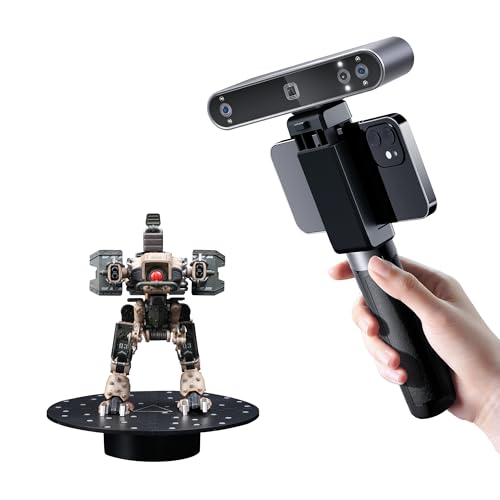
- Full-color scanning with HD RGB camera
- Up to 18 fps with 9-axis IMU stabilization
- Lightweight 190 g body with Wi-Fi 6 and USB-C
Best For: Artists needing portable color scans of medium-sized sculpture
Entry-Level Medium-Format Scanner

- 0.07 mm accuracy and 0.10 mm resolution
- Markerless AI tracking relocks after movement
- JMStudio handles scanning, editing, and optimization
Best For: New users scanning medium-format sculpture and objects
Fast, Easy Color Scanning
Creality CR-Ferret SE 3D Scanner

- 0.1mm accuracy and 30FPS scanning
- Anti-shake tracking for easier handheld use
- Scans black and metal objects without spray
Best For: Beginner-friendly color scanning of medium to large sculptures
Portable Dual-Mode Detail Capture

- 0.05 mm accuracy with dual scan modes
- Wireless WiFi 6.0 and lightweight 190g design
- Scans dark or reflective surfaces without spray
Best For: Portable sculpture scanning with wireless workflow and flexible materials
Ultra-Precision Laser Scanning

- Up to 0.02mm accuracy with blue laser
- Blue light plus NIR for flexible scan modes
- Up to 60fps and broad object-size range
Best For: High-detail sculpture scanning with maximum precision and speed
Budget-Friendly Portable Scanner

- 0.1 mm high-accuracy mode
- Full-color RGB texture capture
- Portable with power-bank support
Best For: Beginners scanning medium to large sculptures with color
High-Precision Multi-Mode Scanner
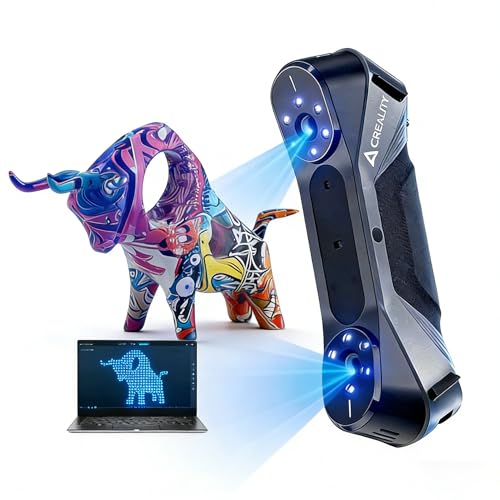
- 0.02 mm maximum accuracy
- Blue laser and infrared scanning modes
- 24-bit color with outdoor-capable lighting
Best For: Professional sculpture scanning where precision and detail are critical
Wireless Beginner Scanner

- Wireless WiFi6 scanning on PC, Android, and iOS
- Up to 0.1 mm accuracy with full color
- 105g body with travel kit included
Best For: Beginners who want portable wireless scanning for sculpture work
Premium Outdoor Detail Scanner – Revopoint INSPIRE 2 3D Scanner
If you want 3d scanners for sculpture that can handle both fine surface detail and less controlled environments, the Revopoint INSPIRE 2 is built for that kind of workflow. Its dual scanning modules, wireless operation, and outdoor-capable lighting support make it a strong fit for sculptors who need flexible capture without constantly relying on scanning spray.
Best For: Sculptors who want a portable scanner for detailed models, mixed materials, and semi-outdoor use.
Pros:
- Up to 0.05 mm accuracy and 0.03 mm precision for detailed capture
- Infrared laser lines can scan reflective or dark surfaces without scanning spray
- WiFi 6 and 190 g weight support flexible handheld use
- AI segmentation and Revo Metro software help clean up background noise
Cons:
- Revo Design is sold separately
- Windows AI object segmentation is only available on Windows
For sculpture work, the INSPIRE 2 stands out when you need portability, detail, and a cleaner workflow across different surface types. The optical zoom and included calibration tools add more control for scans that need to translate well into 3D printing or CAD.
Budget-Friendly Small-Object Scanner – 3DMakerpro Fox 3D Scanner
Among 3d scanners for sculpture, the 3DMakerpro Fox is a practical entry-level option for smaller pieces, maquettes, and prototype artwork. It uses NIR light with markerless tracking, which keeps setup simpler, but the notes make clear that it works best for buyers willing to learn the software and refine their workflow.
Best For: Beginners scanning small to medium sculptural pieces who are comfortable learning the process.
Pros:
- 0.07 mm accuracy for capturing useful structural detail
- Markerless tracking reduces setup time and avoids target dots
- Anti-shake support helps with minor hand tremors
- Works with small to medium objects from 40 mm to 1200 mm
Cons:
- Notes warn that good results require patience and a learning curve
- A capable PC with a dedicated GPU is strongly recommended
- Best results may require basic CAD or 3D modeling experience
The Fox makes sense if you want an accessible scanner for sculptural studies, miniatures, or artistic prototypes and do not mind spending time dialing in the process. It is less of a plug-and-play tool, but it offers solid resolution for the price class.
Portable Full-Color Scanner – Revopoint POP3 Plus 3D Scanner
If your sculpture workflow needs color as well as shape, the Revopoint POP3 Plus is one of the more versatile 3d scanners for sculpture in this group. It adds full-color capture, a fast scanning pace, and portable Wi-Fi or USB connectivity, making it useful for medium-sized works and mixed creative projects.
Best For: Artists and makers who want portable full-color scans of medium-sized sculpture or props.
Pros:
- 20% more accuracy and precision, with calibration claiming up to 20-micron accuracy
- Full-color scans using an HD RGB camera and Flash LED lighting
- Up to 18 fps with a 9-axis IMU for steadier handheld scanning
- Lightweight 190 g design with Wi-Fi 6 and USB Type-C connectivity
Cons:
- Software is only compatible with x86_64 architecture
- Best fit is medium-sized objects rather than very tiny sculpture details
The POP3 Plus is a strong choice when presentation matters, because it captures color along with geometry and keeps the workflow fairly mobile. It is especially appealing for sculptors who also work in animation, game art, or 3D printing.
Entry-Level Medium-Format Scanner – 3DMakerpro Fox 3D Scanner
For buyers comparing 3d scanners for sculpture, this 3DMakerpro Fox package is aimed at beginner-friendly medium-format capture with a focus on usable detail. It keeps the workflow simple with markerless AI visual tracking and integrated pre- and post-processing, which is helpful when scanning real-world objects for modeling or inspection.
Best For: New users who want an accessible scanner for medium-format sculpture and object capture.
Pros:
- 0.07 mm accuracy and 0.10 mm resolution for detailed models
- Markerless AI visual tracking can relock after movement
- JMStudio combines scanning, editing, and optimizing in one workflow
- Designed for reliable medium-format 3D scanning
Cons:
- It is still an entry-level tool, so expectations should stay realistic
- Package details do not list advanced portability or color capture features
This version of the Fox is a straightforward option for sculpture digitization when you want the core scanning features without a complicated setup. It is best suited to buyers who value ease of use and consistent medium-format results over premium extras.
Fast, Easy Color Scanning – Creality CR-Ferret SE 3D Scanner
If you’re comparing 3d scanners for sculpture, the Creality CR-Ferret SE is a practical option for capturing medium to large forms with solid speed and simplified tracking. Its 0.1mm accuracy, 30FPS scanning, and full-color capture make it useful when you want a smooth workflow for detailed organic shapes, textured surfaces, and dark or metal pieces without spray.
Best For: Sculptors and makers who want a fast, beginner-friendly scanner for color models and larger sculptural forms.
Pros:
- 0.1mm accuracy and 0.16mm resolution for detailed dimensional capture
- Anti-shake one-shot tracking helps maintain stable scans with shaky hands or quick movement
- 2MP color camera captures original colors for vivid, full-color models
- Works on black and metal objects without white powder or spray
Cons:
- Best suited to medium and large objects rather than very tiny sculpture details
- Less specialized for ultra-fine precision than higher-end laser systems
Overall, the CR-Ferret SE balances ease of use with helpful material flexibility, making it a strong everyday scanner for sculpture digitizing when speed and color matter more than extreme metrology-grade precision.
Portable Dual-Mode Detail Capture – Revopoint INSPIRE 2
For shoppers seeking 3d scanners for sculpture, the Revopoint INSPIRE 2 stands out for its flexibility across materials and environments. It combines infrared structured light and multi-line laser scanning, supports wireless use, and can capture reflective or dark surfaces without spray, which is helpful when scanning varied sculptural finishes or working away from a desktop setup.
Best For: Artists and preservation-focused users who want a lightweight scanner with wireless operation and dual scanning modes.
Pros:
- Dual scanning modules cover both structured light and multi-line laser workflows
- Up to 0.05 mm accuracy and 0.03 mm precision for detailed models
- Built-in WiFi 6.0 supports wireless scanning and PC-to-mobile streaming
- Handles reflective or dark surfaces without scanning spray
Cons:
- Requires relatively capable hardware for best performance
- Revo Design is separate paid software and Windows-only
The INSPIRE 2 is a versatile option if you need portability and surface flexibility more than a purely studio-bound setup. Its outdoor support and full-color capture also make it useful for digitizing sculpture in varied real-world conditions.
Ultra-Precision Laser Scanning – Creality CR-Scan Raptor
If precision is the priority in 3d scanners for sculpture, the Creality CR-Scan Raptor is the most technically aggressive option in this group. Its blue laser mode reaches up to 0.02mm accuracy, and the combined blue light plus NIR setup gives you a choice between high-detail marker-based scanning and marker-free capture for faces, bodies, and artifacts.
Best For: Users who want high-accuracy sculpture digitizing and can support a more demanding PC setup.
Pros:
- Up to 0.02mm accuracy with thin 0.1mm blue laser lines
- Blue light and NIR modes support both detailed and marker-free scans
- Up to 60fps in blue mode for fast capture
- Scans a wide object range from tiny parts to very large forms
Cons:
- Requires a high-performance Windows or macOS system
- Heavier and more workstation-oriented than the other options here
The CR-Scan Raptor is the best fit when sculptural detail matters enough to justify a more demanding setup. It’s especially compelling for users who want very fine edge capture and the option to switch between precision scanning and marker-free workflows.
Budget-Friendly Portable Scanner – Creality CR-Scan Ferret
If you want one of the more portable 3d scanners for sculpture, the Creality CR-Scan Ferret is a practical entry point for capturing medium-sized pieces with color. It combines handheld scanning, Wi‑Fi 6 connectivity, and a built-in RGB camera, so you can move around a sculpture and build a textured model without a bulky setup.
Best For: Beginners and hobbyists who want a lightweight scanner for larger sculptures and everyday 3D printing reference models.
Pros:
- Up to 0.1 mm accuracy in high-accuracy mode for more detailed captures.
- Built-in RGB camera records full-color textures.
- Portable design can run from a 5V power bank or compatible Android devices.
- Dual-mode scanning supports both wide-range and finer-detail work.
Cons:
- System requirements are fairly specific, especially for Windows, Mac, Android, and iOS.
- High-detail scanning is still better suited to larger objects than very tiny sculpture details.
Overall, the Ferret is a solid choice if portability and color capture matter more than industrial-level precision. Its updated firmware and faster processing help it scan more smoothly, but buyers should still match expectations to its handheld, mid-range design.
High-Precision Multi-Mode Scanner – Creality CR-Scan Raptor
For buyers comparing 3d scanners for sculpture, the Creality CR-Scan Raptor stands out when detail and measurement precision matter. It combines blue laser and infrared structured light scanning, making it a strong option for capturing everything from small objects to large forms while preserving sharper edges and richer surface detail.
Best For: Makers and professionals who need metrological precision for sculpture, props, and larger detailed objects.
Pros:
- Up to 0.02 mm accuracy for very precise scans.
- Multi-mode system supports blue laser, infrared structured light, and unmarked point scanning.
- 24-bit RGB color capture with low dependence on powder coating.
- Works in outdoor light up to 30,000 lux and includes 12 white LED fill lights.
Cons:
- Requires a stronger Windows or macOS system with at least 8 cores and 16 threads.
- More advanced capability may be overkill for casual scanning needs.
The Raptor is the most technical option here, and that extra capability shows in its precision-focused feature set. If your sculpture workflow demands sharper geometry, better edge definition, and flexible scanning modes, it is the strongest fit in this group.
Wireless Beginner Scanner – Creality CR-Scan Ferret Pro
If you need a flexible option among 3d scanners for sculpture, the Creality CR-Scan Ferret Pro is built around easy wireless use and portable scanning. It offers full-color capture, anti-shake tracking, and cross-platform support, which makes it a convenient choice for scanning larger sculpture forms at home, in the studio, or on the move.
Best For: Entry-level users who want wireless scanning across PC, Android, and iOS with portable accessories included.
Pros:
- WiFi6 wireless scanning works with Windows, macOS, Android, and iOS.
- Up to 0.1 mm accuracy with 24-bit full-color capture.
- Lightweight at 105g and includes a carrying case, tripod, power bank, and phone holder.
- Can work outdoors in light below 30,000 lux.
Cons:
- Not suitable for very small or highly detailed items like jewelry or precision parts.
- Reflective, transparent, or very dark surfaces can be difficult to scan well.
The Ferret Pro is the most travel-friendly pick in this set and the easiest to recommend for new users who want wireless convenience. It is well suited to sculpture scanning when you value portability, color, and simple setup over extreme fine-detail performance.
How We Picked the Best 3d Scanners for Sculpture
We prioritized models that are useful for sculptural work in real-world settings: accurate enough for form capture, stable handheld tracking, and capable of handling a range of object sizes. We also looked at color scanning, outdoor or ambient-light usability, and how well each scanner fits common sculpting-to-3D-printing workflows.
Quick Comparison
For small figurines and detailed maquettes, higher-precision scanners are usually the best fit. For busts, mixed-size sculptures, and studio prop work, scanners with stronger tracking and broader size support tend to be easier to live with. If you want painted-reference capture, full-color scanning matters more than maximum spec sheet accuracy.
Key Buying Factors for 3d Scanners for Sculpture
Accuracy and Surface Detail
Sculpture work benefits from stable, fine-detail capture, especially around facial features, drapery, texture, and tool marks. Look for lower stated accuracy numbers when detail is critical, but remember that real scan quality also depends on lighting, calibration, and operator skill.
Object Size and Scanning Range
A scanner that excels on miniatures may struggle with full busts or larger figurative pieces. Check the supported scan range so the device matches what you actually make. If your work varies, choose a model with flexible size support rather than one optimized only for tiny objects.
Tracking Stability and Ease of Use
For 3d Scanners for Sculpture, smooth tracking can matter as much as resolution. Anti-shake features, good frame rates, and dependable handheld operation reduce dropped frames and make it easier to scan organic shapes with fewer rescans.
Color Capture and Texture Needs
If you are documenting painted sculptures, reference maquettes, or mixed-media pieces, full-color scanning can be valuable. If your goal is pure geometry for modeling or printing, color is less important than clean meshes and consistent alignment.
Who Should Buy Which 3d Scanners for Sculpture?
Entry-level users and hobby sculptors should favor scanners that are forgiving and quick to learn, even if they trade away some precision. Artists working on detailed miniatures or presentation pieces should lean toward higher-accuracy options with stronger fine-surface capture. Studios that scan larger sculptures, busts, or outdoor pieces should prioritize tracking, range, and workflow flexibility over single-number specs.
If you mainly want to digitize sculptures for 3D printing or archiving, the best choice is usually the scanner that matches your object size and workflow most closely, not just the one with the highest headline resolution.